
Shopping for the best smart thermostats for 2 zones starts with identifying whether each zone uses 24V HVAC, line-voltage electric heat, or a remote-controlled AC system. That wiring and equipment split matters more than the display, especially when you need separate comfort settings in different parts of the home.

Pros
- Supports 229+ AC brands and 8,000+ models
- Alexa and Google Home voice control
- Daily schedules and smart automation
- Built-in temperature and humidity sensor
Cons
- Requires Tuya Smart or Smart Life app
- Not a standalone AC or heat pump

Pros
- Works with 120V to 240V electric heating
- Humidity sensor and touchscreen
- Scheduling and geofencing support
- Apple Home, Alexa, and Google compatible
Cons
- Requires a neutral or second live wire
- Limited to electric baseboards and fan-forced heaters

Pros
- Built-in air quality sensor
- Controls compatible AC and mini splits
- Geofencing helps reduce wasted cooling
- Apple HomeKit, Google Home, Alexa support
Cons
- Requires a remote-controlled AC unit
- App and WiFi or Bluetooth setup required
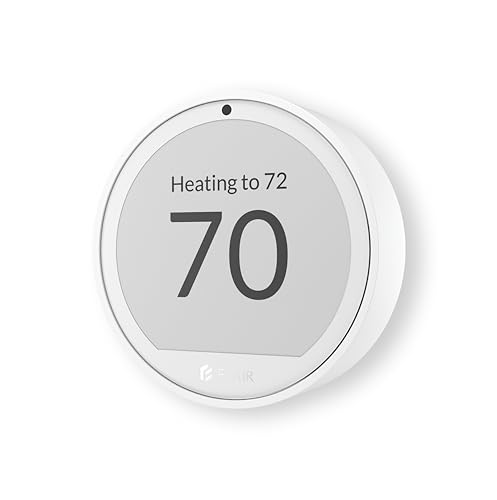
Pros
- Room-by-room temperature and humidity monitoring
- Works with 200+ mini split brands
- Up to 1-year battery life
- Alexa and Google Assistant support
Cons
- Flair Bridge required for central HVAC
- Smart Vents needed for airflow balancing

Pros
- Learns schedules and outdoor temperature effects
- Temperature Sensor included for hot and cold spots
- No C wire required in most homes
- Works with Google Home, Alexa, and Siri
Cons
- C wire may be needed in some homes
- System compatibility varies by heating setup

Pros
- Included SmartSensor manages hot and cold spots
- Built-in air quality monitor with alerts
- Energy STAR certified, saves up to 26%
- Siri, Alexa and Google Home support
Cons
- Smoke alerts require an ecobee security subscription
- Siri requires an Apple home hub
Match Each Zone to Its System
A two-zone setup is not automatically a two-thermostat setup. The ecobee and Google Nest models are designed for most 24V systems, while Mysa is specifically for 120V to 240V electric baseboards and electric fan-forced heaters. Confirm the equipment type in each zone before choosing a control.
Mini splits, portable AC units, and window units need a different approach. The Smart Air Conditioner Controller works with compatible infrared-controlled systems, while Sensibo and Flair also target remote-controlled AC equipment. Flair can additionally work with central HVAC when paired with its smart vents and required bridge.
Check the Wiring First: A thermostat intended for 24V HVAC should not be connected to a line-voltage electric heater. Verify the system type and required wiring before mounting or connecting either zone.
For central systems, the ecobee includes a Power Extender Kit for homes without a C-wire, and Google says its model works with most 24V systems without a C-wire in many homes. Mysa requires one neutral wire or a second live wire, so its installation requirement is different.
Use Sensors to Balance Two Zones
Two thermostats can control separate systems, but room sensors help when one zone contains several rooms with different temperatures. The ecobee includes a SmartSensor that detects occupied rooms, and Google includes a Nest Temperature Sensor that lets you set the temperature a room should reach at a selected time.
Flair takes a room-by-room approach by monitoring temperature and humidity and pairing with Flair Smart Vents. Its app can show rooms individually and adjust them system-wide. Sensibo adds temperature, humidity, air-quality monitoring, geofencing, and optional room-sensor support for compatible remote-controlled AC systems.
| Control type | Key sensor feature | Best placement |
|---|---|---|
| 24V HVAC | Occupancy or room sensor | Separate HVAC zones |
| Line-voltage heat | Humidity sensor | Electric heating zone |
| Remote-controlled AC | Temperature and humidity | Mini split or window unit |
Sensor placement affects the reading your system follows. Keep the primary thermostat or sensor in a representative living area, then use room sensors where hot or cold spots are most disruptive. For broader room coverage, see our smart thermostat category.
Plan Controls, Scheduling, and Connectivity
Scheduling is useful when the two zones follow different routines. The Smart Air Conditioner Controller supports daily schedules and smart scenes, Mysa offers scheduling and geofencing, and Flair provides scheduling plus Active and Inactive Rooms. Google can learn how outdoor temperature affects indoor conditions and asks permission before changing schedules.
Remote control also varies by ecosystem. Mysa supports Apple Home, Alexa, and Google, while ecobee supports Alexa, Siri, and Google Home. Google Nest works through the Google Home app and is Matter compatible. Sensibo supports Apple HomeKit, Google Home, and Alexa.
Pro Tip: Before buying two units, write down the equipment type, wiring, preferred voice platform, and the rooms that need separate sensing. That short checklist prevents a compatible app from masking incompatible hardware.
Expert Examined
From Marcus Bell

I keep the zone equipment and the room-comfort goal separate in my notes. The mistake I see is choosing a thermostat because it supports a favorite voice assistant, then discovering that the heater or AC uses a different electrical or control system.
Read more about Marcus BellIf your home has smoke and carbon monoxide devices connected to a broader smart-home plan, our coverage of Wi-Fi smoke and carbon monoxide detectors can help you compare that separate safety layer.
Which Setup Fits Your Two Zones
I would point you to ecobee Smart Thermostat Premium – WiFi when both zones use compatible 24V HVAC and room occupancy matters. Its included SmartSensor is useful for homes where the hallway temperature does not represent the rooms you actually use. The Power Extender Kit also addresses many installations without a C-wire.
For a 24V system that fits the Google ecosystem, I would choose Google Nest Learning Thermostat (4th gen). The included Nest Temperature Sensor supports a selected room and time of day, while the larger display and Google Home controls suit households that want visible, app-based adjustments.
For electric baseboard zones, I would put Mysa Smart Thermostat V2 for Electric Baseboard first. It is built for 120V to 240V electric baseboards and fan-forced heaters, offers scheduling and geofencing, and can be adjusted from an Android or iOS device. It still requires the stated neutral or second live wire.
The Bottom Line
The biggest mistake with two-zone thermostats is assuming that both zones use the same wiring and control method. A 24V HVAC thermostat, a line-voltage baseboard thermostat, and an infrared AC controller solve different equipment problems.
If you do only one thing first, identify the system type and wiring in each zone. Then select the sensor and smart-home features that match the rooms you want to control, rather than choosing by display or voice-assistant support alone.
FAQs
Two separately controlled HVAC zones generally need controls that match each zone’s equipment. However, room sensors and smart vents can also help balance temperatures within a central system, so the exact setup depends on the equipment and control method. Occupancy and room-temperature sensors help a thermostat respond to the rooms you use instead of relying only on a hallway reading. Ecobee includes a SmartSensor, Google includes a Nest Temperature Sensor, and Flair monitors temperature and humidity across rooms. Check whether the system is 24V or 120V to 240V, then confirm the required wires. Mysa requires one neutral or second live wire, while ecobee and Google describe compatibility with many 24V systems and different C-wire conditions. No. Matter can simplify smart-home integration, but it does not make incompatible HVAC wiring compatible. Confirm the thermostat’s equipment requirements first, then check whether its ecosystem and connectivity features fit your home.Do two zones need two smart thermostats?
Which sensor type helps with hot and cold rooms?
What power should I check before installation?
Does Matter mean every thermostat will work together?
Sources
- US Consumer Product Safety Commission www.cpsc.gov
- UL Solutions www.ul.com