
Shopping for the best video peephole cameras means matching the camera to your door, not simply chasing resolution. The key split is between renter-friendly replacement units and larger viewers with an indoor monitor, so your door thickness, Wi-Fi band, and preferred viewing method deserve attention first.
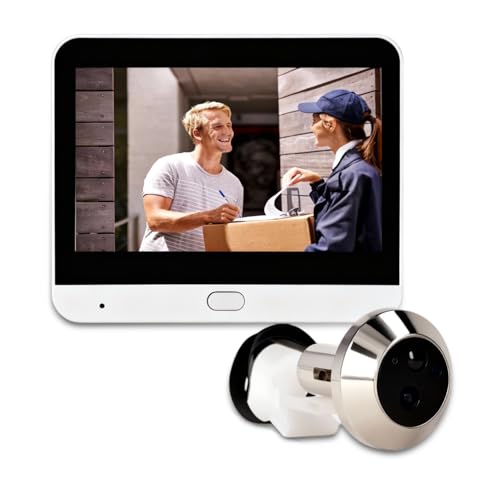
Pros
- 1080P camera with 120-degree wide-angle view
- PIR motion alerts and video recording
- 4.3-inch color monitor with AHD support
- 5000mAh battery with up to 30-day standby
Cons
- System functions require the mobile app
- Memory card for storage is not included

Pros
- Retinal 2K video with wide-angle viewing
- Up to 6x zoom for closer details
- No-drill installation for existing peepholes
- Live View and Two-Way Talk
Cons
- Requires an existing peephole to replace
- Quick Release Battery Pack needs recharging

Pros
- 2MP HD camera with wide-angle viewing
- Night vision for after-dark visitors
- Motion alerts sent to your phone
- Two-way audio and recording via app
Cons
- Requires the smartphone app for remote features
- No weather-resistance specification listed

Pros
- 1080P video with 120° night vision
- PIR motion alerts within 2 meters
- 4.3-inch LCD monitor for quick viewing
- 5000mAh battery, 30-plus days standby
Cons
- Requires a compatible 16mm-plus peephole
- UBOX app required for smart management

Pros
- 1080p HD video
- 4.3-inch color monitor
- 5000mAh rechargeable battery
- Two-way audio and night vision
Cons
- 2.4GHz Wi-Fi only
- PIR detection range limited to 1 to 2 meters

Pros
- 2K video with day and night vision
- 4.3-inch color monitor for indoor viewing
- 170-degree wide-angle field of view
- 32GB memory card included
Cons
- Smartphone app needed for remote monitoring
- 8000mAh battery requires periodic recharging
Start With the Door and Viewing Angle
Measure the existing peephole and door thickness before ordering. Cawhum fits doors from 3 to 12 cm thick with a 16 mm or larger peephole, while HAPYTHDA fits doors from 35 to 115 mm and installs without drilling. Those details matter more than a small difference in image resolution if the camera cannot sit securely.
Wide-angle coverage helps with packages and visitors standing off-center. The listed models range from 120 degrees on Yunseity, Cawhum, and HAPYTHDA to 170 degrees on Bextgoo and the Eypkaol model. A wide view can reduce blind spots, but you should still aim the lens toward the approach rather than a neighboring doorway.
For more advice on positioning, see these practical instructions on angling a video doorbell down. The same sightline principle applies when a peephole camera needs to show packages near the threshold.
Pro Tip: Measure the door, peephole opening, and available clearance before removing the existing viewer.
Choose the Right Screen and Storage Setup
An indoor screen is useful when you want to identify a visitor without reaching for a phone. Yunseity, Cawhum, HAPYTHDA, and Bextgoo include 4.3-inch color monitors, while Ring emphasizes phone viewing and pairing with Echo Show. Bextgoo also includes a 32GB memory card, whereas several alternatives require separate storage.
Storage choices affect how you retrieve events. Yunseity supports a card up to 128GB, Cawhum offers cloud or TF storage, and Bextgoo supports its included card, local storage up to 128GB, or cloud storage. HAPYTHDA records to an SD card, but its instructions specify Class 10 FAT32 media and a 2.4GHz network.
| Device style | Key distinction | Suitable setting |
|---|---|---|
| Monitor viewer | Indoor screen | Family homes |
| Phone-first viewer | App alerts | Apartments |
| Wide-angle viewer | 170-degree view | Broad approaches |
If your router combines bands, check the camera requirements before installation. HAPYTHDA supports 2.4GHz only, while the Eypkaol model lists dual-band Wi-Fi, including 5GHz and 2.4GHz.
Balance Alerts, Night Vision, and Recharging
PIR motion detection is common across the selection, but the stated sensing range is not unlimited. Cawhum and HAPYTHDA describe detection around 1 to 2 meters, so mounting the camera toward a walkway may produce better alerts than pointing it at a distant driveway.
Battery capacity affects maintenance rather than image quality. Yunseity, Cawhum, and HAPYTHDA list 5000mAh batteries, while Bextgoo lists 8000mAh and claims longer operation. Ring uses a removable Quick Release Battery Pack, which can be recharged separately. Night vision appears across the range, with Bextgoo stating visibility up to 16 feet at night.
Before You Mount It: Do not rely on a motion alert as a substitute for a clear view through the door, and do not install the camera where its field of view exposes more private space than necessary.
For maintenance reminders, the advice on doorbell camera connection problems is relevant to any Wi-Fi peephole unit. Keep the lens clean and confirm the signal at the door before final tightening.
Expert Examined
From Marcus Bell

I keep seeing owners focus on the indoor display while overlooking the phone connection at the door. The practical fix is to confirm the app, alert path, and battery access before securing the camera hardware.
Read more about Marcus BellWhich Door Viewer Fits Your Home
I would point apartment and condo renters toward Peephole Cameras with no-drill installation as the first priority. The Ring Peephole Cam 2K (Newest Model) replaces an existing peephole without drilling, provides Retinal 2K video, supports up to 6x zoom, and uses a removable battery pack. That combination suits a renter who wants phone alerts and real-time talk without adding an indoor monitor.
For a household that wants a screen at the door, I would choose the Bextgoo 2K Video Peephole Doorbell Camera. Its 4.3-inch display, 170-degree view, included 32GB card, 8000mAh battery, and local or cloud storage cover the main needs of a busy entrance.
I would also consider the Cawhum Peephole Camera for Apartment Front Door when door fit and shared access matter. Its stated 3 to 12 cm door range, QR code sharing, UBOX app, 4.3-inch screen, and cloud or TF storage make it a practical choice for several household users.
The Bottom Line
The mistake most buyers make is treating a peephole camera like a standard doorbell. Door thickness, peephole size, Wi-Fi band, battery access, and the desired viewing method determine whether the installation will suit your home.
If you only do one thing first, measure the door and confirm the network signal at the peephole. Then choose between a phone-first unit such as Ring and a monitor-equipped model such as Bextgoo or Cawhum.
FAQs
PIR motion detection is useful for activity near the door, especially when sensitivity and detection distance can be adjusted. It should supplement a clear live view rather than replace it, because the listed sensing ranges are intended for nearby movement. Use the existing peephole when the model supports replacement installation, and aim the lens toward the visitor approach. Check that the view includes faces and packages without unnecessarily covering neighboring private areas. Charging depends on activity, settings, and battery capacity. The listed models include batteries from 5000mAh to 8000mAh, while Ring uses a removable Quick Release Battery Pack, so choose a design that makes recharging convenient. A certification mark can indicate that a product or component was evaluated against a particular safety standard, but the mark and its scope must be verified on the packaging or documentation. The U.S. Consumer Product Safety Commission provides consumer safety information at CPSC.gov.Which sensor type should a peephole camera use?
Where should a peephole camera be mounted?
How often does a peephole camera need charging?
What does a security certification mean?
Sources
- U.S. Consumer Product Safety Commission www.cpsc.gov