
Choosing the best TP-Link smart plugs starts with the connection style you need, whether that is a compact plug, an installed in-wall outlet, or a power strip. Renters, mixed-platform households, and home-office users each face a different fit problem, so match the format before comparing app features.

Pros
- Alexa and Google Home voice control
- Remote control through Kasa app
- Scheduling, timers, and countdowns
- UL certified with a 2-year warranty
Cons
- Requires 2.4GHz Wi-Fi
- App required for setup and remote control

Pros
- Four-pack covers multiple appliances
- Works with Alexa and Google Assistant
- Remote control from anywhere via Kasa app
- Timer and countdown scheduling
- UL certified for safety
Cons
- Requires a 2.4GHz Wi-Fi connection
- Kasa app required for setup and remote control

Pros
- Matter support across major smart home platforms
- Compact design helps preserve nearby outlet access
- UL certified flame-retardant design
- Scheduling, timers, app, and voice control
Cons
- 2.4 GHz Wi-Fi only
- Limited to 15A/1800W maximum
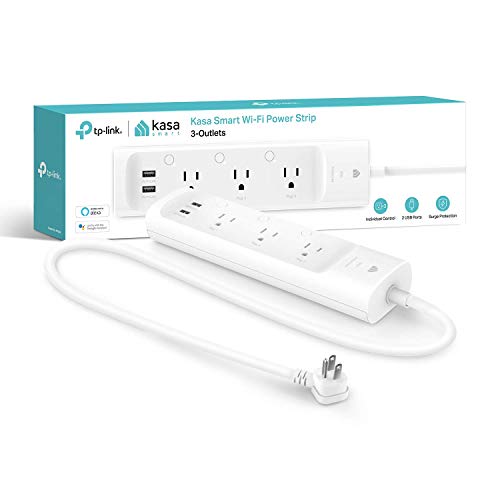
Pros
- Three individually controlled smart outlets
- Two always-on USB charging ports
- ETL-certified surge protection
- Alexa and Google Assistant support
Cons
- USB ports cannot be individually controlled
- Remote control requires the Kasa app

Pros
- Controls two devices separately or together
- Alexa and Google Home voice control
- Remote control, schedules, and scenes
- ETL certified, no hub required
Cons
- Wi-Fi required for connected features
- In-wall installation, not a plug-in unit
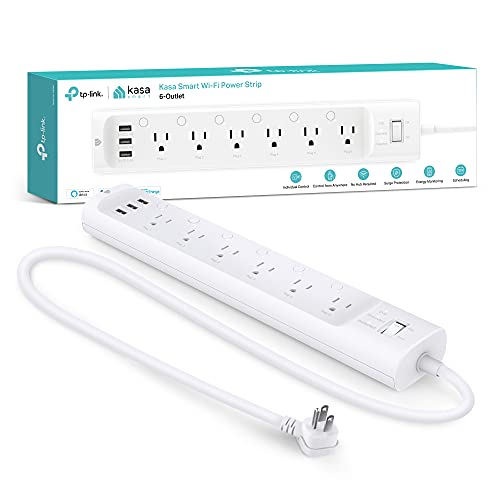
Pros
- Six individually controlled smart outlets
- Three built-in USB charging ports
- ETL certified surge protection
- Energy monitoring through Kasa app
Cons
- App or voice assistant needed for remote control
- 15A, 1875W total load limit
Match the Plug to the Room
A standard plug is the simplest choice for a lamp, fan, humidifier, or seasonal lights. The Kasa Smart models use the Kasa app for remote control, scheduling, and countdown timers, while requiring a 2.4GHz Wi-Fi connection. That makes them practical when you want automation without adding a hub.
Compact designs are useful when a bulky adapter would block the neighboring outlet. A power strip makes more sense for a desk or entertainment area where several devices need separate control, while an in-wall model keeps the installation visually tidy and provides two independently controlled outlets.
Pro Tip: Choose the physical format first: a small plug for one appliance, an in-wall outlet for a permanent room upgrade, or a power strip for several electronics.
Platform Support and Local Control
Alexa and Google Home support appears across the Kasa plug options, allowing voice commands alongside app control. The Tapo Matter model adds Apple Home and Samsung SmartThings compatibility, which can be valuable if your household already uses more than one smart-home platform.
Matter also changes what happens on the local network. The product information states that configured Matter devices can communicate over the LAN when the home internet is offline, rather than relying on a cloud service for every device interaction. For broader platform guidance, the smart sensors and home automation category provides useful context.
| Device type | Main distinction | Best placement |
|---|---|---|
| Compact plug | One appliance | Lamps and fans |
| Matter plug | Multi-platform support | Mixed smart homes |
| Power strip | Several controlled outlets | Desks and offices |
Power Management and Safety
The KP303 and HS300 power strips add surge protection, while the HS300 also provides energy monitoring through the Kasa app. The KP303 has three individually controlled outlets and two always-on USB ports; the HS300 expands that arrangement to six controlled outlets and three USB ports.
Certification is useful, but it does not make every load appropriate. UL or ETL certification describes product safety evaluation claims supplied with the device, while the listed load limits and intended use still matter. You can consult UL Solutions for information about safety standards and certification.
Check the Load: Do not treat a smart plug as a universal replacement for a high-demand appliance controller. Confirm the appliance and outlet requirements before connecting it, and keep total power within the product’s stated limit.
Expert Examined
From Ray Okafor

I keep seeing smart plugs chosen for their app before anyone checks the room’s outlet layout. The mistake I see is buying a power strip for one device or a single plug for a crowded desk, so I start with the number of separately controlled connections.
Read more about Ray OkaforWhich Setup Fits Your Home
I would point renters or anyone automating a few lamps toward the smart plugs and outlets category and the Wi-Fi smoke and carbon monoxide detector selection for broader connected-home planning, but the compact Kasa Smart Plug Ultra Mini 15A, EP10P2 is the more direct fit for a small appliance setup. It offers voice control, remote app access, schedules, and a two-pack format without requiring a hub.
For a household using Apple Home, Alexa, Google Home, or SmartThings together, I would point you to the TP-Link Tapo Matter Supported Smart Plug Mini. Its Matter support, Bluetooth onboarding, compact design, and local-network control give it a clearer role in a mixed-platform home. For a desk with many individually managed devices, I would choose the Kasa Smart Plug Power Strip HS300, Smart Outlet because it combines six controlled outlets, three USB ports, surge protection, and energy monitoring.
The Bottom Line
The most common mistake is comparing voice assistants before deciding how many outlets need separate control. A compact plug, in-wall outlet, and power strip solve different physical problems even when their apps offer similar remote commands.
If you only do one thing, count the devices and identify the platforms you already use. Then select the smallest format that provides the required control, checking Wi-Fi requirements, certification, and load limits before installation.
FAQs
The TP-Link Tapo Matter Supported Smart Plug Mini is listed as compatible with Apple Home, Amazon Alexa, Google Home, and Samsung SmartThings. Matter support makes it the clearest choice for a household that uses several certified smart-home platforms. The listed Kasa and Tapo options are described as Wi-Fi smart plugs and do not require a separate hub for their stated controls. The Kasa models require a 2.4GHz Wi-Fi connection, while the Tapo model also uses Bluetooth onboarding during setup. The KP303 and HS300 include ETL-certified surge protection, which is intended to shield connected electronics from sudden power surges. Certification does not remove the need to follow the strip’s load limits or connect suitable appliances. UL certification indicates that the product carries a safety certification claim associated with UL requirements. It does not mean every appliance is suitable for the plug, so you still need to check the device rating and intended use.Which TP-Link smart plug works with Apple Home?
Do these smart plugs need a hub?
Are smart power strips safer than regular plugs?
What does UL certification mean on a smart plug?
Sources
- UL Solutions and Product Safety Standards. www.ul.com
- US Consumer Product Safety Commission and Home Electrical Safety. www.cpsc.gov