
Choosing the best smart thermostats with room sensors means deciding whether you want an included sensor, a compatible add-on, or occupancy data that helps shape whole-home comfort. This selection suits households trying to reduce hot and cold spots while matching a thermostat to their existing smart-home system.

Pros
- Included RedLINK room sensor
- 5-inch touchscreen
- VOC and CO2 sensing
- Matter, Alexa, and Google support
Cons
- Multicolor finish limits neutral color matching
- No specific warranty details provided

Pros
- No wires needed for placement
- Stand or direct wall mounting
- Temperature and humidity monitoring
- Helps reduce hot and cold spots
Cons
- Compatible only with Sensi Touch 2
- White finish only

Pros
- Built-in Alexa
- Room sensor included
- Programmable thermostat
- White finish
Cons
- Alexa may not suit every buyer
- White is the only listed color

Pros
- Millimetre-wave occupancy detection
- Supports up to five QSZ remote sensors
- Works with Alexa, Apple Home, and Google Home
- Adjustable display responds to light and occupancy
Cons
- Requires a Matter-enabled smart-home speaker for internet
- Remote sensors do not regulate rooms independently
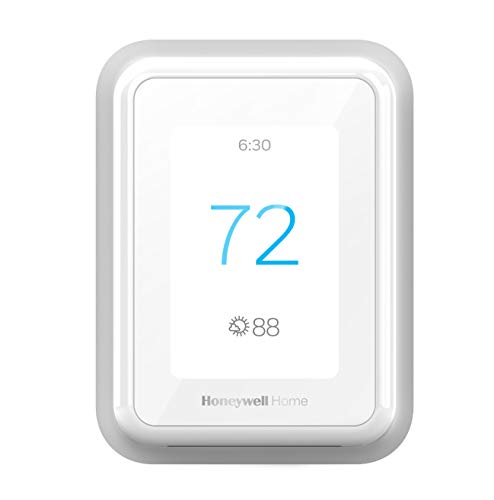
Pros
- Smart Response learns heating and cooling patterns
- Mobile control with automatic home and away mode
- Optional sensors focus comfort across multiple rooms
- Alexa and Google Assistant compatibility
Cons
- C-wire required for installation
- Room sensors sold separately

Pros
- Five-inch touchscreen display
- Wireless room sensor included
- VOC and CO2 sensing
- Matter, Alexa, and Google compatible
Cons
- Heat pump systems limited to 4H/2C
- Conventional systems limited to 3H/3C
Start With the Sensor Arrangement
A room sensor can shift attention away from the thermostat’s own location. That matters when the hallway is comfortable but a bedroom, office, or living area is not. The Honeywell Home YTHX1200B6/U ElitePRO S1200 and ecobee4 Smart Thermostat with Built-in Alexa include a room sensor, while the Honeywell Home T9 WIFI Smart Thermostat and Sensi Touch 2-compatible option support room-focused control through additional sensors.
Sensor behavior is not identical across these products. The TQX Matter Over WiFi Thermostat with Occupancy combines data from rooms collectively, and its individual sensors do not regulate rooms independently. Sensi can average temperature settings across sensors and thermostats, while the T9 is designed to focus comfort across multiple rooms.
Pro Tip: Place a remote sensor in the room that best represents your comfort priority, rather than beside a draft, heat source, window, or frequently opened door.
Match Control Features to Your Home
Smart-home compatibility can be the deciding factor after sensor support. The ElitePRO S1200 models list Matter, Alexa, and Google support, while the TQX works with Matter, Alexa, Apple Home, Google Home, Home Assistant, and Samsung SmartThings through a Matter-enabled smart-home speaker.
The ecobee4 includes built-in Alexa, and the T9 works with Alexa and Google Assist. If you already organize lighting, security, or other connected devices in one ecosystem, choose the thermostat whose stated platform support fits that setup instead of treating room sensing as the only specification.
For broader connected-home planning, the site’s coverage of HomeKit doorbell cameras can help you think through how a thermostat fits beside other smart-home devices. Matter is an interoperability standard, not a promise that every feature works identically across every platform; the Cybersecurity and Infrastructure Security Agency is a useful authority for wider connected-device security considerations.
| Sensor approach | Key distinction | Suitable priority |
|---|---|---|
| Included room sensor | Ready without add-on | Immediate room focus |
| Compatible add-on | Expandable placement | Multi-room coverage |
| Occupancy sensing | Uses presence data | Whole-home automation |
Check Wiring and System Compatibility
Room sensing cannot compensate for an incompatible heating and cooling system. The T9 requires a C-wire and does not work with electric baseboard heat at 120 to 240 volts, while the TQX supports several conventional, heat-pump, PTAC, and fan-coil configurations but is not compatible with 120V or 240V line-voltage systems.
The T9 includes a power adapter and identifies the home’s heating and cooling type during setup. The white ElitePRO S1200 is described as working with residential and commercial systems up to 4H/2C heat pump or 3H/3C conventional. Confirm the equipment configuration before buying, especially if the system is not a standard forced-air installation.
Before You Mount It: A room sensor is not a substitute for checking thermostat wiring and system compatibility. Turn off power before installation and verify the equipment requirements for the thermostat you select.
Expert Examined
From Jenna Castellano

I keep seeing room-sensor purchases made before anyone identifies the home’s wiring or heating type. The better order is to confirm compatibility first, then decide which room deserves sensor priority.
Read more about Jenna CastellanoFor connected safety planning beyond climate control, you can also review WiFi smoke and carbon monoxide detectors. Keeping those decisions separate helps you avoid assuming that a thermostat’s air-sensing features replace dedicated safety equipment.
Which Thermostat Fits Your Rooms
I would point you to ecobee4 Smart Thermostat with Built-in Alexa if you want a thermostat with Alexa built in and a room sensor included from the start. It is a straightforward match for a household already using Alexa and wanting room-focused control without selecting a sensor separately.
I would put Sensi Room Sensor-Compatible with Sensi Touch 2 on the shortlist when you already have a Sensi Touch 2 and need flexible placement. Its sensor can stand on a surface or mount on a wall, reports temperature and humidity, and supports averaging across sensors and thermostats.
For a home centered on Matter and occupancy data, I would consider TQX Matter Over WiFi Thermostat with Occupancy. It can pair with up to five QSZ Remote Sensors and connect with several named smart-home platforms, but I would choose it only if whole-home combined control matches your expectations.
The Bottom Line
The biggest mistake is assuming every room sensor independently controls the room where it sits. The TQX specifically uses combined sensor data for overall temperature, so buyers wanting separate room regulation should read each product’s stated behavior carefully.
If you only do one thing first, check your HVAC wiring and system type before comparing ecosystems or sensor placement. Once compatibility is clear, choose between an included sensor, an expandable sensor system, and occupancy-aware whole-home control.
FAQs
Not always. The TQX combines data from all rooms to adjust the overall temperature, and each individual sensor does not regulate its room independently. Other products in this selection focus on averaging or prioritizing temperatures across rooms rather than providing separate room-by-room HVAC control. Place it in the room whose comfort matters most, such as a bedroom or office, and keep it away from drafts, direct heat, windows, and doors. Sensi supports stand or wall placement, giving you more flexibility when choosing a representative location. Requirements vary by product and system. The T9 states that a C-wire is required and includes a power adapter, while the TQX lists compatibility with particular HVAC configurations. Check your wiring and equipment type before installation. Matter is a smart-home connectivity standard intended to help compatible devices work across supported ecosystems. It does not mean every thermostat feature behaves identically in every app, so verify the platform support and control behavior you need.Do smart thermostats with room sensors control each room separately?
Where should I place a thermostat room sensor?
Do these thermostats need a C-wire?
What does Matter mean on a smart thermostat?
Sources
- U.S. Consumer Product Safety Commission www.cpsc.gov
- UL Solutions www.ul.com