
Replacing a Honeywell thermostat with the best smart thermostats to replace Honeywell depends first on your HVAC wiring, not the app features. Conventional central systems need a different device than a mini-split, window unit, or portable air conditioner, so this selection is for homeowners narrowing the match before installation.

Pros
- Remote app control and real-time monitoring
- 7-day programmable temperature scheduling
- Backlit LCD for dark rooms
- Temperature control within 2°F
Cons
- Requires a 24V C-wire and no batteries
- Works only with 2.4GHz Wi-Fi

Pros
- Remote control through Smart Life App
- Alexa and Google Home compatible
- 7-day or 5-1-1 scheduling
- Supports non-programmable mode
Cons
- Requires C-wire, cannot use batteries
- Not compatible with multi-stage systems
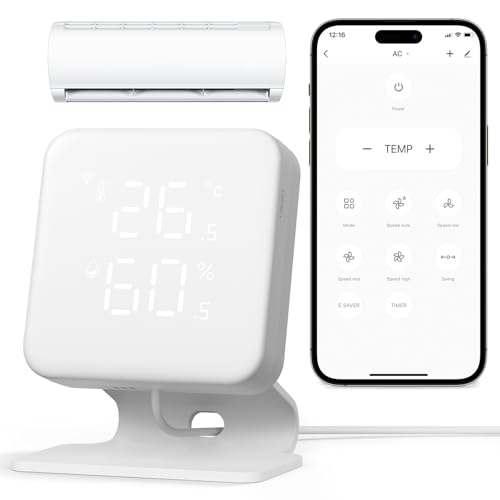
Pros
- Works with 300+ AC brands
- Built-in temperature and humidity display
- Alexa and Google Home control
- 7-day schedules and geofencing
Cons
- 2.4GHz WiFi only, no 5GHz
- Requires IR line of sight
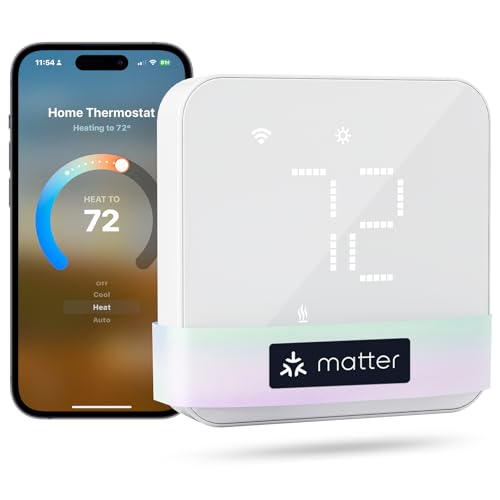
Pros
- Matter support for major smart-home platforms
- Flexible 24/7 heating and cooling schedules
- Remote app and voice control
- Smart alerts for filters and malfunctions
Cons
- C-wire may be required and is not included
- Not compatible with electric baseboard heaters

Pros
- Works with over 20,000 AC models
- AI-based Comfy Max climate control
- Schedules continue during internet outages
- Alexa, Google, SmartThings, and IFTTT support
Cons
- 2.4 GHz Wi-Fi required
- IR remote compatible units only

Pros
- Remote control from anywhere via app
- Alexa and Google Home compatible
- Customizable weekly temperature schedules
- Usage and cost tracking
- DIY WiFi setup with plug-in power
Cons
- Requires WiFi and app for smart controls
- Limited to compatible HVAC systems
Match the thermostat to your HVAC system
The most important split is between wired HVAC thermostats and infrared controllers. Riseem, XuLuaba, and meross connect to thermostat wiring, while WOOX, Cielo Breez, and BOLDR control compatible air conditioners through wireless signals or a plug-in setup.
For a conventional single-stage system, the smart thermostat category is a useful starting point, but you still need to identify the terminals behind the old Honeywell. Riseem supports RH, RC, W, Y, G, and C, while its specifications exclude heat pumps and multi-stage equipment.
XuLuaba covers a wider range of listed equipment, including some heat pumps without auxiliary or emergency heat, heat-only systems, and two-transformer systems. Meross lists compatibility with heat pumps, furnaces, boilers, humidifiers, and dehumidifiers, but it excludes millivolt, two-wire, and electric baseboard systems.
Before You Wire: Do not connect a thermostat until the existing terminals and HVAC type match the product requirements. A C-wire requirement is not interchangeable with battery power, and an incorrect system match can cause abnormal operation.
Central HVAC versus room air conditioners
A mini-split or window air conditioner usually does not use the same wall wiring as a central thermostat. WOOX sends infrared commands and is intended for mini-splits, window units, and portable air conditioners, not central HVAC, ducted systems, or wired systems.
Cielo Breez also targets IR-controlled mini-splits, window units, and portable units. It adds temperature and humidity sensors, weekly schedules, geofencing, and multi-zone coordination, while BOLDR Klima is another plug-in option for window air conditioners, mini-splits, and heat pumps.
| Device type | Key requirement | Best placement |
|---|---|---|
| Wired thermostat | Compatible HVAC terminals | Existing wall wiring |
| IR controller | Remote line of sight | Near indoor unit |
| Plug-in controller | Regular power outlet | Within unit range |
The physical location matters for the wireless choices. WOOX requires IR line of sight, and Cielo recommends placement within 6 to 12 feet of the air conditioner. Keep the controller where its temperature reading represents the room rather than a hot window or enclosed shelf.
Browse smart energy and climate control topics for related household automation ideas.
Power, Wi-Fi, and scheduling details
Riseem and XuLuaba require a 24-volt C-wire connection and cannot run on batteries. Riseem works only with 2.4GHz Wi-Fi and offers seven-day or non-programmable operation, while XuLuaba adds 5-1-1 scheduling and Smart Life app control.
Meross also may require a C-wire depending on the wiring configuration. Its Matter integration connects with Apple Home, Alexa, Google Home, Home Assistant, and SmartThings, and its app includes flexible schedules and alerts for filter life and system malfunctions.
The room-air options use 2.4GHz Wi-Fi too, but they avoid thermostat wiring. Cielo schedules can continue when internet connectivity is lost, while WOOX provides temperature and humidity history and BOLDR focuses on app scheduling, usage tracking, and voice control.
Pro Tip: Photograph the old thermostat terminals and record each wire label before removing anything. Then confirm the system type, C-wire status, and Wi-Fi band against the selected model.
Expert Examined
From Ray Okafor

I keep seeing the same mistake with thermostat replacements: a homeowner chooses a central HVAC model for a ductless room unit, or assumes every wall thermostat can run without a C-wire. Start with the equipment label and existing wiring, then choose app features only after the compatibility match is clear.
Read more about Ray OkaforSee related Wi-Fi home safety devices if you are also updating connected equipment around the home.
Which replacement fits your home
I would point you to WiFi Thermostats for Home Smart Thermostat for a straightforward single-stage gas, oil, or electric system that already has a C-wire. Its seven-day programming, 2.4GHz connection, app control, and backlit display suit a homeowner who wants a simple Honeywell replacement without support for multi-stage equipment or heat pumps.
For a broader central HVAC match, I would consider meross Matter Smart Thermostat for Home. It is the stronger fit when Matter platform support, flexible scheduling, and alerts for filters or system problems matter, provided your wiring is not millivolt, two-wire, or electric baseboard.
If the old Honeywell is actually controlling a mini-split or another IR-based room air conditioner, I would choose Breez Max Smart WiFi Thermostat for Mini-Split. Its room sensors, schedules, geofencing, and multi-zone features are aimed at that equipment type, and its placement guidance makes the line-of-sight requirement explicit.
The Bottom Line
The mistake most buyers make is treating every Honeywell replacement as a conventional wall thermostat. The right choice depends on whether your home has compatible HVAC terminals, a C-wire, or an IR-controlled room air conditioner.
If you do only one thing first, remove the faceplate carefully and document the wire labels and equipment type. That check will eliminate incompatible models before you spend time comparing schedules, voice assistants, or smart-home platforms.
FAQs
Mini-split owners need an IR controller rather than a conventional wired thermostat. WOOX, Cielo Breez, and BOLDR are intended for compatible mini-splits or other listed room air conditioners, with placement and remote-signal requirements that vary by model. Riseem and XuLuaba require a C-wire and cannot use batteries. Meross may require one depending on the wiring configuration, while the listed room-air controllers use plug-in power instead. Place it where the air conditioner can receive its signal without obstruction. Cielo specifies 6 to 12 feet and line of sight, while WOOX also requires line of sight to the AC receiver. Matter indicates integration with supported smart-home platforms rather than a particular HVAC wiring type. Meross lists Apple Home, Alexa, Google Home, Home Assistant, and SmartThings support, but compatibility with your HVAC equipment still comes first.Which smart thermostat type replaces a Honeywell for a mini-split?
Do these smart thermostats require a C-wire?
Where should an IR thermostat controller be placed?
What does Matter mean on a smart thermostat?
Sources
- US Consumer Product Safety Commission www.cpsc.gov
- UL Solutions www.ul.com