
Choosing among the best smart thermostats for baseboard heaters starts with the wiring behind your wall, not the app on your phone. Line-voltage compatibility separates these models, while heater type and smart-home support decide which one fits your room.

Pros
- Works with 120V to 240V electric heating
- Humidity sensor and touchscreen
- Scheduling and geofencing support
- Apple Home, Alexa, and Google compatible
Cons
- Requires a neutral or second live wire
- Limited to electric baseboards and fan-forced heaters
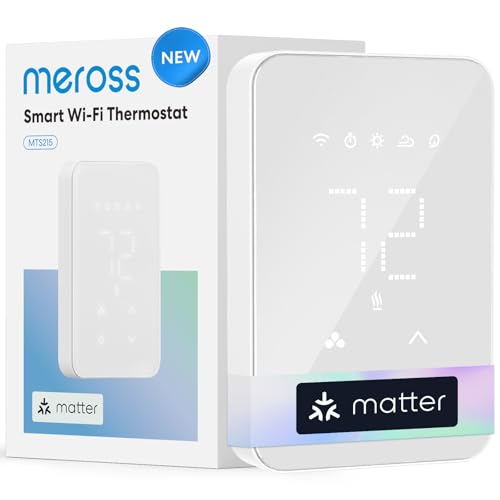
Pros
- Supports 120 to 240V electric heating
- Matter compatibility across major smart-home platforms
- 24/7 scheduling for automated temperature control
- Real-time and historical energy monitoring
Cons
- Not compatible with 24V HVAC systems
- Requires Wi-Fi for remote app control

Pros
- Smartphone control from anywhere
- Alexa and Google Assistant compatible
- 7-day programmable energy-saving schedule
- 15-foot floor sensor included
Cons
- Requires a compatible underfloor heating system
- Smart controls depend on WiFi and app setup

Pros
- 1°F temperature accuracy
- Works with Apple Home, Alexa, and Google Home
- 7-day programmable heating schedule
- Energy monitoring with historical reports
Cons
- Requires four or more installation wires
- Electric baseboard heater not included

Pros
- Supports 120V and 240V heating cables
- Built-in Class A GFCI protection
- Smart-home and voice-assistant integration
- App-based energy usage tracking
- Three-year limited warranty
Cons
- Maximum 15-amp load
- Larger systems need an additional power module
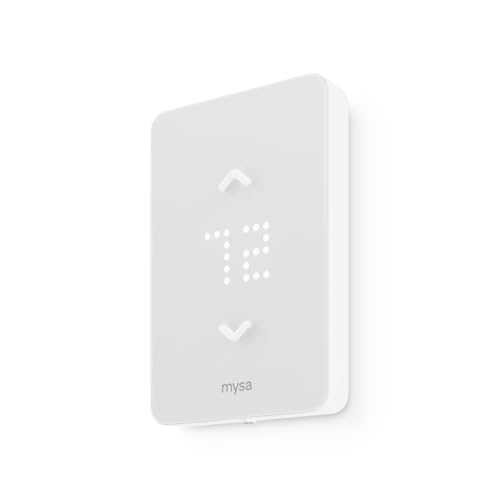
Pros
- Supports 120V and 240V electric heating
- 7-day scheduling with no subscription
- HomeKit, Alexa, and Google compatibility
- Remote control, geofencing, and vacation mode
Cons
- Requires four wires, including neutral or second live
- Not compatible with 24V furnaces or heat pumps
Match the Thermostat to the Heater
Electric baseboards, convectors, fan-forced heaters, radiant ceilings, and underfloor systems do not all use the same control setup. The Mysa and meross baseboard models are designed for 120V to 240V electric heating, while MAXKOSKO and Schluter are aimed at radiant floor applications.
Do not assume that a thermostat for conventional central heating will work here. meross specifically excludes 24V HVAC systems, and Mysa LITE also excludes 24V furnaces and central heat pumps. Check the heater type and voltage before considering app features.
Before You Wire: A line-voltage thermostat should be installed only with the power turned off at the breaker. Follow the product wiring instructions, check local code requirements, and use an electrician if high-voltage wiring is outside your comfort level.
| System type | Voltage range | Best match |
|---|---|---|
| Electric baseboard | 120V to 240V | Mysa or meross |
| Radiant floor | 120V or 240V | MAXKOSKO or Schluter |
Check the Wires Before Ordering
Wiring requirements are a major separator in this category. Mysa V2 requires a neutral or second live wire, while Mysa LITE needs four wires, including a neutral or second live wire. The standard meross model also requires four or more wires in the electrical box.
That makes a box inspection more useful than choosing by screen design. Mysa V2 is described as a quick installation with online guides, while meross says its standard model takes less than thirty minutes. Those estimates do not replace checking the actual wiring first.
Pro Tip: Take a clear photo of the existing thermostat wiring after switching off the breaker, then compare the wires with the manufacturer compatibility information before ordering.
I also recommend checking whether the thermostat needs a particular WiFi band or app. Mysa LITE joins 2.4 GHz WiFi, and the product uses the Mysa app for scheduling, remote control, geofencing, and vacation settings.
Expert Examined
From Marcus Bell

I keep seeing homeowners focus on the thermostat face while overlooking the electrical box. The better approach is to identify the heater, voltage, and wire count first, then choose the smart features that genuinely matter in that room.
Read more about Marcus BellChoose the Controls You Will Actually Use
Smart-home support varies in emphasis, although several options work with more than one platform. meross Matter supports Alexa, Apple Home, Google Home, and SmartThings at the same time, while the standard meross model supports Apple Home, Alexa, Google Home, and SmartThings.
Energy features can also shape the decision. The meross models provide energy monitoring, and both include open-window detection. Mysa focuses on remote control, scheduling, geofencing, and vacation functions, while Schluter adds energy tracking through its app for compatible floor-heating systems.
If radiant floor safety matters, Schluter includes a built-in Class A GFCI and supports 120V and 240V heating cables. Its product information also specifies a three-year limited warranty when installation follows the Schluter handbook and technical documentation. Learn more about smart energy and climate control through smart energy and climate products.
Which Thermostat Fits Your Room
I would point you to smart thermostat options that match the heating system before considering display style. For electric baseboards or fan-forced heaters where you want broad platform support and detailed usage information, I would choose the meross Matter Smart Thermostat for Electric. Matter support, scheduling, energy monitoring, and open-window detection make it the most flexible fit among the listed baseboard choices.
For a household that wants geofencing, vacation settings, and a dedicated Mysa app, I would choose the Mysa Smart Thermostat LITE for Electric Baseboard, provided the box has the required four wires. It supports 120V or 240V electric baseboard, fan-forced, wall, convector, and radiant ceiling heat.
For an underfloor heating installation, I would put the Schluter Ditra-Heat-E-WiFi Programmable first when its cable system and load requirements fit. The built-in Class A GFCI, floor-heating focus, energy tracking, and support for both common cable voltages give it a more specialized role than the baseboard models.
The Bottom Line
The single mistake most buyers make is treating every electric heating thermostat as interchangeable. Voltage, heater type, wire count, and system load must match before voice control or scheduling enters the decision.
If you do only one thing first, turn off the breaker and identify the heater voltage and wiring arrangement. Then select a thermostat whose stated compatibility matches those details, using the app ecosystem and energy features to break any remaining tie.
FAQs
Electric baseboard heaters need a thermostat designed for high-line-voltage systems, such as 120V or 240V models listed for baseboards. A thermostat made for 24V central HVAC equipment is not automatically compatible, so confirm the heater type and voltage before ordering. Check the number of wires in the electrical box and whether the system has a neutral or second live wire. The requirements vary by model, so compare the existing wiring with the manufacturer information and ask an electrician for help when needed. The listed products are wired thermostats for electric heating systems, and their compatibility information focuses on line voltage and electrical-box wiring. Do not assume battery operation or backup behavior without confirming it in the exact product documentation. A Class A GFCI is a protection feature that cuts power to help prevent electrical shock when it detects a ground-fault condition. Schluter lists this feature on its Ditra-Heat-E-WiFi thermostat, which is designed for compatible floor-heating cables.Which thermostat type is right for electric baseboard heaters?
What wiring should I check before installing a smart thermostat?
Do smart thermostats for baseboard heaters need batteries?
What does a Class A GFCI mean on a floor-heating thermostat?
Sources
- UL Solutions and electrical safety information. www.ul.com
- National Fire Protection Association and electrical safety standards. www.nfpa.org
- U.S. Consumer Product Safety Commission and home electrical safety. www.cpsc.gov