
Choosing among the best smart plugs is mainly a question of network fit: do you want Matter over Wi-Fi, Matter over Thread, or a plug that works directly through a familiar app? Renters, busy households, and anyone tracking appliance use need different strengths from the same small outlet accessory.

Pros
- Real-time and historical energy monitoring
- Matter over Thread local control
- 15A/1800W capacity for household appliances
- Schedules, timers, and custom automations
Cons
- Requires a compatible Thread Border Router
- Phone app control depends on Matter ecosystem setup

Pros
- Matter-certified for major smart-home platforms
- Detailed energy monitoring and usage statistics
- Bill estimates and off-peak scheduling
- Overcharge prevention with power thresholds
Cons
- 15A rating limits higher-load devices
- Four-pack may exceed single-outlet needs
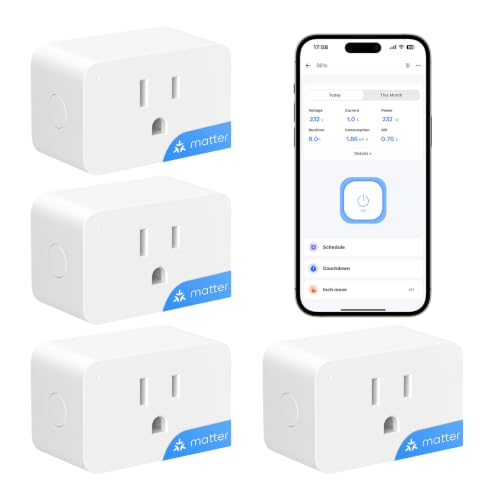
Pros
- Matter support for Apple Home, Alexa, and Google Home
- Real-time energy monitoring and cost tracking
- 15A load capacity for everyday appliances
- Overload protection and fire-resistant housing
- No hub required for 2.4GHz Wi-Fi setup
Cons
- Requires 2.4GHz Wi-Fi
- App or Matter controller needed for setup

Pros
- Real-time energy monitoring and historical usage
- Matter over Thread for local smart-home control
- 15A/1800W capacity for household appliances
- Schedules, timers, app, and voice control
Cons
- Requires a compatible Thread Border Router
- Four-pack may be more than needed

Pros
- Matter support for Apple Home, Alexa, Google Home
- Energy monitoring tracks usage over time
- Compact design helps preserve adjacent outlet space
- UL-certified flame-retardant design and 2-year warranty
Cons
- Requires 2.4GHz Wi-Fi
- 15A/1800W maximum load

Pros
- Matter support for Apple Home, Alexa, Google Home, SmartThings
- Real-time and historical energy monitoring
- LAN control without registration or data tracking
- Compact V0-rated fire-retardant design
- 15A/1800W capacity with overload protection
Cons
- Requires a Matter-compatible hub
- 2.4GHz IPv6 only, no Thread support
Match the Plug to Your Home Network
Matter gives compatible devices a common language across platforms such as Apple Home, Amazon Alexa, Google Home, and Samsung SmartThings. That is useful if your household uses more than one ecosystem, but the connection method still matters. Wi-Fi models join a 2.4GHz network, while Thread models require a compatible Thread Border Router.
The smart sensors and home automation category is a helpful starting point if you are building several connected devices. For a simple setup, direct Wi-Fi may be easier. For a home already equipped for Thread, a Matter over Thread plug can reduce dependence on crowded Wi-Fi traffic.
| Connection type | Key requirement | Best placement |
|---|---|---|
| Matter over Wi-Fi | 2.4GHz network | Everyday appliances |
| Matter over Thread | Thread Border Router | Connected homes |
| Matter multi-platform | Compatible controller | Mixed ecosystems |
Pay attention to platform details before ordering. The meross model uses Matter over Wi-Fi and requires 2.4GHz, IPv6, and a compatible hub for the selected platform. The Kasa and SONOFF options also emphasize broad Matter compatibility, while Tapo adds Alexa and Google Assistant control through its app.
Pro Tip: Check your router band and smart-home controller before pairing a plug. This avoids buying a Thread model for a home without a Thread Border Router.
Energy Monitoring Is More Than On and Off
Energy monitoring is the clearest difference between a basic remote switch and the products listed here. These plugs can show real-time or historical consumption, helping you identify appliances that draw power unnecessarily. Several also provide cost tracking or bill estimates, which can make usage data easier to interpret.
Scheduling is particularly useful for coffee makers, lamps, fans, and other household appliances that follow a routine. Tapo adds programmable operation around lower-rate periods and user-set power thresholds. SONOFF combines cost tracking with overload protection, while meross offers historical data through its app.
Expert Examined
From Jenna Castellano

I keep smart plugs away from appliances whose startup load is unclear. The mistake I see is treating a 15A label as permission to connect anything with a motor or heating element without checking its operating instructions first.
Read more about Jenna CastellanoFor broader advice about connected electrical safety, the U.S. Consumer Product Safety Commission is a more useful authority than an informal forum. A plug can automate an appliance, but it does not remove the need to follow the appliance maker’s instructions.
Check Capacity, Clearance, and Protection
Every model in this comparison is presented with a 15A rating, and several specify up to 1800W. That makes them suitable for common items such as lamps, fans, coffee makers, heaters, and kitchen devices according to the supplied product information. You should still confirm that the connected appliance stays within its rated load.
Compact construction matters when the plug sits beside another occupied outlet. Kasa, meross, and ONVIS describe designs intended to keep the neighboring outlet accessible. Safety-related differences include UL certification for Kasa, FCC certification for the ONVIS single-pack model, and overload or fire-protection features on selected products.
Before You Plug In: Never exceed the plug’s stated load, and do not assume a compact body makes every high-draw appliance suitable. Inspect the outlet, cord, and appliance instructions before leaving an automated load running unattended.
Power management can also affect what happens during an abnormal condition. Tapo can cut power at user-set thresholds or durations, while SONOFF and meross describe overload protection. These features are useful safeguards, but they should supplement sensible appliance selection rather than replace it.
Wi-Fi smoke and carbon monoxide detectors can address a different layer of household protection, especially where remotely monitored alerts matter. A smart plug should not be treated as a smoke or heat alarm.
Which Plug Fits Your Setup
I would point renters or mixed-platform households toward Tapo Smart Plug, Matter Compatible when energy insight and flexible platform support matter. Its four-pack format suits several lamps or routine appliances, while programmable scheduling, bill estimates, and threshold-based power management give you more control than simple remote switching.
For a home that already has Thread infrastructure, I would choose Onvis Matter Over Thread Smart Plug with Energy. It combines real-time and historical tracking with 15A/1800W capacity, schedules, and local control through a compatible Thread Border Router. Its compact design also helps preserve outlet access.
I would reserve meross Matter Smart Plug, Energy Monitoring for buyers who value local control and privacy. It offers energy history, no registration, and no data tracking according to the supplied features, but remember that it is Matter over Wi-Fi, not Thread, and needs a compatible hub for your chosen platform.
The Bottom Line
The biggest mistake is choosing a plug by brand or app alone while ignoring the home network it must join. Matter compatibility does not mean every Matter plug uses the same connection method, and Thread models need the right supporting hardware.
Start by checking whether your home has a suitable 2.4GHz network, IPv6 support where required, or a Thread Border Router. Then match the plug’s energy monitoring and safety features to the appliance you want to control.
FAQs
Choose Matter over Wi-Fi if your router and selected controller already support the required network settings. Choose Matter over Thread when you have a compatible Thread Border Router and want Thread-based local connectivity. The listed plugs support common appliances including heaters and coffee makers within their stated 15A capacity. Confirm the appliance instructions and electrical load before using schedules or remote control. Energy monitoring can provide real-time consumption data and historical usage information. Some models also support electricity cost tracking, bill estimates, or usage thresholds through their associated app or controller. Matter describes interoperability, not one universal connection method. Some Matter plugs use Wi-Fi, while Thread models need a compatible Thread Border Router, and meross specifies that a compatible hub is required for the selected platform. Look for a stated load rating, overload protection, flame-retardant construction, or relevant certification in the product details. These features do not replace checking the appliance’s instructions or avoiding loads beyond the plug’s rating.Should I choose a Wi-Fi or Thread smart plug?
Can a smart plug control a heater or coffee maker?
What does energy monitoring show?
Does Matter mean a plug needs no hub?
What safety features should I look for?
Sources
- UL Solutions, electrical safety resources. www.ul.com
- U.S. Consumer Product Safety Commission, home electrical safety. www.cpsc.gov