
Choosing among the best smart plugs with app means matching the control platform to your home, not simply counting features. The key split is whether you want broad voice compatibility, Alexa-only simplicity, or Matter support for Apple Home and other platforms.
Pros
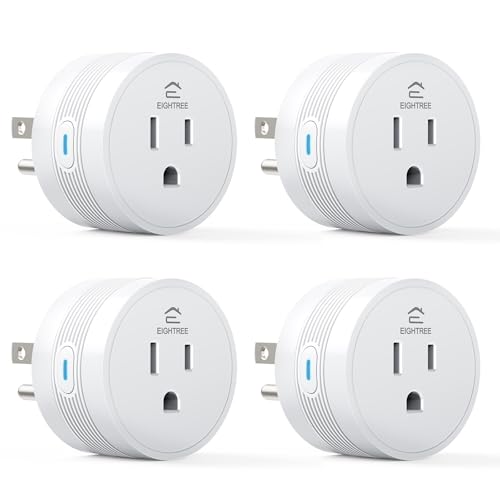
- 15A/1800W capacity for high-power appliances
- Compact 1.2-inch thickness fits crowded outlets
- Alexa and Google Home voice control
- FCC and ETL certified
- Four-pack supports grouped device control
Cons
- Requires 2.4GHz WiFi only
- Smart Life app required for setup

Pros
- Compact design leaves the second outlet free
- Alexa voice control and app access
- Schedules support sunrise and sunset routines
- Four-pack covers multiple appliances
Cons
- Works with Alexa only
- Requires 2.4 GHz Wi-Fi

Pros
- Four smart outlets in a compact 2-in-1 design
- Independent control for each socket
- WiFi and Bluetooth app control
- Works with Alexa and Google Assistant
Cons
- Does not support 5G WiFi
- Requires a Govee Home App account

Pros
- Alexa and Google Assistant voice control
- Remote control through three compatible apps
- Schedules and timers for connected devices
- Group control and family sharing
- ETL and FCC listed
Cons
- 2.4GHz WiFi only
- Alexa and Google setup requires the GHome app first

Pros
- Matter support across major smart-home platforms
- 15A/1800W capacity for household electronics
- Remote control, timers, and scheduling
- FCC certified with overload protection
Cons
- Hub required for most listed platforms
- 2.4GHz Wi-Fi and IPv6 network only

Pros
- Matter support for major smart home platforms
- 15A/1800W capacity
- Remote app control from anywhere
- Voice control with Siri and Alexa
- Timers and schedules for automation
Cons
- Requires 2.4GHz Wi-Fi and IPv6
- Hub required for most Matter platforms
Start With Your Home’s Control Platform
App compatibility should come before automation extras. EIGHTREE, Govee, and GHome support Alexa and Google Home, while Amazon Basics is designed for Alexa and manages setup directly inside the Alexa app without a third-party app or hub.
Linkind takes a different route with Matter support for Apple Home, Alexa, Google Home, and SmartThings. A Matter-certified hub or controller is required for those platforms, although the AiDot app can be used without one. If you already use a HomePod, Echo Dot, Nest, or SmartThings Hub, that requirement may fit your setup naturally.
For broader smart-home planning, the platform choice resembles the decision between ordinary Wi-Fi accessories and devices built for a specific ecosystem. Our coverage of HomeKit doorbell cameras explains why ecosystem compatibility deserves attention before installation.
Pro Tip: Check whether your home uses Alexa, Google Home, Apple Home, or SmartThings before opening the package. A compatible voice assistant is not the same as a compatible setup process.
Match Wi-Fi Limits to the Installation
Every option listed here uses 2.4GHz Wi-Fi, and Govee specifically states that it does not support 5G Wi-Fi. This band is common for connected-home accessories, but your phone and router setup still need to support the required connection during pairing.
Bluetooth-assisted setup is available on EIGHTREE, Govee, and GHome. EIGHTREE uses the Smart Life app, Govee uses Govee Home, and GHome works with GHome, Smart Life, and Tuya. Amazon Basics keeps the process inside Alexa, which can be appealing if you want fewer accounts.
| Control type | Network requirement | Best fit |
|---|---|---|
| Wi-Fi app | 2.4GHz network | Remote appliance control |
| Matter platform | 2.4GHz and hub | Multi-platform homes |
| Dual outlet | 2.4GHz Wi-Fi | Two devices per socket |
Linkind also specifies IPv6 network support for its Wi-Fi connection. Before pairing any plug, confirm the router offers the required band and that the chosen app or controller is ready.
Consider Load, Space, and Scheduling
For appliances that need more capacity, EIGHTREE and Linkind list 15A/1800W support. EIGHTREE specifically names coffee makers, air fryers, heaters, and other high-power appliances, while Linkind lists protection against short circuits and overloads alongside its compact design.
Govee’s dual design places two horizontally positioned plugs in the space of one normal vertical outlet and lets each socket operate independently. EIGHTREE instead emphasizes a round body with 1.2-inch thickness, useful behind furniture or in crowded outlets.
All six product descriptions include schedules, timers, or routines in some form. That can automate lamps, fans, holiday lighting, coffee makers, and other connected appliances, but you should still follow the appliance maker’s instructions before leaving a high-power device unattended.
Before You Connect a Heater: Do not assume every smart plug is suitable for every appliance. Confirm the appliance’s power needs against the plug’s listed capacity and avoid using automation where the appliance maker does not permit unattended operation.
Read the Certifications and App Details
Certification labels help distinguish the products, but they do not remove the need to check compatibility and load. EIGHTREE lists FCC and ETL certification, Govee lists ETL certification, GHome lists ETL and FCC, and Linkind lists ETL certification plus FCC certification in its safety details.
The U.S. Consumer Product Safety Commission provides consumer safety information for household electrical products. For broader alarm and home-safety planning, you can also review our recommendations for Wi-Fi smoke and carbon monoxide detectors.
Expert Examined
From Jenna Castellano

I keep seeing smart plugs placed where their indicator light and reset button become impossible to reach. The better approach is to choose the compact shape for the outlet location, then leave enough access to disconnect or reset the device if the network changes.
Read more about Jenna CastellanoFCC and ETL markings are useful signals that a product has been evaluated under relevant requirements, but they are not substitutes for reading the instructions. UL Solutions also publishes consumer information about product safety and certification at UL Solutions.
Which Plug Fits Your Household
I would point Alexa-only households toward Amazon Basics Smart Plug, Works with Alexa Only when direct Alexa app management matters more than cross-platform support. Its routines can use scheduled times, voice commands, sunrise, or sunset, and its compact shape leaves the other outlet available.
I would put EIGHTREE 15A Smart Plug Works with Alexa & Google in a home that needs four plugs, higher listed capacity, and both Alexa and Google Home control. Its Smart Life app adds grouping, remote status checks, timers, and schedules.
For Apple Home users or households combining several smart-home platforms, I would choose Linkind Matter Smart Plug, Works with Apple Home. The two-pack is a practical starting point, while Matter can keep devices communicating locally on the home network after setup if the internet connection goes offline.
The Bottom Line
The mistake most buyers make is treating every app-controlled plug as interchangeable. App ownership, voice-platform support, 2.4GHz requirements, Matter hub needs, outlet shape, and rated capacity can change whether a plug suits the room.
If you only do one thing first, identify the platform and network you already use. Then select the plug whose app, voice assistant support, capacity, and physical design match that setup before planning schedules.
FAQs
EIGHTREE, Govee, and GHome support both Alexa and Google Home. Amazon Basics is designed for Alexa and uses the Alexa app, while Linkind uses Matter for broader platform support with a compatible controller. The products listed specify 2.4GHz Wi-Fi, and Govee explicitly says it does not support 5G Wi-Fi. Check your router and use the required network band during setup. Linkind states that Apple Home, Alexa, Google Home, and SmartThings require a Matter-certified hub or controller. The AiDot app can be used without a hub. These markings indicate that the product carries stated certification information related to applicable safety or communications requirements. They do not replace checking appliance compatibility, load limits, or installation instructions. EIGHTREE lists coffee makers, air fryers, heaters, and other high-power appliances for its 15A/1800W plug. Always compare the appliance requirements with the plug rating and follow the appliance manufacturer’s instructions.Which smart plug app should I choose for Alexa and Google Home?
Do these smart plugs work with 5GHz Wi-Fi?
Do Matter smart plugs need a hub?
What does ETL or FCC certification mean on a smart plug?
Can smart plugs control heaters and coffee makers?
Sources
- U.S. Consumer Product Safety Commission www.cpsc.gov
- UL Solutions www.ul.com