
Choosing the best smart plugs for space heater use requires more than checking app compatibility: the heater’s nameplate load must stay within the plug’s rating. You are deciding between platform flexibility, energy monitoring, and a setup that does not encourage unattended heating.

Pros
- Matter support across major smart home platforms
- Compact design helps preserve nearby outlet access
- UL certified flame-retardant design
- Scheduling, timers, app, and voice control
Cons
- 2.4 GHz Wi-Fi only
- Limited to 15A/1800W maximum
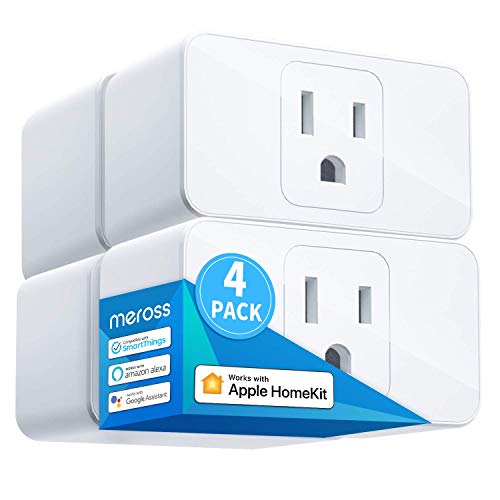
Pros
- Apple HomeKit, Alexa, Google Assistant compatible
- 15A capacity for appliances up to 1800W
- Compact design leaves room for two plugs
- Scheduling supports sunrise and sunset settings
Cons
- HomeKit remote control needs an online bridge
- Requires a 2.4GHz Wi-Fi network

Pros
- Apple HomeKit and Siri support
- Works with Alexa, Google Assistant, SmartThings
- Compact design preserves the adjacent outlet
- UL certified flame-retardant design
Cons
- 2.4GHz Wi-Fi only
- HomeKit remote control needs an Apple device

Pros
- Matter support for Apple Home, Alexa, Google Home
- Energy monitoring tracks usage over time
- Compact design helps preserve adjacent outlet space
- UL-certified flame-retardant design and 2-year warranty
Cons
- Requires 2.4GHz Wi-Fi
- 15A/1800W maximum load

Pros
- Matter support across major smart-home platforms
- 15A/1800W capacity for household electronics
- Remote control, timers, and scheduling
- FCC certified with overload protection
Cons
- Hub required for most listed platforms
- 2.4GHz Wi-Fi and IPv6 network only

Pros
- Matter support for major smart home platforms
- 15A/1800W capacity
- Remote app control from anywhere
- Voice control with Siri and Alexa
- Timers and schedules for automation
Cons
- Requires 2.4GHz Wi-Fi and IPv6
- Hub required for most Matter platforms
Start With the Heater’s Electrical Load
Every model in this selection is rated for up to 15A and 1800W where that specification is stated, but that does not automatically make every space heater appropriate. Read the heater’s label and manual first, then compare its maximum demand with the smart plug rating. Leave room below the limit rather than treating the rating as a target.
A smart plug adds switching, scheduling, and remote control, not temperature sensing or a replacement for the heater’s built-in safety systems. Do not use a plug to bypass a heater’s controls, and do not connect a power strip or extension cord unless the heater manufacturer specifically permits it.
Before You Plug In: Never leave a space heater operating through a smart plug unless the heater manufacturer and the plug instructions allow that arrangement. Stop if the plug, outlet, or cord becomes warm, discolored, loose, or damaged.
The US Consumer Product Safety Commission provides broader consumer safety guidance for portable heaters. That guidance matters more than remote access features when the appliance will run near bedding, curtains, furniture, or a busy walkway.
Matter, HomeKit, and Wi-Fi Details
Matter is useful if your home includes Apple Home, Alexa, Google Home, or Samsung SmartThings. The TP-Link Tapo Matter Supported Smart Plug Mini and Kasa Matter Smart Plug with Energy Monitoring support certified Matter platforms, while the Linkind models also require a Matter-certified hub or controller for several platform integrations.
Local network control can continue when the internet goes offline for Matter devices configured on the same LAN. Remote control is a separate feature, and some Apple Home setups require a networked Apple device at home. All Wi-Fi-only models listed here use 2.4GHz Wi-Fi, so confirm that your network supports the required band.
| Control approach | Key requirement | Best fit |
|---|---|---|
| Matter | Compatible hub or controller | Multi-platform homes |
| Apple HomeKit | Home hub for remote access | Siri households |
| App and voice | 2.4GHz Wi-Fi | Simple room control |
If your home already centers on Siri, the HomeKit device ecosystem may make the HomeKit-focused Tapo or meross option easier to organize. If you want fewer separate apps, Matter provides a clearer path across supported platforms.
Scheduling, Monitoring, and Placement
Scheduling can turn a connected heater or other appliance on and off at set times, but a schedule should not replace supervision. Keep the heater on a stable surface with clear space around it, away from water and combustible materials, and place the plug where its indicator and connection remain accessible.
The Kasa Matter Smart Plug with Energy Monitoring is the only listed model with energy tracking, so it is the clearest choice if you want consumption information over time. Compact designs from Tapo, meross, Kasa Smart, and Linkind can help preserve the neighboring outlet, but compact size does not remove the need to inspect the connection.
Pro Tip: Before creating a schedule, record the heater’s maximum wattage, confirm the smart plug rating, and choose an automatic shutoff time that matches how the room is occupied.
Expert Examined
From Marcus Bell

I keep the smart plug easy to reach rather than hiding it behind furniture. The mistake I see is treating remote control as permission to run a heater unattended, so I would use schedules only with the heater’s own safety features intact and the room kept clear.
Read more about Marcus BellFor related automation decisions, the site’s coverage of smart sensors and home automation can help you think about how plugs fit with the rest of your setup. A plug alone cannot detect smoke, carbon monoxide, motion, or room temperature.
Which Plug Fits Your Setup
I would point Apple Home households toward HomeKit-compatible smart home devices when the household already uses Siri. Within this selection, the Tapo Apple HomeKit Smart Plug Mini, 15A is a focused fit because it supports Apple HomeKit, Alexa, and Google Home, includes scheduling, uses Bluetooth onboarding, and has a compact UL-certified flame-retardant design.
I would choose the Kasa Matter Smart Plug with Energy Monitoring for a household that wants Matter compatibility plus energy-use tracking. Its monitoring feature gives you more information than a basic on and off schedule. For a smaller purchase, I would point you to the Linkind Matter Smart Plug, Works with Apple Home, provided your network meets its 2.4GHz Wi-Fi and IPv6 requirements and you have the necessary Matter controller for your chosen platform.
The Bottom Line
The mistake most buyers make is assuming that a 15A smart plug makes any space heater safe to operate remotely. The rating is only one part of the decision; the heater’s instructions, cord, outlet, placement, and built-in protections still govern how it should be used.
If you do only one thing first, read the heater’s maximum electrical specification and manual before choosing a plug. Then select the platform and monitoring features that fit your home, and keep the connection visible and accessible.
FAQs
No. Check the heater’s manual and nameplate, then compare its maximum electrical demand with the smart plug’s rating. A compatible app or voice assistant does not prove that the heater and plug are approved for use together. Keep the plug and outlet accessible, dry, and free from furniture pressure. The heater should stand on a stable surface with clear space around it and away from bedding, curtains, and other combustible materials. No. A smart plug controls power according to its schedule or command, but it does not replace the heater’s own thermostat or safety controls. Use the heater exactly as its manufacturer specifies. It indicates that the product has been certified by the named safety organization for applicable requirements. Certification is not a guarantee that every appliance combination is appropriate, so the heater’s instructions and electrical load still matter. Matter devices configured on the same local network may communicate and be controlled locally when the internet is offline. Remote control from outside the home and some platform integrations may still require an active hub, controller, or internet connection.Can I use any smart plug with a space heater?
Where should I place a smart plug for a space heater?
Does a smart plug replace a heater timer or thermostat?
What does UL or ETL certification mean on a smart plug?
Will a Matter smart plug work without internet?
US Consumer Product Safety Commission | https://www.cpsc.gov/
UL Solutions | https://www.ul.com/
National Fire Protection Association | https://www.nfpa.org/