
Shopping for the best smart door locks without deadbolt means deciding whether you want to replace the handle or knob while keeping an existing deadbolt in place. That distinction matters most for bedrooms, offices, side doors, and rentals where drilling is undesirable.

Pros
- Fingerprint handle recognition for keyless entry
- Built-in Wi-Fi with remote app control
- Real-time notifications and event history
- 15-minute installation with no drilling
- Works with left- and right-hand doors
Cons
- Requires eight AA batteries
- IP53 protection limits outdoor exposure

Pros
- Fingerprint handle opens in 0.3 seconds
- Five entry methods, including app and key
- Built-in 2.4GHz Wi-Fi, no hub required
- Up to 100 PIN codes with access logs
Cons
- Requires eight AA alkaline batteries
- Requires specific door hole and clearance

Pros
- Fingerprint, app, passcode, key fob, and key access
- 10-minute screwdriver installation
- Temporary and one-time passcode management
- Reversible handle for left- or right-handed doors
Cons
- Remote control needs a separately sold WiFi gateway
- App required for remote code management

Pros
- Built-in WiFi, no hub required
- Fingerprint entry in 0.3 seconds
- One-time and recurring PIN codes
- Matching handle set included
Cons
- Requires 2.4GHz WiFi within 33 feet
- Batteries not included, alkaline only

Pros
- Five entry methods, including fingerprint access
- Stores 50 passwords, fingerprints, and key fobs
- Auto-lock and app-based locking
- Screwdriver installation for standard American doors
Cons
- Remote control requires a separately sold Wi-Fi gateway
- Bluetooth connection limits control without the gateway
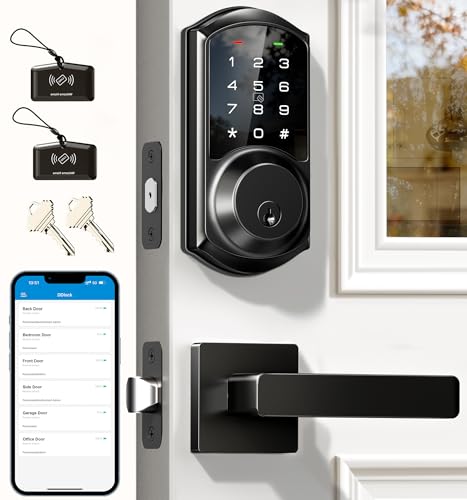
Pros
- App and web control with no subscription fee
- Stores 250+ flexible access codes
- IP54 weatherproof, BHMA/ANSI Grade 3
- IC card capacity exceeds 1,000 cards
Cons
- Remote features require separate G2 gateway
- Two-year warranty requires product registration
Start With the Door Hardware
A handle-style lock replaces the operating hardware at the door, while the deadbolt and knob relationship still affects how the entrance is protected. The Yamiry Keypad Smart Door Knob Lock is specifically described as working with an existing deadbolt, making it the clearest fit when you want smart entry without removing that separate lock.
Before buying, measure the hole, door thickness, backset, and clearance around the handle. The Philips Upgraded Wi-Fi Smart Lock with Handle lists a 2-1/8-inch hole, 1-3/8 to 2-inch door thickness, and 2-3/8 or 2-3/4-inch backset requirement. Those details matter more than a long feature list if the replacement cannot fit.
Pro Tip: Measure the existing hardware before ordering, including the door hole and the space between the deadbolt and handle.
Choose Access for the Household
Fingerprint recognition is useful when family members want quick entry without remembering a code. The eufy Security Smart Lock C33 uses fingerprint recognition in the handle, while the Philips Upgraded Wi-Fi Smart Lock with Handle stores up to 50 fingerprints and combines that method with app, password, voice, and key access.
Keypad access is more practical for guests, cleaners, and tenants because you can issue a code instead of handing over a key. Veise VE06-L Smart Deadbolt Lock with 2 Lever supports permanent, scheduled, recurring, and one-time codes, while the Philips models offer flexible code management through their apps.
<table]
Device style | Main access | Best placement
Handle replacement | Fingerprint and PIN | Front or side door
Knob replacement | App, PIN, key fob | Door with deadbolt
Lever deadbolt set | Codes and app | Entry or rental door
[/table]
Remote Control, Batteries, and Gateways
Built-in Wi-Fi gives you remote management without buying a separate bridge. The eufy Security Smart Lock C33 and both Philips models include Wi-Fi access, while the Yamiry products and Veise model require a separately sold Wi-Fi gateway for remote control or voice features.
Battery details also differ. The eufy model uses eight AA batteries, the Philips Upgraded model requires eight AA alkaline batteries that are not included, and the Philips WiFi Keypad Deadbolt with Handle lists up to six months of daily performance with standard alkaline batteries. Keep the app alerts enabled where available and replace batteries before the lock becomes inconvenient to operate.
Before You Mount It: A gateway is not included with every model. Confirm whether remote access is built in or requires an additional accessory before relying on off-site unlocking.
The difference between a smart lock bridge and built-in Wi-Fi is especially important for a rental or side entrance. A local Bluetooth lock can still provide app access nearby, but remote functions depend on the required gateway and its connection.
Expert Examined
From Marcus Bell

I keep an eye on the hardware mismatch that causes the most frustration with this category. The lock may have the right app features, yet the door hole or clearance can prevent the handle from sitting correctly, so measurements should come before setup.
Read more about Marcus BellMatch the Lock to the Door’s Job
For a family front door, I would favor a model that combines fingerprints, codes, a physical key, and app control. For a bedroom or office, a simpler knob or handle can make more sense, particularly when remote access is not essential.
Weather exposure and security specifications also deserve attention. The eufy Security Smart Lock C33 lists IP53 protection, while the Veise model lists IP54 weather resistance and BHMA/ANSI Grade 3 certification. These labels describe stated protection and classification, not permission to ignore the manufacturer’s fit requirements.
If you are uncertain about door security hardware, the role of the strike plate is worth checking separately. A smart handle cannot correct a poorly aligned door or weak surrounding hardware.
Which Lock Fits Your Home
I would point families toward the Philips Upgraded Wi-Fi Smart Lock with Handle when several people need different entry methods. It stores up to 50 fingerprints, supports up to 100 passwords, works with 2.4GHz Wi-Fi without a hub, and offers scheduled or one-time codes for guests.
I would put the eufy Security Smart Lock C33 on a side, garage, basement, or office door when a fast fingerprint handle and built-in Wi-Fi are the priority. Its stated no-drill installation, left- and right-hand compatibility, eight AA battery design, and app notifications make it a practical fit for households wanting remote event visibility.
For a door that already has a deadbolt you want to keep, I would choose the Keypad Smart Door Knob Lock. It is designed to work with an existing deadbolt, supports fingerprint, password, app, key fob, and key entry, and can add remote control through a separately sold Wi-Fi gateway.
The Bottom Line
The most common mistake is treating every handle or knob lock as a universal replacement. Hole diameter, door thickness, backset, clearance, and the presence of an existing deadbolt determine whether the installation will work.
If you do only one thing first, measure the door and identify whether you are replacing a knob, replacing a handle, or adding smart control beside an existing deadbolt. Then choose the access methods and Wi-Fi arrangement that match the people using that door.
FAQs
Yes. The Yamiry Keypad Smart Door Knob Lock is described as working with an existing deadbolt, so it can add keypad, fingerprint, app, key fob, and key access while that separate lock remains in place. Always confirm the product’s fit and installation requirements first. Fingerprint access can be convenient for household members who do not want to carry keys or remember codes. Keypads are better for guests and service providers because you can create separate passwords, including temporary or scheduled options on supported models. Some include built-in Wi-Fi, including the eufy Security Smart Lock C33 and Philips Wi-Fi models. The Yamiry and Veise products list gateway-dependent remote features, so nearby Bluetooth control and off-site access are not the same thing. An IP rating describes the product’s stated resistance to dust and water exposure. It does not replace correct installation or prove that every door location is suitable, so follow the product’s placement and maintenance instructions.Can a smart door lock work without replacing my deadbolt?
Which access type is easiest for a family?
Do these smart locks need a Wi-Fi gateway?
What does IP53 or IP54 mean on a smart lock?
Sources
- UL Solutions www.ul.com
- BHMA buildershardware.com