
Shopping for the best smart door locks with handle and deadbolt means choosing between direct Wi-Fi control and simpler Bluetooth or keypad access. That split matters most for homeowners, landlords, and families who want remote entry without replacing hardware twice.

Pros
- Fingerprint handle recognition for keyless entry
- Built-in Wi-Fi with remote app control
- Real-time notifications and event history
- 15-minute installation with no drilling
- Works with left- and right-hand doors
Cons
- Requires eight AA batteries
- IP53 protection limits outdoor exposure

Pros
- Fingerprint, app, passcode, key fob, and key access
- 10-minute screwdriver installation
- Temporary and one-time passcode management
- Reversible handle for left- or right-handed doors
Cons
- Remote control needs a separately sold WiFi gateway
- App required for remote code management

Pros
- Built-in WiFi, no hub required
- Fingerprint entry in 0.3 seconds
- One-time and recurring PIN codes
- Matching handle set included
Cons
- Requires 2.4GHz WiFi within 33 feet
- Batteries not included, alkaline only

Pros
- Five entry methods, including fingerprint access
- Stores 50 passwords, fingerprints, and key fobs
- Auto-lock and app-based locking
- Screwdriver installation for standard American doors
Cons
- Remote control requires a separately sold Wi-Fi gateway
- Bluetooth connection limits control without the gateway
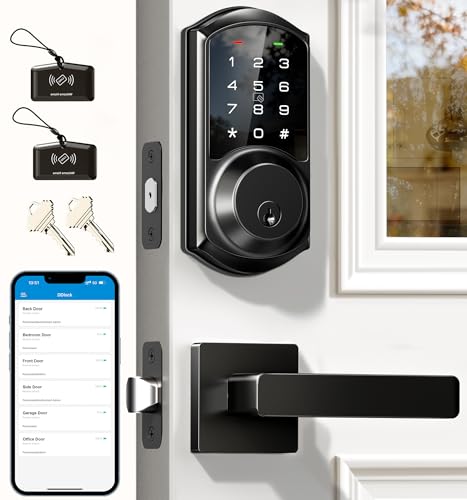
Pros
- App and web control with no subscription fee
- Stores 250+ flexible access codes
- IP54 weatherproof, BHMA/ANSI Grade 3
- IC card capacity exceeds 1,000 cards
Cons
- Remote features require separate G2 gateway
- Two-year warranty requires product registration

Pros
- 0.3-second fingerprint access
- Built-in WiFi, no hub required
- Permanent, one-time, and recurring PINs
- Matching handle set included
Cons
- Requires eight AA alkaline batteries
- WiFi supports 2.4GHz networks only
Choose the connection before the handle
A built-in Wi-Fi lock can communicate with your phone when you are away from home. The eufy Security Smart Lock C33 and both Philips models include built-in Wi-Fi, while the Philips WiFi Keypad Deadbolt with Handle connects directly to 2.4GHz Wi-Fi without an extra hub.
Bluetooth-first models can still suit a front door, rental, or interior entry point, especially if you mainly use fingerprints, codes, key fobs, or a phone nearby. The Yamiry Smart Door Handle Lock with Keypad can add remote control through a separately sold Wi-Fi gateway, and the Veise VE06-L Smart Deadbolt Lock with 2 Lever needs its G2 gateway for remote and voice features.
Pro Tip: Confirm whether remote access works out of the box or requires a separately sold gateway before ordering.
Match access methods to your household
Fingerprint access is useful when children, parents, or frequent residents need entry without carrying keys. Philips lists 0.3-second fingerprint access, while eufy describes a fingerprint reader integrated with the handle grip. Keypad codes are more practical for guests, cleaners, and rental occupants because you can issue temporary or recurring access.
App records and scheduled codes also matter if several people use the door. Veise supports permanent, scheduled, recurring, and one-time codes, while Yamiry describes temporary access and unlock records through its app. For a simpler setup, the Keypad Smart Door Knob Lock supports app, password, key fob, fingerprint, and key entry, but remote control needs a gateway.
| Connection type | Key access feature | Suitable placement |
|---|---|---|
| Built-in Wi-Fi | Remote app control | Main entry door |
| Bluetooth | Nearby phone access | Interior or side door |
| Keypad and key | Local entry choices | Family or rental door |
Check the door and battery requirements
Measure the door thickness, hole size, and handing before buying. Veise lists compatibility with doors from 1-3/8 to 2 inches thick and either left- or right-handed installation. The Philips WiFi Keypad Door Lock with Handle specifies 1-3/8 to 1-3/4 inches, so similar-looking handle sets are not automatically interchangeable.
Battery details deserve equal attention. The eufy model uses eight AA batteries, while the Philips WiFi Keypad Deadbolt with Handle lists up to six months of daily performance and requires standard 1.5V alkaline batteries, which are not included. Check the low-battery notice regularly and keep the physical key available.
Before You Mount It: A gateway, rechargeable battery, or incompatible battery type can prevent the features you expected from working. Follow the product’s battery instructions and verify the door measurements first.
I keep spare batteries and the mechanical key in a predictable, accessible place rather than inside the locked room. The mistake I see most often is choosing a feature-rich lock before checking the existing bore hole and door thickness.
Expert Examined
From Marcus Bell

In real homes, the trouble is usually not the keypad itself but a door that does not align cleanly with the strike. I would correct the door fit first, then install the electronic hardware so the deadbolt moves without pressure.
Read more about Marcus BellFor broader door protection, read about why the strike plate matters. A smart lock cannot compensate for a weak or poorly aligned mounting surface.
Use remote features with realistic expectations
Remote access is convenient for letting in a visitor, checking status, or managing a rental, but it depends on the network path and app setup. Philips advises keeping its lock within 33 feet of the Wi-Fi router and reducing obstacles such as walls and metal objects.
Security settings also deserve attention. Veise describes local AES-encrypted data storage, anti-peeping keypad protection, and a two-minute lockout after five incorrect attempts. For general advice about digital entry risks, the smart lock security risks discussion is useful, while what a smart lock bridge does explains the gateway role.
For installation and door hardware guidance, the U.S. Consumer Product Safety Commission is a useful safety authority, although it does not replace the lock maker’s installation instructions.
Which lock fits your entry door
I would point families wanting direct phone control and fingerprint entry toward the smart lock category and specifically the eufy Security Smart Lock C33. Its built-in Wi-Fi, handle-integrated fingerprint access, event history, and compatibility with left- and right-hand doors make it a flexible choice for a main, side, garage, or basement door.
I would choose the Philips WiFi Keypad Deadbolt with Handle for a household that wants direct Wi-Fi, voice assistant compatibility, flexible PIN types, and automatic locking. The Veise VE06-L Smart Deadbolt Lock with 2 Lever makes more sense for landlords or property managers who need web access, many codes, e-keys, access logs, and gateway-based remote control.
The Bottom Line
The biggest mistake is assuming every handle-and-deadbolt set fits every American door. Thickness, hole diameter, handing, router distance, and gateway requirements can matter more than the number of access methods.
If you do only one thing first, measure the door and identify whether remote control must work without an added gateway. That single check narrows the six choices quickly and prevents a costly installation mismatch.
FAQs
Fingerprint access is convenient for household members who regularly use the door, while keypad codes are easier to share with guests, cleaners, and tenants. Many models combine both, so your choice can depend on who needs access and how often codes must change. Several listed models support reversible or left- and right-handed installation, but compatibility varies. Check the product specifications and your existing door layout before mounting the handle and deadbolt. Check battery status in the app when the model provides that feature, and respond to low-battery alerts promptly. Use the specified battery type, keep replacement batteries available, and retain the mechanical key as a backup. IP54 indicates protection against limited dust entry and water splashes, but it does not mean the lock is waterproof. Mount the device according to its instructions and protect exposed electronics from direct, sustained water.Is a fingerprint lock better than a keypad lock?
Can these smart locks work on left- and right-handed doors?
How often should I check smart lock batteries?
What does IP54 mean on a smart lock?
Sources
- UL Solutions and product safety standards. www.ul.com
- U.S. Consumer Product Safety Commission and home safety information. www.cpsc.gov