
Running the best Power over Ethernet security cameras eliminates the dropped signals and battery recharges common with wireless gear. The core decision hinges on whether you need an all-in-one system with dedicated recording hardware or individual IP units added to an existing network switch. Homeowners seeking continuous, high-bandwidth surveillance get dependable 24/7 protection through this single-cable standard.
Pros
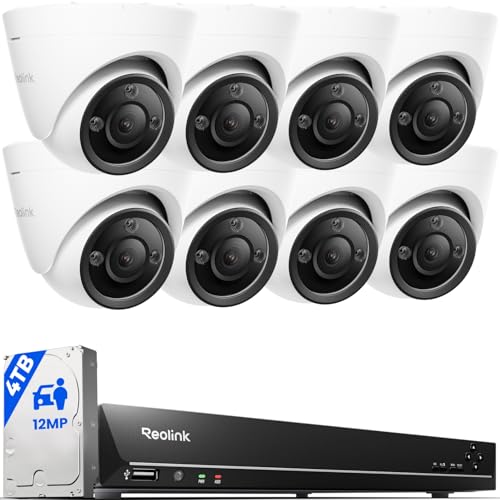
- High-resolution 12MP video with spotlight color night vision
- Onboard smart detection for people, vehicles, and pets
- Included 4TB hard drive for local video storage
- Sixteen PoE ports expandable up to 24 channels
- Built-in speaker allows two-way audio communication
Cons
- Requires running physical Ethernet cables for PoE cameras
- Battery camera compatibility limited to select models

Pros
- 4K 8MP resolution with 20fps video
- Wide 105-degree field of view with 2.8mm lens
- Infrared night vision reaching up to 98 feet
- Weatherproof IP66 metal housing for outdoor mounting
- Single-cable PoE power and data delivery
Cons
- Incompatible with Reolink, Lorex, and Amcrest NVRs
- Frame rate tops out at 20fps in 4K
- Support limited to weekday business hours

Pros
- Ultra-wide 180-degree panoramic viewing angle
- High-resolution 8MP 4K video recording
- Single-cable Power over Ethernet installation
- IP66 weatherproof rating for outdoor mounting
Cons
- Incompatible with Reolink, Lorex, and Amcrest NVRs
- Requires manual IP setup via ONVIF protocol

Pros
- 5MP resolution at 2592 by 1920 video
- 2.8 to 12mm manual varifocal zoom lens
- Night vision reaches up to 120 feet
- NDAA compliant with federal certification
Cons
- Zoom is manual, requiring physical lens adjustment
- Full 5MP recording tops out at 20 FPS
Pros
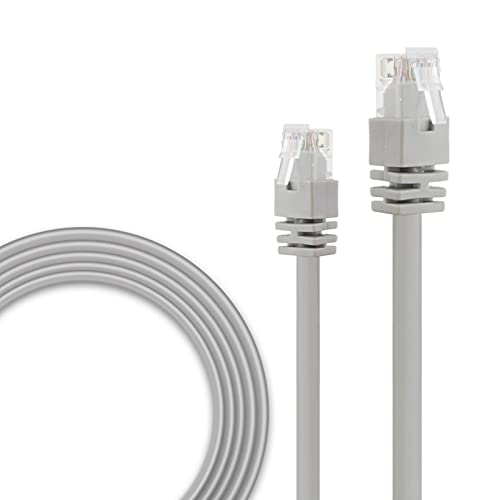
- Carries camera power and signal over one line
- RJ45 connectors wired to T-568B standard
- Suitable for indoor and outdoor routing
- Built with wear and bend resistant casing
Cons
- Older Cat-5 standard rather than Cat-6
- Fixed 60-foot length limits placement flexibility

Pros
- 2K+ resolution with Color Night Vision
- Smart AI detects faces, people, and vehicles
- Red and blue deterrence lights
- IP67 weatherproof outdoor housing
Cons
- Requires a compatible U-Series NVR
- Cables are not included
Understanding Network Protocols and Hardware Matching
Connecting wired cameras requires attention to software handshakes between components. Understanding what is an NVR and how it functions helps prevent purchasing standalone cameras that cannot communicate with your base station. Many third-party units rely on the ONVIF protocol, yet proprietary ecosystems often block advanced motion alerts across competing brands.
Network standards also determine how juice reaches the hardware. Standard network gear follows specifications developed by the IEEE to regulate wattage delivery over twisted-pair copper wire. Using uncertified switches or mismatched power injectors can starve high-draw pan-tilt units or cause continuous night reboot loops.
Check Compatibility First: Not all network recorders accept third-party IP cameras. Proprietary ecosystems frequently disable motion tags, two-way audio, or continuous recording if the camera lacks direct brand integration.
Lens Types and Field of View Selection
Fixed lenses provide a set vantage point, usually between 2.8mm for wide entryways and 4mm for focused yard views. Fixed 180-degree panoramic lenses stretch across wide property lines, but they compress pixel density at extreme edges. Choosing the wrong optical profile leaves dead spots right along walkways.
Varifocal optics let you tune the focal length after mounting, making them ideal for long driveways where optical zoom captures license plates clearly. Optical adjustments preserve full resolution, unlike digital zoom which simply magnifies image noise. Dome housings also disguise the viewing direction, which adds subtle deterrence compared to obvious bullet casings.
| Lens Style | Typical Angle | Ideal Placement |
|---|---|---|
| Wide Fixed | 100 to 180 deg | Porches and yards |
| Varifocal | 30 to 90 deg | Gates and alleys |
| Turret Dome | 85 to 110 deg | Soffits and entries |
Night Vision Modes and Deterrence Features
Infrared LEDs deliver discrete monitoring in total darkness without drawing neighborhood attention. However, standard black-and-white footage can blur facial contours and clothing hues during critical incidents. Newer units incorporate motion-activated spotlights that switch the sensor into vivid full-color capture during suspicious events.
Expert Examined
From Marcus Bell

I keep seeing homeowners mount spotlight dome units right beneath reflective aluminum gutters. The infrared bounce blinds the sensor at night, creating washed-out footage exactly where you need clear perimeter identification.
Read more about Marcus BellActive deterrence systems introduce visible flashing beacons and built-in sirens to disrupt trespassers instantly. Deciphering what the lights on a security camera mean helps you separate active deterrence strobes from normal network activity indicators. High-output deterrence features also assist in maintaining court admissibility of video evidence by ensuring crisp, illuminated nighttime event logs.
Cable Routing Tip: Always seal exterior cable penetrations with drip loops and waterproof grommets. Water running down an ethernet jacket can wick directly into the camera RJ45 coupler, causing silent electrical shorts.
Modern edge processing now incorporates smart filters to reduce false alerts from swaying branches or wandering wildlife. Advanced units can even identify specific visitors, matching methods seen in security cameras with facial recognition to keep alerts relevant and timely.
Selecting the Right Camera Setup
For complete whole-home coverage out of the box, I would point you to the REOLINK 16CH 12MP PoE Security Camera System. It combines an expansive 4TB recorder with eight 12MP spotlight cameras, offering two-way audio and local smart filtering without requiring complex third-party software configuration.
If you manage an existing recorder using Blue Iris or a commercial NVR, I would put the Real HD 8MP 4K PoE IP Security Turret Camera under your eaves. Its metal IP66 enclosure, 105-degree field of view, and NDAA compliance make it an exceptional value for high-traffic entryways.
Properties with long approaches benefit from the GW Security 5MP 2.8-12mm Varifocal Zoom Outdoor. The manual 4X optical zoom allows precise framing of gates up to 120 feet away while retaining crisp resolution.
The Bottom Line
The single biggest mistake buyers make is treating all ethernet hardware as universally interchangeable. Buying standalone cameras without confirming software protocol compatibility with your recorder leads to broken features, lost alerts, and frustrating installation delays.
Before buying hardware, map out your mounting locations and pull high-quality solid copper Cat5e or Cat6 wiring to each exterior point. Once the physical network infrastructure is securely in place, matching the right camera form factors to your property becomes straightforward.
FAQs
Can I run PoE security cameras without an NVR?
Yes, you can run individual cameras directly into a PoE switch or standalone power injector connected to your home router. You can view live video through manufacturer computer programs, smartphone apps, or third-party platforms like Blue Iris without needing a dedicated recording hub.
How far can an Ethernet cable run to a PoE camera?
Standard network cable supports reliable power and data delivery up to 328 feet, which equals 100 meters. Exceeding this distance requires an inline PoE extender, an intermediate powered switch, or fiber optic conversion to maintain signal integrity without severe voltage drops.
Do PoE cameras need an internet connection to record?
No, wired cameras do not require active internet access to capture and record video to a local NVR or computer hard drive. Internet connectivity is only needed if you wish to check live views remotely or receive push notifications on your phone.
What does NDAA compliance mean for home surveillance?
NDAA compliance confirms that the equipment does not contain telecommunications components from specific restricted foreign manufacturers barred by federal law. For residential users, it serves as a reliable baseline for network privacy, build quality, and standardized firmware security protocols.
Sources
- Institute of Electrical and Electronics Engineers www.ieee.org
- Federal Communications Commission www.fcc.gov
- UL Solutions www.ul.com