
Shopping for the best philips smart locks means first deciding whether you want a complete handle set, a deadbolt-only design, or a retrofit that keeps your existing exterior. That choice matters most for homeowners, renters, and busy families comparing fit, access methods, and battery requirements.

Pros
- Fingerprint handle opens in 0.3 seconds
- Five entry methods, including app and key
- Built-in 2.4GHz Wi-Fi, no hub required
- Up to 100 PIN codes with access logs
Cons
- Requires eight AA alkaline batteries
- Requires specific door hole and clearance

Pros
- Five entry methods, including fingerprint and PIN
- Remote control through the Philips App
- Up to 100 user codes
- Auto-lock timer from 30 to 180 seconds
Cons
- Requires compatible 35 to 50mm door
- Remote features depend on Wi-Fi and app access

Pros
- Fingerprint, passcode, app, key, and voice entry
- Built-in Wi-Fi, no extra hub needed
- Up to 100 custom passcodes
- Auto-lock adjustable from 10 to 180 seconds
Cons
- Batteries not included
- Supports 2.4GHz Wi-Fi only

Pros
- Built-in WiFi, no hub required
- Fingerprint entry in 0.3 seconds
- One-time and recurring PIN codes
- Matching handle set included
Cons
- Requires 2.4GHz WiFi within 33 feet
- Batteries not included, alkaline only
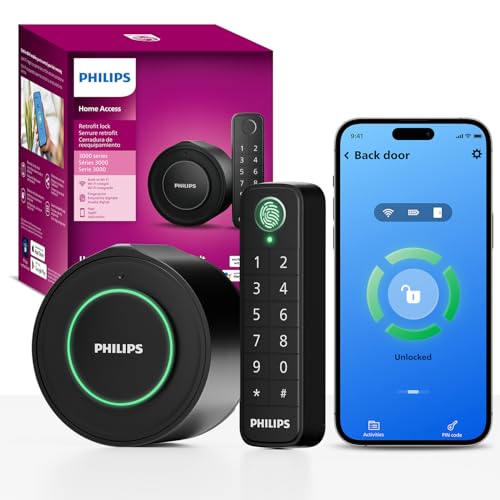
Pros
- Keeps original exterior hardware and keys
- Wireless fingerprint and passcode keypad
- Built-in WiFi, no extra hub required
- Remote app control and access history
Cons
- Requires a 2.4GHz WiFi network
- Keypad must sit within 39 inches

Pros
- 0.3-second fingerprint access
- Built-in WiFi, no hub required
- Permanent, one-time, and recurring PINs
- Matching handle set included
Cons
- Requires eight AA alkaline batteries
- WiFi supports 2.4GHz networks only
Start With the Door Hardware
A complete handle set can make sense when you are replacing both the lock and the lever. The Philips Upgraded Wi-Fi Smart Lock with Handle and Philips Wi-Fi Front Lock Set include matching handles, while the Philips Wi-Fi Smart Deadbolt Lock focuses on the deadbolt itself. Check the existing hole, backset, door thickness, and clearance before ordering.
The retrofit model takes a different route. Philips WiFi Smart Retrofit Lock replaces only the interior portion of an existing deadbolt, keeps the exterior hardware and existing keys, and places its wireless keypad within 39 inches of the door. That can suit a door whose outside appearance you want to preserve.
For broader door-planning advice, review what a strike plate does before installation. A smart lock cannot compensate for a door that does not close and align properly.
Before You Mount It: Confirm the door measurements and required batteries first. A lock that needs a different hole size, clearance, or thickness range may not fit even if the exterior style looks suitable.
Match Access Methods to Daily Use
Fingerprint entry is the quickest choice for households that want to avoid keys and repeated code entry. The Philips Upgraded Wi-Fi Smart Lock with Handle and Philips WiFi Keypad Deadbolt with Handle specify 0.3-second fingerprint access, while the other models also combine fingerprints with app, passcode, key, or voice access.
Passcodes become more useful when several people need different permissions. Depending on the model, you can create permanent, scheduled, recurring, temporary, or one-time codes, and some support up to 100 user codes. App activity records and remote access can help you manage guests, cleaners, tenants, or deliveries.
| Design | Main distinction | Suitable placement |
|---|---|---|
| Handle set | Replaces lock and lever | Front or entry doors |
| Deadbolt only | Keeps existing lever | Doors with sound handles |
| Retrofit | Keeps exterior hardware | Appearance-sensitive doors |
Voice control is available through Alexa or Google Assistant on these products, but it depends on a stable network and your own assistant account. For broader access concerns, read about how smart locks can be hacked before enabling remote features.
Plan Wi-Fi, Batteries, and Auto-Lock
Every model in this comparison uses 2.4GHz Wi-Fi for direct connectivity, so no separate hub is required. The Philips Wi-Fi Smart Deadbolt Lock recommends keeping the router and lock within 65 feet, while the Philips WiFi Keypad Deadbolt with Handle specifies keeping the lock within 33 feet of the router.
Battery planning differs considerably. Several handle and deadbolt models require AA alkaline batteries that are not included. The retrofit model includes two CR123 batteries and states up to four months of typical use, while the WiFi Keypad Deadbolt with Handle states up to six months and provides a low-battery alert.
Pro Tip: Set the auto-lock delay around your routine rather than choosing the shortest setting automatically. Confirm that everyone can leave and enter safely before relying on automatic locking.
Auto-lock ranges vary by model, from settings beginning at zero, five, or ten seconds to longer intervals up to 180 seconds. The Philips Wi-Fi Front Lock Set starts at 30 seconds. The retrofit and deadbolt models also offer app alerts or activity history, which can help you notice missed entries or a low battery.
Expert Examined
From Marcus Bell

If you want a refresher on safe key storage, see where to hide a spare key. A backup plan matters because every electronic lock still depends on power and compatible hardware.
Which Philips Lock Fits Your Door
I would point families and small property owners toward the Philips Upgraded Wi-Fi Smart Lock with Handle when they need many access options in one unit. It stores up to 50 fingerprints, supports up to 100 passwords, connects directly to 2.4GHz Wi-Fi, and offers permanent, scheduled, and one-time codes. Its handle fingerprint reader opens as you turn the handle, which suits frequent household entry.
I would choose the Philips WiFi Smart Retrofit Lock for a door where keeping the outside hardware and existing keys matters. The wireless keypad can be positioned near the door, and the interior knob remains a straightforward manual option. For a full front-door refresh, I would consider the Philips Wi-Fi Front Lock Set, which pairs the keypad deadbolt with two handles and offers five entry methods.
The Bottom Line
The mistake most buyers make is treating these as interchangeable because they share Wi-Fi, fingerprint, keypad, and app features. Their hardware requirements differ, and the retrofit model changes the interior only while the handle sets replace more of the door hardware.
If you do one thing first, measure your door and identify whether you are keeping the existing handles and exterior lock. Then confirm the required battery type, Wi-Fi band, and clearance before choosing the access features you will actually use.
FAQs
A handle set is suited to a project that replaces the deadbolt and lever together. A deadbolt-only model is better when your existing handle works well and you want to change less hardware. Check door thickness, deadbolt backset, hole diameter, and clearance between the deadbolt and handle area. The Philips Upgraded Wi-Fi Smart Lock with Handle requires a 2-1/8-inch hole and at least 4.53 inches of clearance, while other models list different thickness ranges. Several models use AA alkaline batteries, and batteries are not included with some products. The retrofit model uses two included CR123 batteries, so confirm the exact product requirements and keep the app’s low-battery alerts enabled. The listed models connect directly to a 2.4GHz Wi-Fi network and do not require an extra hub. Network distance and obstacles can affect remote control, so follow the product’s stated placement guidance. The supplied product information does not identify a specific certification for these models. Check the packaging and current manufacturer documentation for any applicable listing or certification rather than assuming that Wi-Fi or fingerprint features indicate one; UL Solutions explains how safety marks are evaluated.Should I choose a handle set or a deadbolt-only lock?
What door measurements should I check before buying?
What batteries do Philips smart locks use?
Do these locks work without a Wi-Fi hub?
What certification should I look for on a smart lock?
Sources
- UL Solutions safety standards and certification information. www.ul.com
- National Fire Protection Association home safety resources. www.nfpa.org