
Shopping for the best philips smart door locks is mainly a choice between replacing your exterior hardware and keeping your current deadbolt. That distinction matters most to homeowners, renters, and families who need remote access without discovering a fit problem at installation.

Pros
- Fingerprint handle opens in 0.3 seconds
- Five entry methods, including app and key
- Built-in 2.4GHz Wi-Fi, no hub required
- Up to 100 PIN codes with access logs
Cons
- Requires eight AA alkaline batteries
- Requires specific door hole and clearance

Pros
- Five entry methods, including fingerprint and PIN
- Remote control through the Philips App
- Up to 100 user codes
- Auto-lock timer from 30 to 180 seconds
Cons
- Requires compatible 35 to 50mm door
- Remote features depend on Wi-Fi and app access

Pros
- Fingerprint, passcode, app, key, and voice entry
- Built-in Wi-Fi, no extra hub needed
- Up to 100 custom passcodes
- Auto-lock adjustable from 10 to 180 seconds
Cons
- Batteries not included
- Supports 2.4GHz Wi-Fi only

Pros
- Built-in WiFi, no hub required
- Fingerprint entry in 0.3 seconds
- One-time and recurring PIN codes
- Matching handle set included
Cons
- Requires 2.4GHz WiFi within 33 feet
- Batteries not included, alkaline only
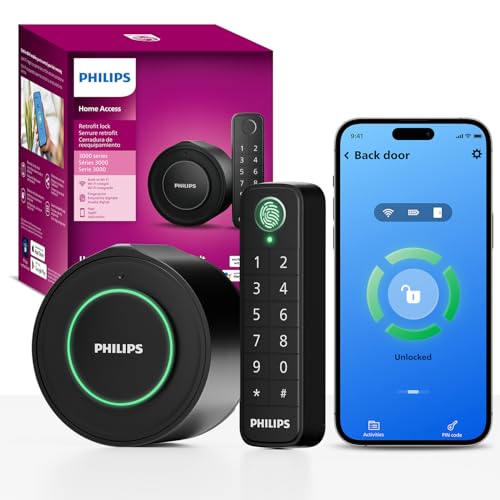
Pros
- Keeps original exterior hardware and keys
- Wireless fingerprint and passcode keypad
- Built-in WiFi, no extra hub required
- Remote app control and access history
Cons
- Requires a 2.4GHz WiFi network
- Keypad must sit within 39 inches

Pros
- 0.3-second fingerprint access
- Built-in WiFi, no hub required
- Permanent, one-time, and recurring PINs
- Matching handle set included
Cons
- Requires eight AA alkaline batteries
- WiFi supports 2.4GHz networks only
Start With the Door Hardware
Handle-set models provide a coordinated exterior upgrade, while deadbolt-only designs focus on the locking portion of the door. The Philips Wi-Fi Front Lock Set includes two handles, and the Philips Upgraded Wi-Fi Smart Lock with Handle combines a handle with fingerprint access on the handle itself.
If you want to preserve the outside appearance and continue using existing keys, the Philips WiFi Smart Retrofit Lock takes a different approach. It replaces only the interior portion of an existing deadbolt and uses a separate wireless keypad placed within 39 inches of the door.
Measure the door before choosing a model. The handle set is listed for doors 35 to 50 mm thick, while the Philips WiFi Keypad Door Lock with Handle fits 1-3/8 to 1-3/4 inch doors. The upgraded handle model also requires a 2-1/8 inch hole and specific deadbolt-to-handle clearance.
Before You Mount It: Confirm the hole size, door thickness, backset, and clearance listed for the exact model. A smart lock cannot correct a mismatched bore or a latch that does not line up with the strike plate.
Match Access Features to Daily Use
All six choices support several entry methods, but their strongest use cases differ. Fingerprint access suits busy households, app control helps with remote entry, and scheduled or one-time codes are useful for guests, cleaners, tenants, and service visits.
The Philips Upgraded Wi-Fi Smart Lock with Handle stores up to 50 fingerprints and 100 passwords, with auto-lock settings from 5 to 180 seconds. The Philips Wi-Fi Smart Deadbolt Lock also supports up to 100 custom passcodes, activity alerts, voice control, and an Away Mode that limits entry methods while you are gone.
For a property with frequent visitors, flexible code management may matter more than the handle design. For a household that wants quick entry without reaching for a phone, fingerprint access and a handle-integrated reader may feel more natural.
| Device type | Key distinction | Best fit |
|---|---|---|
| Handle set | Replaces exterior hardware | Front-door upgrade |
| Deadbolt only | Focuses on deadbolt | Existing handle |
| Retrofit lock | Keeps exterior hardware | Preserve door appearance |
Plan for Wi-Fi and Battery Care
Every product in this group uses built-in Wi-Fi, so no separate hub is required. The listed models use 2.4GHz Wi-Fi, but their stated distance guidance differs: the retrofit keypad sits within 39 inches of the door, while the Philips WiFi Keypad Deadbolt with Handle should remain within 33 feet of the router.
Battery details are not interchangeable. Several models require AA alkaline batteries that are not included, while the retrofit model uses two included CR123 batteries and lists up to four months of typical battery life. The keypad deadbolt with handle lists up to six months and requires standard 1.5V alkaline batteries.
Expert Examined
From Marcus Bell

I keep spare batteries with the household keys because a low-battery alert is easy to overlook during a busy week. The mistake I see most often is installing the lock first and checking wireless reach later, so I would confirm the router location before drilling or replacing hardware.
Read more about Marcus BellUse the Philips Home Access app to monitor status, manage codes, and review activity where supported by the model. For broader door-security context, read about how smart locks can be hacked, and consult UL Solutions for general information about safety standards and product markings.
Which Philips Lock Fits Your Home
I would point renters or owners preserving a distinctive exterior toward Philips WiFi Smart Retrofit Lock. It keeps the original outside hardware and existing keys, while adding app control, a wireless fingerprint keypad, passcodes, voice control, and adjustable auto-locking. That makes it the most suitable choice when changing the visible door hardware is undesirable.
I would put the Philips Upgraded Wi-Fi Smart Lock with Handle on a busy family entry door where fast physical access matters. Its fingerprint reader is built into the handle, it stores up to 50 fingerprints and 100 passwords, and it offers passage and privacy modes in addition to remote app control.
For a simpler front-door replacement centered on the deadbolt, I would consider the Philips Wi-Fi Smart Deadbolt Lock. It combines fingerprint, code, app, key, and voice entry with Away Mode, real-time activity alerts, and a 10 to 180 second auto-lock range. Confirm that your router and door layout meet its stated requirements first.
The Bottom Line
The biggest mistake buyers make is treating every Philips smart lock as a drop-in replacement. Handle sets, deadbolt-only models, and retrofit designs change different parts of the door, so a lock can have the right features and still be wrong for the opening.
If you do only one thing first, measure the door and identify whether you want to retain the existing exterior deadbolt. Then compare the required hole, thickness, backset, clearance, Wi-Fi range, and battery format against the specific model you are considering.
FAQs
Choose a handle set when you want matching exterior hardware or need to replace the handle and deadbolt together. Choose a deadbolt-only model when your current handle works and you want to change only the locking portion. The retrofit model specifies placement within 39 inches of the door. Mount any keypad where household members can reach it comfortably, while following the model’s installation instructions and keeping it protected from obvious weather exposure. Battery requirements vary by model. Several use AA alkaline batteries, while the retrofit model uses two CR123 batteries, so check the exact product instructions and pay attention to low-battery notifications. A certification mark can indicate that a product was evaluated against a particular safety standard, but the meaning depends on the organization and standard named. Do not assume that one mark covers security performance, installation compatibility, or every part of a lock system.Should I choose a handle set or a deadbolt-only smart lock?
Where should the wireless keypad go?
What batteries do Philips smart locks use?
What does a safety certification on a smart lock mean?
Sources
- UL Solutions www.ul.com
- US Consumer Product Safety Commission www.cpsc.gov