
Shopping for the best peephole cameras for front doors means deciding whether you need a private indoor viewer or a connected camera that sends alerts and supports conversations. The right choice depends on your door fit, visibility needs, and tolerance for batteries, Wi-Fi, and extra features.

Pros
- 120-degree wide-angle lens
- 2.4-inch display, 240x320 resolution
- AAA battery or 5V USB power
- Zinc alloy construction
Cons
- AAA batteries not included
- 0.3MP camera has modest resolution

Pros
- 120-degree wide-angle visitor view
- 3.5-inch LCD display
- 1MP image resolution
- DIY installation with included instructions
Cons
- No app or remote access listed
- Small 3.5-inch viewing screen

Pros
- 3.5-inch HD color LCD screen
- 120-degree wide viewing angle
- Zinc alloy outdoor camera housing
- Wire-free installation with included bracket
Cons
- No night vision or motion detection
- Four AAA batteries not included
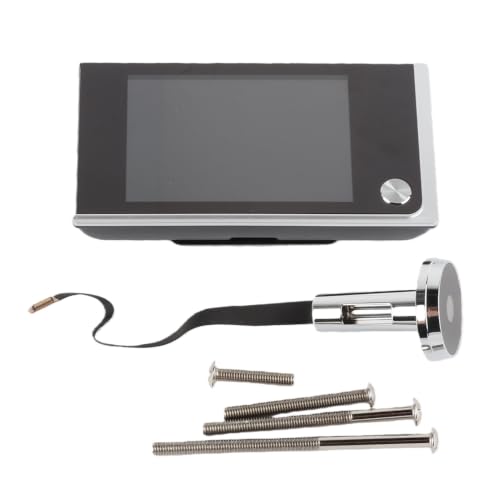
Pros
- 3.5-inch high-definition color LCD
- 120-degree actual viewing angle
- Fits 40 to 100mm door thicknesses
- Installs in about three minutes
Cons
- Requires four AAA batteries
- Limited to 14 to 28mm openings

Pros
- 5-inch IPS display for clear visitor viewing
- 120-degree wide-angle lens
- PIR motion alerts up to 2 meters
- 10,000mAh battery rated up to 180 days
Cons
- Remote features require 2.4GHz WiFi
- Motion detection range limited to 2 meters

Pros
- 1080P camera with 120-degree viewing angle
- PIR motion detection with push alerts
- Two-way intercom with noise reduction
- 4.3-inch TFT color LCD display
Cons
- WiFi router required for smartphone monitoring
- Door-mounted hardware measures 7.48 inches long
Start With the Door and the View
A peephole camera must match the opening already in your door. Several simple viewers in this group fit a 14 to 28 mm hole and doors from 40 to 100 mm thick, while the Dioche model supports a 14 to 30 mm hole and 35 to 120 mm thickness. Measure before ordering, especially if you live in an apartment with a nonstandard entry door.
The viewing angle is 120 degrees across these choices, but the screen size and image resolution still affect visitor identification. A 3.5-inch display is easier to read than a small screen, while the Dioche and Qinlorgo models add larger displays and 1080P video. A wider view helps with packages placed beside the doorway, but it does not replace careful mounting.
For broader doorbell-camera context, see our advice on video doorbell features. Peephole models keep the display indoors and avoid many visible exterior components, but their camera position is fixed by the existing hole.
Pro Tip: Measure the door thickness and peephole diameter at home, then compare both figures with the product limits before removing the old viewer.
Choose Between a Viewer and a Connected Camera
Battery-powered viewers such as the Yulatik and Sonew focus on seeing who is outside from an indoor LCD. They do not require Wi-Fi, and their low-power alerts can help you remember battery changes. The Yulatik listing specifically states that it has no doorbell button, motion detection, or night vision, so it suits visual identification rather than active alerting.
Connected models change the role of the device. Dioche adds 2.4GHz Wi-Fi, phone access, two-way intercom, PIR motion detection, infrared night viewing, and storage support. Qinlorgo also provides Wi-Fi, 1080P video, motion notifications, recording, and two-way intercom, but its listing does not specify a long-life battery or storage capacity.
| Device type | Key difference | Best placement |
|---|---|---|
| Basic viewer | Indoor LCD, no alerts | Apartments, simple entry |
| Smart camera | Wi-Fi, PIR, intercom | Connected households |
If alerts matter, check the wireless signal at the door and consider what happens when the router is unavailable. For broader connectivity troubleshooting, our article on why doorbell cameras disconnect covers the same practical concern.
Before You Mount It: Do not assume every peephole camera provides night vision or motion recording. Confirm those functions in the listing, and keep the ribbon cable gently seated during installation so the indoor display does not lose its camera connection.
Power, Privacy, and Daily Upkeep
The Fockety viewer offers two power methods: three AAA batteries or 5V 1A USB charging, although batteries are not included. Yulatik and Sonew use four AAA batteries, while the Dioche uses a rechargeable 10,000mAh battery and claims up to 180 days per charge. Qinlorgo is wireless, but the supplied details do not state its battery capacity.
Smart features also create more privacy decisions. Dioche supports local and cloud storage, encrypted data transmission, and microSD cards from 16GB to 256GB. Qinlorgo can record video and audio, so decide whether you want recordings enabled and whether household members understand when the camera is active.
Placement should preserve a clear view without pointing unnecessarily into a shared hallway. If you rent, confirm that replacing the existing peephole is allowed. The package lock box placement guide can also help if deliveries, rather than visitor identification, are your main concern.
Expert Examined
From Marcus Bell

I keep seeing the same installation mistake: buyers choose a feature-rich camera without checking the door thickness, then discover the camera cannot sit securely. I would measure the door first and confirm the camera cable has a gentle path before tightening the bracket.
Read more about Marcus BellWhich Camera Fits Your Entry
I would point apartment residents who want a large, straightforward indoor image to for hd Peephole Camera 1MP Resolution for Front. Its 3.5-inch LCD, 1-megapixel resolution, 120-degree lens, ABS construction, and DIY installation make it a sensible fit when you mainly want to identify visitors without adding phone connectivity.
I would choose 3.5″ Digital Door Viewer Peephole Camera for a household that values a large screen and simple battery operation. Its 3.5-inch color display, zinc alloy exterior, low-power alert, and stated fit for 14 to 28 mm holes and 40 to 100 mm doors are useful, but remember that it has no motion detection or night vision.
For remote access, motion alerts, and conversations, I would point you to Dioche Smart Peephole Camera 3MP. Its 5-inch IPS display, 2.4GHz Wi-Fi, PIR detection, infrared night viewing, two-way intercom, and rechargeable battery make it the most capable choice for a connected household. I would reserve Qinlorgo for buyers who specifically want Wi-Fi, 1080P video, intercom, and a 4.3-inch display.
The Bottom Line
The biggest mistake is treating every peephole camera as a smart doorbell. Some are visual viewers with an LCD and batteries, while others add PIR alerts, night viewing, recording, Wi-Fi, and two-way communication.
If you only do one thing first, measure the peephole opening and door thickness. Then decide whether you need an indoor screen only or a connected camera that can notify your phone.
FAQs
Some do, but not all. Dioche and Qinlorgo list PIR motion detection, while the Yulatik listing specifically says it does not include motion detection. Check the individual feature list before assuming a camera will send alerts or record movement. Measure the existing peephole diameter and the full door thickness. Many basic models listed here fit 14 to 28 mm openings and 40 to 100 mm doors, but supported ranges vary, so compare your measurements with the exact product limits. Power options include AAA batteries, USB power, and rechargeable batteries. Fockety supports AAA batteries or 5V 1A USB charging, while Dioche uses a rechargeable 10,000mAh battery. Check whether batteries are included and pay attention to low-power alerts. A certification mark should identify a recognized safety evaluation, not simply a marketing claim. Check the product documentation and the certifier’s records rather than assuming that a camera is certified because its packaging uses security language. UL Solutions explains its safety certification role at its official website.Do peephole cameras have motion detection?
What door measurements should I take?
How are peephole cameras powered?
What does a security certification mean?
Sources
- UL Solutions www.ul.com
- US Consumer Product Safety Commission www.cpsc.gov