
Shopping for the best mortise smart locks starts with the lock pocket, not the keypad, because a mismatched body may not fit your door. The main split is between sliding-door hardware and swing-door mortises, so renters, homeowners, and property managers should measure before choosing access features.

Pros
- Five entry methods for family or rental access
- Stores up to 300 users
- Reversible handle for left or right opening
- IP65 weatherproof housing with emergency power backup
Cons
- Not a universal fit without mortise measurements
- Battery operation requires monitoring low-power alerts

Pros
- Five access methods for flexible entry
- Supports 100 fingerprints and 250 user profiles
- Tuya Wi-Fi control, no hub required
- Temporary passwords, logs, and notifications
Cons
- Requires drilling for installation
- Not compatible with Alexa or Google
- Fits only 25 to 50mm thick doors
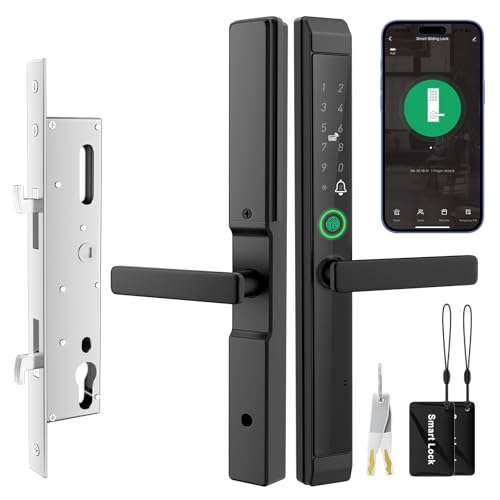
Pros
- Fingerprint, IC card, PIN, app, and key access
- Fits 1-3/16 to 2-3/16-inch doors
- Peek-proof PIN code with temporary access codes
- IP65 dust and water resistance
Cons
- Requires a 2.4 GHz Wi-Fi network
- Four AA batteries are not included

Pros
- Stores up to 50 fingerprints
- Stores up to 100 passcodes
- Random-digit anti-peeping keypad protection
- Auto-lock adjustable from 2 to 9 seconds
Cons
- Requires compatible mortise dimensions
- Battery backup needs Type-C emergency power

Pros
- Seven entry methods
- Fingerprint and Bluetooth app access
- Time-limited guest passcodes
- Access records in the app
Cons
- 3585 mortise compatibility must be verified
- WiFi gateway sold separately for Alexa

Pros
- 3D face, palm vein, and fingerprint entry
- Eight access options for family and guests
- 4-inch indoor screen with night vision
- IP67 dust and water protection
Cons
- Larger mortise, drilling may be needed
- Remote features depend on Tuya or Smart Life app
Start With the Existing Mortise
A mortise smart lock is not automatically interchangeable with every mortise opening. Door thickness, pocket depth, backset, hole positions, and handle movement can all affect fit. Eseesmart supports 2085 and 2885 sliding-door pockets, while Luston includes a 3585 mortise and asks buyers to confirm compatibility with multipoint hardware.
Sliding doors need a different check from front doors. Eseesmart fits sliding-door thicknesses from 7/8 to 4-3/4 inches, while JNZCH is specified for doors from 1-3/16 to 2-3/16 inches. Compare the door edge and the supplied dimensions before ordering, especially if the existing panel is aluminum, vinyl, glass, or wood.
Before You Mount It: Never drill until the lock body, spindle, and handle direction match the door. A lock that powers on can still fail to engage the latch if the mortise depth or opening geometry is wrong.
Match Access Features to the Household
Fingerprint entry suits people who want a fast daily method, while PINs, cards, physical keys, and phone access help when several people need entry. EIYSIE supports up to 100 fingerprints and 250 user profiles, and Eseesmart stores up to 300 users, making both more suitable for busy households or managed properties.
Remote administration is useful when a guest, tenant, contractor, or delivery visitor needs temporary access. EIYSIE uses the Tuya app over Wi-Fi without a hub, JNZCH offers temporary codes and entry records through Tuya, and Luston provides Bluetooth app access with optional Wi-Fi gateway support for Alexa voice control.
For a broader explanation of remote access hardware, see what a smart lock bridge does. Also remember that JNZCH requires a 2.4 GHz Wi-Fi network during setup, while EIYSIE is not compatible with Alexa or Google.
| Lock style | Key specification | Best placement |
|---|---|---|
| Sliding mortise | Pocket and thickness | Patio doors |
| Standard mortise | Body and hole spacing | Front or bedroom doors |
| Biometric video | Larger mortise opening | Monitored entrance |
Power, Weather, and Backup Entry
Battery planning matters because a smart lock is still the doorway’s primary access point. Eseesmart claims up to eight months of battery operation, JNZCH up to six months with four AA batteries, and both include low-battery alerts plus emergency power-bank support. OULEDO adds a Type-C emergency port and a mechanical key.
Outdoor exposure also varies by placement. Eseesmart and JNZCH specify IP65 protection, with operating ranges reaching as low as -13°F. YINTIN specifies IP67 protection, rechargeable power, USB-C emergency input, and a mechanical key, but its larger mortise design may require drilling or mortising.
Pro Tip: Photograph the door edge, existing mortise, and handle before ordering. Keep the mechanical key or emergency power option accessible outside the locked room, but do not leave either in an obvious location.
Expert Examined
From Marcus Bell

I keep seeing buyers focus on fingerprints while overlooking the door opening itself. The practical fix is to compare the lock body and spindle dimensions first, then decide which entry methods the household will actually use.
Read more about Marcus BellFor additional access planning, compare a smart lock with a key lock box using this key lock box and smart lock safety comparison. A backup method is valuable, but it should not replace checking the physical fit.
Which Lock Fits Your Door
I would point patio-door owners toward Eseesmart Sliding Door Smart Lock when their measurements match the 2085 or 2885 pocket options. Its reversible handle, template-guided installation, five entry methods, 300-user capacity, IP65 housing, and emergency power-bank support make it a practical choice for families, rentals, and multi-unit access.
I would consider EIYSIE WiFi Smart Door Lock with Handle for a conventional 25 to 50 mm door where remote Tuya control matters. It supports temporary passwords, access logs, notifications, and a privacy mode, though buyers should remember its stated limits with Alexa and Google.
For a feature-heavy entrance, I would choose YINTIN 3D Face Recognition Smart Lock with Camera. Its face, palm-vein, and fingerprint options combine with a video doorbell, indoor screen, night vision, two-way talk, and remote access, but the larger mortise requires especially careful dimension checks.
The Bottom Line
The mistake most mortise-lock buyers make is treating the keypad and app as the deciding factors. The lock body, pocket, door thickness, spindle, and handle movement determine whether the installation can work at all.
If you do one thing first, measure the existing mortise and door thickness, then compare those measurements with the product’s fit requirements. Only after that should you weigh fingerprints, remote codes, cameras, weather protection, battery format, and household user capacity.
FAQs
Choose a sliding-door model when the lock replaces patio-door hardware and its pocket dimensions match. Standard mortise models are intended for front, rear, side, bedroom, or similar swing-door locations, subject to the stated door measurements. Compare door thickness, mortise pocket depth, backset, hole positions, spindle length, and handle direction with the product dimensions. A photograph of the door edge can also help confirm whether the existing opening resembles the required lock body. Look for low-battery alerts and a backup method such as a mechanical key, USB-C power, or a power bank. Keep the emergency option available without placing it in an obvious location near the door. IP ratings describe resistance to dust and water, not the complete security performance of a mortise lock. Treat the rating as an environmental specification and separately verify physical fit, backup entry, and the manufacturer’s stated construction details.Should I choose a sliding-door or standard mortise smart lock?
How do I measure for a mortise smart lock?
What happens if the batteries run down?
Does IP65 or IP67 certify security strength?
Sources
- UL Solutions and product safety information. www.ul.com
- U.S. Consumer Product Safety Commission and home safety information. www.cpsc.gov