
Shopping for the best mortise smart door locks starts with the lock pocket, not the app: a front-door mortise and a sliding-patio mortise are not interchangeable. You need a model that matches your door thickness, opening direction, and access routine.

Pros
- Five entry methods for family or rental access
- Stores up to 300 users
- Reversible handle for left or right opening
- IP65 weatherproof housing with emergency power backup
Cons
- Not a universal fit without mortise measurements
- Battery operation requires monitoring low-power alerts

Pros
- Five access methods for flexible entry
- Supports 100 fingerprints and 250 user profiles
- Tuya Wi-Fi control, no hub required
- Temporary passwords, logs, and notifications
Cons
- Requires drilling for installation
- Not compatible with Alexa or Google
- Fits only 25 to 50mm thick doors
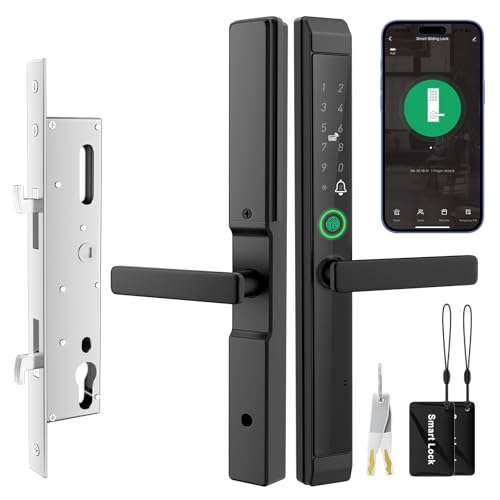
Pros
- Fingerprint, IC card, PIN, app, and key access
- Fits 1-3/16 to 2-3/16-inch doors
- Peek-proof PIN code with temporary access codes
- IP65 dust and water resistance
Cons
- Requires a 2.4 GHz Wi-Fi network
- Four AA batteries are not included

Pros
- Stores up to 50 fingerprints
- Stores up to 100 passcodes
- Random-digit anti-peeping keypad protection
- Auto-lock adjustable from 2 to 9 seconds
Cons
- Requires compatible mortise dimensions
- Battery backup needs Type-C emergency power

Pros
- Seven entry methods
- Fingerprint and Bluetooth app access
- Time-limited guest passcodes
- Access records in the app
Cons
- 3585 mortise compatibility must be verified
- WiFi gateway sold separately for Alexa

Pros
- 3D face, palm vein, and fingerprint entry
- Eight access options for family and guests
- 4-inch indoor screen with night vision
- IP67 dust and water protection
Cons
- Larger mortise, drilling may be needed
- Remote features depend on Tuya or Smart Life app
Measure the mortise before choosing features
The mortise is the recessed lock body inside the door, so its dimensions decide whether a replacement can sit correctly. Compare the existing pocket, backset, hole positions, door thickness, and handle movement with the manufacturer’s size information before ordering.
Sliding patio doors need special attention. The Eseesmart Sliding Door Smart Lock supports 2085 and 2885 pockets, while the JNZCH model fits doors from 1-3/16 to 2-3/16 inches thick. Those ranges are not interchangeable, and a deep pocket may require a wider frame.
Before You Mount It: A smart lock that does not fully retract the existing latch or multipoint mechanism can leave the door insecure or difficult to open. Confirm the lock-body dimensions and handle travel before drilling.
For a door with multipoint hardware, Luston specifies a 3585 mortise and notes that its handle turns only 45 degrees. If your current handle needs more movement to retract every locking point, ask the manufacturer to confirm compatibility first. The strike plate explanation can also help you understand how the latch meets the frame.
Match access methods to the household
Fingerprint entry is convenient for daily users, while PINs and cards are useful for guests, children, cleaners, and tenants. App access adds remote control and temporary credentials, but it also makes account security and phone access part of your routine.
EIYSIE offers Wi-Fi control through Tuya without a hub, with user profiles, temporary passwords, logs, and notifications. JNZCH requires a 2.4 GHz Wi-Fi network for setup. Luston adds Bluetooth, key fobs, Apple Watch, NFC on Android, and Alexa voice unlocking when its separate Wi-Fi gateway is used.
| Lock type | Access focus | Best placement |
|---|---|---|
| Sliding mortise | Fingerprint and cards | Patio doors |
| Standard mortise | PIN and app access | Front or bedroom doors |
| Feature-rich mortise | Face and palm biometrics | Main entrance |
If you are concerned about digital access, read how smart locks can be hacked before enabling remote features. Use unique account credentials and remove temporary users when access is no longer needed.
Plan for batteries, weather, and backup entry
Battery details vary widely. Eseesmart lists up to eight months of operation, JNZCH lists up to six months with four AA batteries, and both provide low-battery alerts and emergency power options. OULEDO uses a Type-C emergency port and includes a mechanical key for backup entry.
Outdoor exposure also separates these products. Eseesmart and JNZCH carry IP65 ratings, while YINTIN carries IP67 protection and a rechargeable power system. Weather ratings do not remove the need to keep battery contacts, wiring, and the door edge protected from damage.
Pro Tip: Measure the door while it is closed, then photograph the door edge, existing lock body, and handle position. Keep a physical backup key or charged emergency power bank available before relying on remote access.
Expert Examined
From Marcus Bell

I keep seeing smart-lock problems begin with a rushed measurement rather than a software issue. The better approach is to record door thickness and mortise dimensions first, then choose access features that fit the household.
Read more about Marcus BellFor more context on battery failures and backup access, see how to reset a smart lock. A reset may remove stored users, so treat it as a recovery step rather than ordinary maintenance.
Which lock fits your entry?
I would point patio-door owners toward the ESEESMART Sliding Door Smart Lock when their measurements match the 2085 or 2885 pocket. Its reversible handle, five entry methods, temporary codes, IP65 housing, and emergency power support make it a practical choice for busy homes or rental units.
For a conventional front, rear, side, garage, living-room, or bedroom door between 25 and 50 mm thick, I would consider the EIYSIE WiFi Smart Door Lock with Handle. Its Tuya remote management, logs, notifications, and support for up to 100 fingerprints suit households that need to manage several users without a hub.
I would reserve the YINTIN 3D Face Recognition Smart Lock with Camera for a main entrance where visitor visibility matters. Its face, palm-vein, fingerprint, video doorbell, indoor screen, night vision, two-way talk, and local biometric storage add functions beyond ordinary keyless entry, but its larger mortise requires careful dimension checks.
The Bottom Line
The mistake most buyers make is treating “mortise” as a universal size. Door thickness, pocket dimensions, handle travel, and sliding versus swinging operation determine fit before fingerprints, cameras, or app controls matter.
If you do only one thing first, measure the existing lock body and door edge with the door closed. Keep those measurements beside the product specifications, then confirm compatibility with the manufacturer before drilling or removing hardware.
FAQs
Are mortise smart locks suitable for sliding patio doors?
Some are, but standard front-door mortise locks are not automatically compatible with sliding doors. Look for a model specifically listing sliding or patio doors, then match its pocket depth, door thickness range, spindle, and frame requirements.
Which access method is best for a family home?
Fingerprints work well for regular household members, while PINs, cards, and temporary app codes help with guests or service providers. Keep a mechanical key or emergency power option available because every electronic lock depends on battery power.
How often do smart-lock batteries need attention?
The interval depends on the model, usage, network activity, and battery format. Enable low-battery alerts, replace or recharge batteries promptly, and keep the listed emergency power method accessible before the lock reaches a depleted state.
What does an IP65 or IP67 rating mean?
These ratings describe protection from dust and water under specified conditions, not complete immunity from every installation environment. They can help with exposed entrances, but correct mounting, sealed connections, and routine inspection still matter.
For general consumer safety information about residential security products, the U.S. Consumer Product Safety Commission provides recalls and safety notices. UL Solutions also explains how certification and product safety evaluation differ from a manufacturer’s feature claims.
Sources
- U.S. Consumer Product Safety Commission www.cpsc.gov
- UL Solutions www.ul.com