
Shopping for the best hardwired doorbell cameras makes sense when you want continuous power, but the decisive choice is whether your existing wiring, indoor chime, and subscription preferences match the camera. These picks suit homeowners replacing a wired doorbell rather than renters seeking a removable setup.

Pros
- Sharp 2K video with Head-to-Toe View
- Continuous power from hardwired connection
- Two-way audio with noise cancellation
- IP65 weather-resistant design
Cons
- Requires existing doorbell wiring
- Person detection requires separate Blink subscription
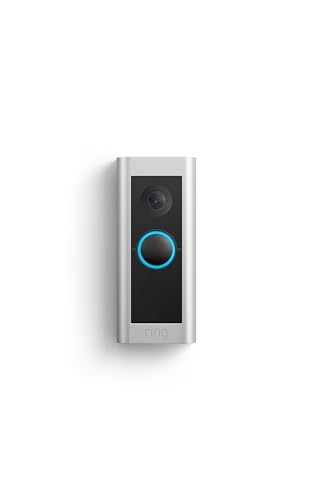
Pros
- 1536p Head-to-Toe HD+ video
- 3D Motion Detection for precise alerts
- Two-way Talk with Audio+
- Certified refurbished with same limited warranty
Cons
- Requires existing doorbell wiring
- Alexa Greetings and extra features require subscription

Pros
- Head-to-Toe 2K video
- Continuous hardwired power
- Included in-home Blink Chime
- Two-way audio with noise cancellation
Cons
- Hardwired installation requires existing wiring
- Person detection requires separate subscription

Pros
- 2K head-to-toe video
- Package and person detection
- Rechargeable or hardwired installation
- Included Chime 2 with 80+ dB siren
Cons
- Paid plan required after the trial
- Rechargeable setup needs periodic charging

Pros
- Retinal 4K video clarity
- Up to 10x Enhanced Zoom
- 3D Motion Detection alerts
- Two-Way Talk with Audio+
Cons
- Hardwired installation required
- Video Descriptions require a Ring subscription

Pros
- Dual cameras capture visitors and packages
- 2K video with color night vision
- Built-in 8GB local storage
- Wireless or wired installation
Cons
- Supports 2.4 GHz Wi-Fi only
- Rechargeable battery requires periodic charging
Start With the Wiring and Chime
A hardwired camera needs compatible doorbell wiring and a suitable installation point. Ring Wired Doorbell Pro and Ring Wired Doorbell 4K Pro are designed for hardwired installation, while Arlo Video Doorbell 2K (2nd Gen) and eufy Security Video Doorbell E340, Dual Cameras can also use a rechargeable setup when wiring is not convenient.
Do not assume a wired camera automatically rings inside the house. Blink Wired Doorbell 2K+ (newest model) requires Alexa or a Blink Chime for in-home alerts, while Blink Wired Doorbell 2K+ (all-new) includes a Blink Chime. Arlo includes an Arlo Chime 2, and eufy can connect with a compatible mechanical chime or listed smart-home accessories.
Before You Mount It: Never work on doorbell wiring while it is energized. Turn off the relevant circuit, confirm the old doorbell is no longer powered, and follow the manufacturer’s wiring instructions before connecting anything.
For a safer installation plan, review these hardwired video doorbell safety steps before removing the existing button. A doorbell chime kit may also affect compatibility, so identify what is already installed instead of assuming every indoor chime will work.
Match Coverage to the Entryway
Head-to-toe video is useful when packages land below the camera, but the viewing layout differs by model. Ring Wired Doorbell Pro provides Head-to-Toe HD+ Video, both Blink models provide Head-to-Toe 2K View, and Arlo offers a head-to-toe view in 2K. The eufy model uses dual cameras, with one aimed at visitors and another aimed downward at deliveries.
Higher resolution can help with faces and package details, but alert quality matters too. Ring models use 3D Motion Detection, Blink offers person detection with a compatible subscription, Arlo identifies packages, pets, people, and vehicles, and eufy provides AI motion and package detection without a subscription.
| Camera approach | Main distinction | Best placement |
|---|---|---|
| Single wired view | Head-to-toe coverage | Standard front door |
| Dual-camera view | Visitor and package angles | Deep porch or steps |
| Wired or battery | Flexible installation | Homes without usable wiring |
Angle and height still shape what the camera sees. If visitors appear cropped or the porch dominates the image, the mounting angle may need attention; these doorbell camera positioning tips can help you assess the view before drilling new holes.
Choose Your Storage and Alert Model
Subscription rules are one of the largest differences between these cameras. Ring lists Alexa Greetings and additional history or AI alerts as Ring Protect features, Blink lists person detection as requiring a compatible Blink subscription, and Arlo includes a trial plan with advanced detection and video history while basic alerts and live streaming remain available without one.
eufy Security Video Doorbell E340, Dual Cameras stores video in built-in 8GB local storage and does not require a subscription. That is a strong fit if recurring cloud fees are not acceptable, although the device supports only 2.4 GHz Wi-Fi and still needs a compatible power arrangement.
Pro Tip: Before buying, decide whether you want cloud history, local storage, or only live viewing and basic alerts. That choice can matter more than the resolution number on the box.
Expert Examined
From Marcus Bell

I keep an eye out for a camera that looks wired but leaves the household without an audible indoor alert. The mistake I see is choosing the doorbell first and checking chime compatibility later, so I identify the indoor alert method before finalizing the mount.
Read more about Marcus BellNight coverage also deserves attention at a shaded entry. Blink provides color in low light and black-and-white vision in near darkness, Ring Wired Doorbell 4K Pro (Newest Model) uses Low-Light Sight, Arlo includes night vision, and eufy lists color night vision with a stated viewing distance.
Which Doorbell Fits Your Home
I would point you to Blink Wired Doorbell 2K+ (newest model) if you already have usable doorbell wiring and want continuous 2K video, two-way audio, person detection, and weather resistance. Plan on adding Alexa or a Blink Chime if you need to hear alerts throughout the house.
For a home where package visibility matters most, I would choose eufy Security Video Doorbell E340, Dual Cameras. Its two-camera design separates visitor viewing from the downward package view, and its built-in local storage avoids a subscription. The 2.4 GHz Wi-Fi requirement should be confirmed first.
I would reserve Arlo Video Doorbell 2K (2nd Gen) for households that want wiring flexibility plus an included indoor Chime 2. It supports wired trickle charging or a rechargeable setup and adds package, pet, person, and vehicle notifications through its app.
The Bottom Line
The mistake most buyers make is treating hardwired power as proof that the doorbell will automatically provide indoor alerts. Chime compatibility, subscription requirements, Wi-Fi needs, and the existing wiring all deserve equal attention.
If you only do one thing first, inspect the current doorbell wiring and indoor chime. Once those are understood, choose between single-view coverage, dual-camera package coverage, and local or cloud storage.
FAQs
Hardwired models can provide continuous power when connected to compatible existing wiring. Battery-capable models offer more installation flexibility, but they require charging or a rechargeable battery arrangement. Mount it at the existing doorbell position with a clear view of faces, the approach, and packages near the threshold. Check the camera’s vertical coverage before drilling, especially if the entry has steps or a deep porch. Not always, but the camera may need a compatible chime, Alexa device, or separate accessory for audible alerts inside. Check the included accessories and supported chime types before installation. Hardwired power does not guarantee recording or alerts if the home network or electrical service is unavailable. Review the camera’s connection requirements and consider whether local storage or another backup is important for your setup. An IP rating describes resistance to dust and water under defined conditions, not immunity to every installation problem. Position the camera so water does not collect around wiring or connectors, and follow the maker’s mounting instructions.Are hardwired doorbell cameras better than battery models?
Where should a hardwired doorbell camera be mounted?
Do hardwired doorbell cameras need an indoor chime?
What happens during a power or Wi-Fi outage?
What does weather resistance mean on a doorbell camera?
Sources
- UL Solutions, product safety standards information. www.ul.com
- US Consumer Product Safety Commission, home safety information. www.cpsc.gov
- NFPA, electrical and home safety resources. www.nfpa.org