
Choosing the best 120V smart thermostats starts with the heater wiring, not the app features. The key split is whether you need WiFi control and scheduling or a simpler thermostat for one electric baseboard or convector, especially if you are replacing an existing line-voltage control.
Pros
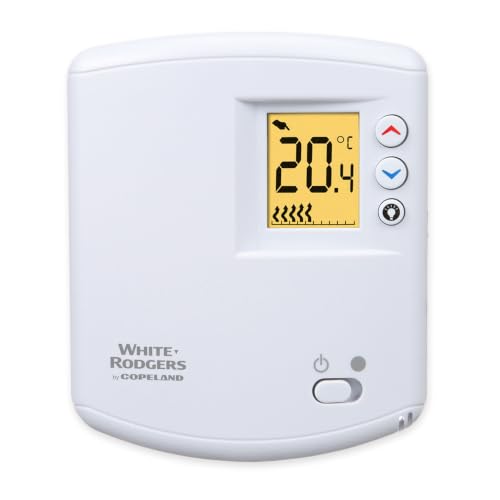
- High-accuracy digital temperature control
- Supports single-pole applications
- Supports double-pole applications
- 4000-watt maximum at 240 volts
Cons
- Nonprogrammable design lacks scheduling
- Line-voltage applications only

Pros
- Works with 120V to 240V electric heating
- Humidity sensor and touchscreen
- Scheduling and geofencing support
- Apple Home, Alexa, and Google compatible
Cons
- Requires a neutral or second live wire
- Limited to electric baseboards and fan-forced heaters

Pros
- 1°F temperature accuracy
- Works with Apple Home, Alexa, and Google Home
- 7-day programmable heating schedule
- Energy monitoring with historical reports
Cons
- Requires four or more installation wires
- Electric baseboard heater not included

Pros
- 5/2-day programming for weekday and weekend schedules
- Four program periods per day
- Temporary override for quick temperature changes
- Front battery access with low-battery indicator
Cons
- Heat-only operation
- Not compatible with resistive-element and blower systems

Pros
- Holds temperature within 1°F
- Up to 10% savings versus mechanical thermostats
- Fahrenheit or Celsius display
- Three-year manufacturer warranty
Cons
- Not compatible with fan-forced heaters
- Nonprogrammable, manual temperature setting only
Pros
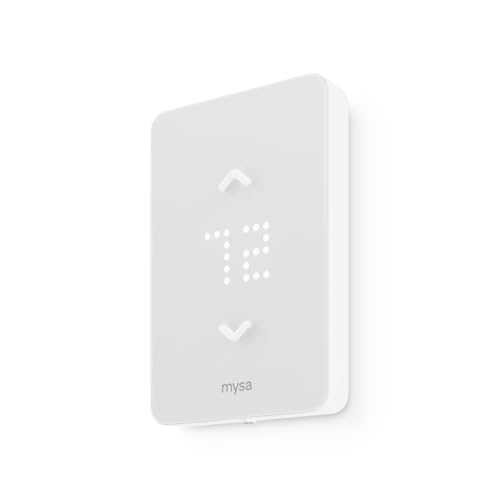
- Supports 120V and 240V electric heating
- 7-day scheduling with no subscription
- HomeKit, Alexa, and Google compatibility
- Remote control, geofencing, and vacation mode
Cons
- Requires four wires, including neutral or second live
- Not compatible with 24V furnaces or heat pumps
Match the Thermostat to the Heater
These products are made for line-voltage electric heat, but compatibility still varies. Mysa supports 120V to 240V electric baseboards and fan-forced heaters, while Stelpro is for electric baseboards and convectors and specifically excludes fan heaters. LUX also excludes appliances that combine a resistive heating element with an inductive blower.
Check the heater type and electrical rating before ordering. The meross model supports baseboards, convectors, fan-forced systems, and in-ceiling radiant heat, with a stated maximum output of 16A. The Mysa LITE supports several of those heater types, but its wiring requirements remain decisive.
Before You Mount It: High-voltage wiring can cause shock or fire if the breaker is not off or the connections are incorrect. Confirm the circuit and wire arrangement first, then hire an electrician where local code requires it or whenever the wiring is unfamiliar.
Wiring Is the Real Compatibility Check
A smart thermostat is not automatically a drop-in replacement for every 120V control. Mysa V2 needs one neutral or a second live wire, while Mysa LITE needs four wires including a neutral or second live wire. The meross model also requires four or more wires in the electrical box.
By contrast, the Stelpro uses a simple two-wire installation, and its standard connection-box mounting may suit a straightforward replacement. White-Rodgers supports single-pole and double-pole applications, but you still need to confirm the circuit load and the existing wiring before choosing it.
| Thermostat type | Wiring note | Heater fit |
|---|---|---|
| Smart Mysa | Neutral or second live | Baseboard and fan-forced |
| Smart meross | Four or more wires | Multiple electric heaters |
| Basic digital | Two-wire options | Baseboard or convector |
If you are unsure which wires are present, remove the old thermostat cover only after turning off the breaker and compare the box arrangement with the manufacturer instructions. Mysa also provides a compatibility checker, which is useful before buying a WiFi model.
Expert Examined
From Marcus Bell

I keep seeing homeowners focus on the wall display and overlook the electrical box. The mistake I see is ordering a smart thermostat before confirming the neutral, second live wire, or total heater load. Photographing the de-energized wiring and checking the model requirements first prevents a costly mismatch.
Read more about Marcus BellChoose Control Features That Matter
Remote access is the main reason to choose a smart model. Mysa V2 offers app control, scheduling, geofencing, a humidity sensor, and a touchscreen, while Mysa LITE adds scheduling, remote control, voice control, geofencing, and vacation features without a subscription.
meross adds energy monitoring, open-window detection, voice control through Apple Home, Alexa, Google Home, and SmartThings, plus a seven-day schedule. For a room that only needs dependable local adjustment, White-Rodgers or Stelpro avoids the extra connectivity requirements. The smart thermostat category can help you compare related climate-control choices.
Pro Tip: Write down the heater wattage, voltage, wire count, and heater type before selecting a model. Those four details narrow the options faster than comparing displays.
Apple Home users may also want to consider ecosystem compatibility alongside scheduling. If your home already uses connected safety devices, related coverage such as HomeKit doorbell cameras can help you keep control platforms consistent.
Which Thermostat Fits Your Room
I would point you to the Mysa Smart Thermostat V2 for Electric Baseboard when you want a touchscreen, humidity sensing, geofencing, and phone control for compatible 120V to 240V baseboard or fan-forced heating. Its 15-minute installation claim and online instructions are useful, but only after the required wire arrangement is confirmed.
I would choose the Mysa Smart Thermostat LITE for Electric Baseboard for a connected room that needs scheduling, remote access, voice control, and vacation settings without a subscription. Its 120V or 240V support is broad, yet the four-wire requirement means it belongs in a properly wired electrical box.
For a lower-complexity smart setup, I would consider the meross Smart Thermostat for Electric Baseboard when Apple Home, Alexa, Google Home, or SmartThings integration and energy monitoring are priorities. If the room only needs local temperature control, White-Rodgers or Stelpro is more appropriate than paying for features you will not use.
The Bottom Line
The mistake most buyers make is treating every 120V thermostat as interchangeable. Heater type, load, pole arrangement, and wire count can rule out a model before smart features matter.
If you do one thing first, turn off the breaker and identify the heater type, circuit voltage, load, and wires in the box. Then select the thermostat whose installation requirements match those facts, using CPSC safety information and the manufacturer instructions for the final installation decision.
FAQs
No. Compatibility depends on whether the heater is a baseboard, convector, fan-forced unit, or radiant system, along with the thermostat’s voltage and load limits. Some models exclude heaters with blower fans, so verify the heater type before ordering. Requirements vary. Mysa V2 needs a neutral or second live wire, while Mysa LITE and meross require four wires or more. A two-wire thermostat such as Stelpro may fit a simpler installation, but the circuit still needs verification. A line-voltage thermostat needs electrical power to operate its display and smart functions. When power returns, check the schedule and connection status, then confirm the room is heating normally before leaving the system unattended. UL approval indicates that the product has been evaluated against applicable safety requirements by Underwriters Laboratories. It does not confirm that the thermostat fits your wiring or heater, so installation compatibility remains your responsibility. Some products provide guided DIY installation, but line-voltage wiring carries a shock and fire risk. Turn off the breaker, follow the exact instructions, and use a qualified electrician when local rules require one or the wiring is unclear.Can a 120V smart thermostat control any electric heater?
What wires do smart line-voltage thermostats need?
Do smart thermostats work during a power outage?
What does UL approval mean for a thermostat?
Can I install a line-voltage thermostat myself?
Sources
- National Fire Protection Association www.nfpa.org
- UL Solutions www.ul.com
- US Consumer Product Safety Commission www.cpsc.gov