
Shopping for the best smart thermostats for two HVAC systems starts with identifying whether you have two 24V systems, ductless equipment, or electric baseboard heat. The key decision is system compatibility, especially if each area needs separate control, and this matters most for homeowners replacing thermostats without rewiring the house.

Pros
- Supports 229+ AC brands and 8,000+ models
- Alexa and Google Home voice control
- Daily schedules and smart automation
- Built-in temperature and humidity sensor
Cons
- Requires Tuya Smart or Smart Life app
- Not a standalone AC or heat pump

Pros
- Works with 120V to 240V electric heating
- Humidity sensor and touchscreen
- Scheduling and geofencing support
- Apple Home, Alexa, and Google compatible
Cons
- Requires a neutral or second live wire
- Limited to electric baseboards and fan-forced heaters

Pros
- Built-in air quality sensor
- Controls compatible AC and mini splits
- Geofencing helps reduce wasted cooling
- Apple HomeKit, Google Home, Alexa support
Cons
- Requires a remote-controlled AC unit
- App and WiFi or Bluetooth setup required
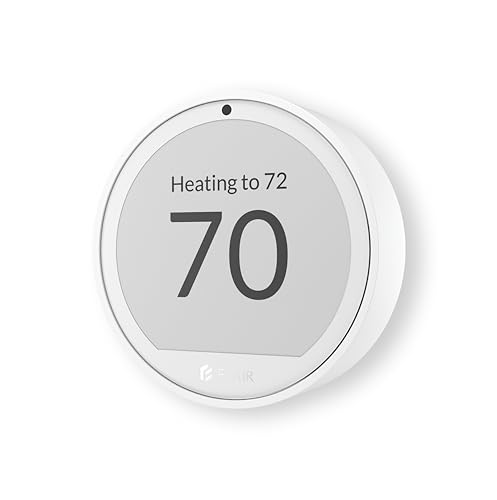
Pros
- Room-by-room temperature and humidity monitoring
- Works with 200+ mini split brands
- Up to 1-year battery life
- Alexa and Google Assistant support
Cons
- Flair Bridge required for central HVAC
- Smart Vents needed for airflow balancing

Pros
- Learns schedules and outdoor temperature effects
- Temperature Sensor included for hot and cold spots
- No C wire required in most homes
- Works with Google Home, Alexa, and Siri
Cons
- C wire may be needed in some homes
- System compatibility varies by heating setup

Pros
- Included SmartSensor manages hot and cold spots
- Built-in air quality monitor with alerts
- Energy STAR certified, saves up to 26%
- Siri, Alexa and Google Home support
Cons
- Smoke alerts require an ecobee security subscription
- Siri requires an Apple home hub
Start With the HVAC System Type
Most conventional smart thermostats are designed around 24V heating and cooling equipment. The Google Nest Learning Thermostat (4th gen) works with most 24V systems, including gas, electric, oil, forced air, heat pump, and radiant systems, while ecobee says its Premium model is compatible with 95% of HVAC systems.
That does not make either model universal. Mysa is intended for 120V to 240V electric baseboards and electric fan-forced heaters, and it requires one neutral or second live wire. For window units, portable air conditioners, mini splits, and compatible heat pumps, an infrared controller such as the Smart Air Conditioner Controller or Sensibo Air PRO is a closer match.
Before You Wire: Do not connect a line-voltage baseboard thermostat to a 24V HVAC thermostat system. Confirm the voltage, wiring, and equipment type before installation, and use a qualified electrician if the wiring is unclear.
Separate Systems Need Separate Control
Two HVAC systems may serve different floors, additions, or comfort zones. A thermostat that reads one hallway cannot automatically represent conditions in a distant room, so included or compatible room sensors can be more useful than a larger display.
The ecobee Smart Thermostat Premium – WiFi includes a SmartSensor that detects which rooms are occupied. Google Nest includes a Nest Temperature Sensor (2nd gen), and its app lets you set the temperature a sensor room should reach at a particular time. These features help with hot and cold spots, but they do not turn incompatible equipment into one unified system.
If your setup uses central HVAC with smart vents, Flair Puck 2 can monitor temperature and humidity by room and work with ecobee, Honeywell, Nest, and Sensi thermostats. Its Bridge is required for central HVAC, while mini split use can operate in a USB-powered Solo Mode.
| Device type | Key requirement | Best placement |
|---|---|---|
| 24V thermostat | System compatibility | Existing wall wiring |
| Line-voltage thermostat | 120V to 240V circuit | Electric heating room |
| AC controller | Remote-controlled unit | Near indoor AC |
See more smart thermostat options if your equipment does not fit a conventional setup.
Room Sensors, Humidity, and Automation
Humidity sensing is useful when comfort differs between rooms, but the implementation varies. Mysa includes a humidity sensor, the Smart Air Conditioner Controller monitors temperature and humidity, and Sensibo Air PRO adds an air quality sensor alongside climate features.
Geofencing can turn equipment on before you arrive or off after everyone leaves. Sensibo supports geofencing for remote-controlled AC units, while Mysa offers scheduling and geofencing through its app. Flair adds schedules and Active or Inactive Rooms, which can help prioritize occupied spaces in a central HVAC installation.
Pro Tip: Before buying, write down the equipment serving each area, the thermostat voltage, whether a C-wire is present, and which room needs the sensor. That short inventory prevents a polished app from masking a wiring mismatch.
For broader household automation, you can also compare these controls with other smart energy and climate products. Voice support varies, but the listed products include combinations of Alexa, Google Home, Apple Home, Siri, or Google Assistant support.
Expert Examined
From Marcus Bell

I keep seeing homeowners treat two thermostats as if they were two sensors for one system. The practical fix is to map each thermostat to the equipment it controls, then choose room sensors or controllers that match that equipment instead of forcing one app to manage incompatible hardware.
Read more about Marcus BellInstallation and Power Details Matter
Google says its Nest Learning Thermostat generally requires no C-wire, while ecobee includes a Power Extender Kit for homes without a C-wire. Those details can simplify replacement, but compatibility should still be checked before removing the existing thermostat.
Mysa describes a quick installation with online guides and requires the correct line-voltage wiring. Flair Puck 2 is battery-powered and wireless when paired with a Bridge, with battery life of up to one year. Sensibo uses WiFi or Bluetooth and sits on a flat surface, so it avoids thermostat-wall wiring altogether.
For advice about electrical safety and household equipment, consult the US Consumer Product Safety Commission. Its general safety information is more useful than assuming every smart thermostat installation has the same electrical requirements.
Which Model Fits Your Setup
I would point you to the ecobee Smart Thermostat Premium – WiFi when two conventional HVAC areas need better room awareness. Its included SmartSensor, occupancy-based temperature adjustment, air quality monitor, Power Extender Kit, and support for Alexa, Siri, and Google Home make it a strong fit for a central system where comfort varies by room.
I would choose the Google Nest Learning Thermostat (4th gen) when you want a learning schedule and a second-room sensor for compatible 24V equipment. Its larger display, broad stated system compatibility, no-C-wire installation in most homes, and outdoor-condition learning are useful for separate areas that follow different daily patterns.
For electric baseboard heating, I would put the Mysa Smart Thermostat V2 for Electric Baseboard ahead of conventional 24V models. It is specifically built for 120V to 240V electric baseboards and fan-forced heaters, includes humidity sensing, and supports app control, scheduling, geofencing, Apple Home, Alexa, and Google.
The Bottom Line
The mistake most buyers make is treating two HVAC systems as one compatibility problem. A smart thermostat may handle one equipment type well while being unsuitable for the other, especially when line-voltage heat, mini splits, and 24V systems are mixed.
If you only do one thing first, photograph or record the wiring and identify the voltage and equipment controlled by each thermostat. Then select a model or controller for each system, adding room sensors only after the underlying compatibility is confirmed.
FAQs
Usually, each HVAC system needs a compatible control path, and two separate thermostats may be necessary. Room sensors can improve readings and comfort, but they do not replace equipment compatibility or convert line-voltage systems into 24V systems. A room temperature sensor is useful when a hallway thermostat misses a bedroom or living area. Humidity sensors add comfort information, while air quality sensors provide a separate indoor-health measurement rather than direct HVAC compatibility. The requirement varies by model and system. Google says its Nest Learning Thermostat generally needs no C-wire, ecobee includes a Power Extender Kit for homes without one, and line-voltage products require their specified circuit wiring. A remote-controlled AC controller should be placed where it can communicate with the indoor unit and read a representative room temperature. Follow the product setup instructions, especially for window units, portable ACs, mini splits, and heat pumps. Compatibility means the thermostat can communicate safely with the HVAC equipment and receive the power and wiring signals it requires. It does not mean every smart-home platform, sensor, or heating method will work with the same model.Can one smart thermostat control two HVAC systems?
Which sensor type helps with separate HVAC areas?
Do smart thermostats need a C-wire?
Where should an AC controller be placed?
What does compatibility mean for a smart thermostat?
Sources
- US Consumer Product Safety Commission www.cpsc.gov
- NFPA www.nfpa.org