
Shopping for the best smart plugs for ev charging means separating convenient scheduling from electrical suitability, especially when a charger may run for hours. The key decision is whether you need a 20A plug, an outdoor-rated outlet, or a permanently installed wall format.

Pros
- 20A maximum current for household appliances
- Built-in energy monitoring
- Overcharge protection included
- V0 flame-retardant PC construction
Cons
- 2.4GHz WiFi required
- IP20 rating limits moisture protection
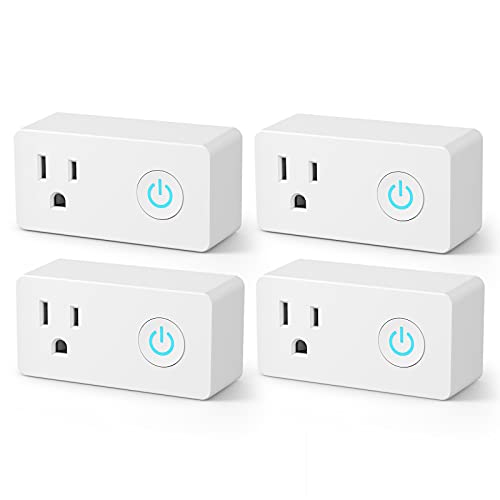
Pros
- Four-pack for controlling multiple devices
- Alexa and Google Assistant compatible
- Remote control through BN-LINK Smart app
- Timer scheduling for lights and appliances
Cons
- 2.4GHz WiFi only
- Requires app or voice assistant setup

Pros
- Alexa and Google Assistant voice control
- Remote control through three compatible apps
- IP44 weatherproof outdoor housing
- 15A, 1875W resistive heavy-duty rating
Cons
- Requires secured 2.4GHz Wi-Fi
- Must stay at least 2 feet off ground

Pros
- 20A tamper-resistant duplex receptacle
- Two USB ports and two plugs
- GFCI receptacle meets UL 943 Class A
- ETL and FCC certified
Cons
- No sensing feature listed
- White color only
Match the Current Rating to the Charger
A smart plug should not be treated as a universal adapter for every EV charger. The Tuya Smart Plug WiFi Socket 20A with Power has a 20A maximum current and supports 100-240V, while the BN-LINK WiFi Heavy Duty Smart Plug Outlet is rated at 15A, 125V, and 1875W. Those ratings are central to deciding whether either model fits your charging setup.
Energy monitoring is another useful distinction. The Tuya model includes built-in monitoring and overcharge protection, allowing you to track power use while the charger is connected. If your priority is remote switching rather than usage data, the BN-LINK model offers app control, scheduling, group control, and voice control through Alexa or Google Assistant.
Before You Connect It: Do not exceed the plug, outlet, or charger rating. A smart plug that fits physically may still be unsuitable for the electrical load, so confirm the charger requirements and use a properly secured 2.4GHz Wi-Fi network where required.
Indoor, Outdoor, or Wall Installation
Placement changes the choice. The HBN Outdoor Smart WiFi Plug has an IP44 weatherproof design, one grounded outlet, and a two-foot minimum placement recommendation with the plug pointing straight down. That makes its installation instructions more specific than those for indoor plug-in models.
The 3GRACE Smart Wall Outlet is a different category: it is a 20A tamper-resistant duplex receptacle with two USB ports and two plugs. Its ETL and FCC certifications, plus the stated UL 943 Class A and UL 498 standards, make it relevant when you want a wall-mounted format rather than a loose adapter. For broader outlet planning, see the Smart Plugs & Outlets category.
| Device format | Key distinction | Best placement |
|---|---|---|
| Plug-in 20A | Monitoring and protection | Indoor outlet |
| Outdoor plug | IP44 weatherproofing | Covered exterior |
| Wall outlet | Duplex, USB ports | Indoor wall box |
Scheduling, Voice Control, and Network Limits
All three plug-in choices rely on 2.4GHz Wi-Fi, so a 5GHz-only network will not work with them. The BN-LINK model works with Smart Life and supports Alexa and Google Assistant, while HBN supports HBN Smart, Smart Life, or Tuya Smart along with both major voice platforms.
Schedules can be useful for limiting when a charger receives power, but they do not replace checking the charger itself. The HBN plug supports automatic schedules and remote control, while the Tuya model adds timing, wireless control, and ultra-low standby power. For automation context, the site’s Smart Sensors & Home Automation section covers related device decisions.
Expert Examined
From Marcus Bell

I keep the network requirement visible during setup because a 2.4GHz-only device can appear faulty on a modern router. The mistake I see is treating remote control as proof that the electrical connection is suitable, so I would confirm the ratings before opening the app.
Read more about Marcus BellCertification labels describe compliance with particular requirements, not permission to exceed the listed load. ETL, FCC, UL, CE, and RoHS markings should be read alongside the current, voltage, wattage, grounding, and weather instructions. UL Solutions explains certification information at UL Solutions.
Which Plug Fits Your Charging Setup
I would point you to the <a href="Tuya Smart Plug WiFi Socket 20A with Power when energy tracking and a 20A maximum current matter most. Its wide 100-240V range, overcharge protection, scheduling, and power monitoring give you more information than a basic timed outlet, while its IP20 rating keeps the intended setting indoors.
I would choose the <a href="HBN Outdoor Smart WiFi Plug for an exterior location where weather exposure is the defining concern. Its IP44 construction, grounded outlet, and downward-facing placement guidance are specific advantages, but you must follow the two-foot elevation instruction and stay within its 15A rating.
For an indoor wall replacement, I would consider the <a href="3GRACE Smart Wall Outlet. It provides a 20A duplex receptacle with two USB ports and tamper resistance, so it suits a fixed outlet plan better than a hanging plug. I would reserve BN-LINK for setups centered on app, timer, group, and voice control at its listed 15A rating.
The Bottom Line
The most common mistake is assuming that any heavy-duty smart plug can handle an EV charger simply because the connector fits. Current, voltage, wattage, grounding, indoor or outdoor placement, and the charger’s own requirements all need to agree.
If you only do one thing first, read the charger and outlet ratings before choosing a smart plug. Then select the format that matches the location: Tuya for indoor monitoring at 20A, HBN for weather-exposed use, BN-LINK for connected scheduling, or 3GRACE for a wall-mounted 20A outlet.
FAQs
A 20A rating may suit some charging arrangements, but it does not automatically make the connection appropriate. Compare the charger’s required current and voltage with the plug, outlet, wiring, and installation conditions before connecting it. The HBN Outdoor Smart WiFi Plug is the only listed option with an IP44 weatherproof rating. It should be positioned at least two feet above ground with the plug pointing straight down, and its 15A rating must not be exceeded. The listed models are plug-in devices and their features depend on connection to household power. Remote control and scheduling also require a secured 2.4GHz Wi-Fi network for the models that specify that requirement. These markings identify compliance or certification claims associated with safety, electromagnetic requirements, or material restrictions. They do not replace checking the product’s current, voltage, wattage, grounding, and placement instructions.Can a 20A smart plug be used for EV charging?
Which smart plug is suitable for outdoor charging?
Do these smart plugs need a battery?
What do ETL, FCC, UL, CE, and RoHS markings mean?
Sources
- UL Solutions and Product Safety Certification. www.ul.com
- US Consumer Product Safety Commission and Electrical Safety. www.cpsc.gov