
Shopping for the best smart plugs for washer and dryer means checking electrical capacity before choosing app features. The key split is whether you need simple scheduling, broad Matter compatibility, or energy monitoring, especially if the laundry outlet is tight or shared.

Pros
- Matter support across major smart home platforms
- Compact design helps preserve nearby outlet access
- UL certified flame-retardant design
- Scheduling, timers, app, and voice control
Cons
- 2.4 GHz Wi-Fi only
- Limited to 15A/1800W maximum
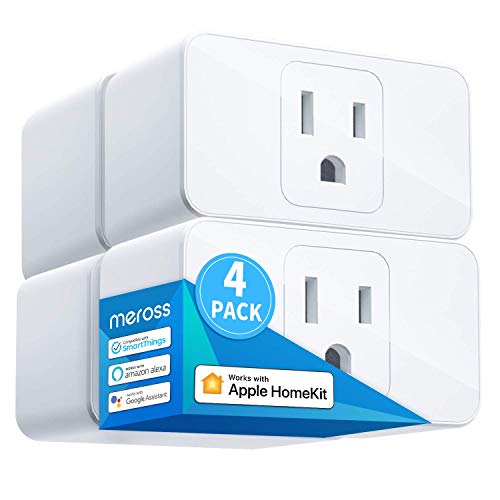
Pros
- Apple HomeKit, Alexa, Google Assistant compatible
- 15A capacity for appliances up to 1800W
- Compact design leaves room for two plugs
- Scheduling supports sunrise and sunset settings
Cons
- HomeKit remote control needs an online bridge
- Requires a 2.4GHz Wi-Fi network

Pros
- Apple HomeKit and Siri support
- Works with Alexa, Google Assistant, SmartThings
- Compact design preserves the adjacent outlet
- UL certified flame-retardant design
Cons
- 2.4GHz Wi-Fi only
- HomeKit remote control needs an Apple device

Pros
- Matter support for Apple Home, Alexa, Google Home
- Energy monitoring tracks usage over time
- Compact design helps preserve adjacent outlet space
- UL-certified flame-retardant design and 2-year warranty
Cons
- Requires 2.4GHz Wi-Fi
- 15A/1800W maximum load

Pros
- Matter support across major smart-home platforms
- 15A/1800W capacity for household electronics
- Remote control, timers, and scheduling
- FCC certified with overload protection
Cons
- Hub required for most listed platforms
- 2.4GHz Wi-Fi and IPv6 network only

Pros
- Matter support for major smart home platforms
- 15A/1800W capacity
- Remote app control from anywhere
- Voice control with Siri and Alexa
- Timers and schedules for automation
Cons
- Requires 2.4GHz Wi-Fi and IPv6
- Hub required for most Matter platforms
Start With the Appliance Load
Every option in this comparison is rated for up to 15A and 1800W, but that does not automatically make every plug suitable for every laundry setup. Check the washer or dryer label and the appliance manual before adding a smart plug, particularly if the appliance has a high-power heating cycle.
A smart plug should not replace an appliance’s own controls or safety systems. It is most useful when you need scheduled power control, remote switching, or a timer for a compatible load. If the appliance instructions prohibit an external switch, follow those instructions instead.
Before You Plug In: Never connect a smart plug to a load that exceeds its stated 15A or 1800W capacity, and do not use an adapter or power strip to defeat the outlet’s intended setup.
Matter, HomeKit, and Wi-Fi Choices
Matter can simplify control across Apple Home, Alexa, Google Home, and Samsung SmartThings. The TP-Link Tapo Matter Supported Smart Plug Mini, Kasa Matter Smart Plug with Energy Monitoring, and both Linkind Matter models also support local-network control after setup, so compatible Matter devices can continue communicating on the home LAN if internet service goes offline.
Hub requirements still matter. Linkind specifies a Matter controller for Apple Home, Alexa, Google Home, and SmartThings, while its AiDot app can be used without a hub. The meross Smart Plug 15A, Works with Apple Home requires a HomePod, Apple TV, or iPad for remote HomeKit control. Apple households may also want to compare HomeKit-compatible devices before adding another platform.
| Control approach | Key requirement | Best fit |
|---|---|---|
| Matter | Certified controller | Mixed platforms |
| HomeKit | Apple home bridge | Apple households |
| App control | 2.4GHz Wi-Fi | Simple scheduling |
Fit the Plug to the Laundry Area
Compact designs help when a washer and dryer share a crowded wall outlet. The Tapo, Kasa, meross, and Linkind models are described as compact, with the meross design specifically allowing two mini plugs to stack in one outlet. That can be useful for separate low-profile devices, but the appliance connection still needs to follow the manufacturer’s instructions.
All six products use 2.4GHz Wi-Fi, so check that your setup supports that band during onboarding. Bluetooth onboarding is highlighted for both Tapo models, which may make initial configuration simpler. For broader home automation planning, the site’s smart sensors and home automation category offers related device choices.
Expert Examined
From Marcus Bell

I keep the laundry area simple: the mistake I see is choosing a plug for its app and only later discovering that the outlet, appliance instructions, or load rating creates a problem. I would verify the appliance requirements first, then choose the smallest compatible plug that leaves the other receptacle usable.
Read more about Marcus BellScheduling and Energy Visibility
Schedules can turn a connected appliance on or off around household routines, while timers can reduce the chance that a device remains powered longer than intended. These controls are useful only when they match the appliance’s operating instructions and do not interfere with a cycle that needs to finish normally.
The Kasa Matter Smart Plug with Energy Monitoring is the only option here specifically described as tracking energy use over time. If consumption information matters more than basic remote switching, that feature gives you a clearer reason to choose Kasa. For general electrical safety information, consult the U.S. Consumer Product Safety Commission.
FYI: Matter is a smart-home interoperability standard, not a promise that every device works without a controller. Confirm the platform, hub, and Wi-Fi requirements before setup.
Which Plug Fits Your Laundry Setup
I would point Apple households toward the meross Smart Plug 15A, Works with Apple Home when HomeKit compatibility is the priority and a HomeKit bridge is already available. Its compact form and scheduling support suit a laundry area where outlet space matters.
For a home that mixes Apple Home, Alexa, Google Home, or SmartThings, I would choose the TP-Link Tapo Matter Supported Smart Plug Mini. It combines Matter support, local-network control, compact construction, UL certification, and Bluetooth onboarding.
If you specifically want to watch consumption patterns, I would choose the Kasa Matter Smart Plug with Energy Monitoring. Its energy-monitoring feature separates it from the otherwise similar Matter choices, while its 15A/1800W rating remains important to verify against the appliance.
The Bottom Line
The most common mistake is treating a smart plug’s voice assistant support as proof that it is appropriate for a washer or dryer. The appliance’s load, instructions, outlet arrangement, and the plug’s 15A/1800W limit deserve attention first.
If you do only one thing, read the appliance label and manual before buying. Then select the platform and control features that match your home, keeping the plug within its stated rating and avoiding adapters or power strips.
FAQs
A smart plug may be appropriate only when the appliance instructions allow external power control and the load stays within the plug’s 15A/1800W rating. Check the appliance label and manual before connecting it, and do not use an adapter or power strip to bypass the intended outlet setup. The listed models specify 2.4GHz Wi-Fi only. Make sure your network provides that band during setup, and check whether your chosen Matter platform also requires a compatible controller or hub. Matter allows compatible devices to work across certified platforms such as Apple Home, Alexa, Google Home, and SmartThings. Some Matter features require a certified controller, while local-network communication can continue within the home LAN after setup if internet service is unavailable. The Kasa Matter Smart Plug with Energy Monitoring is the listed model with energy monitoring. It tracks usage over time, helping you understand consumption patterns, but it does not remove the need to verify the appliance’s electrical requirements. Compact plugs can help preserve outlet space, and the meross model is described as allowing two mini plugs to stack in one outlet. Still, each connected load must follow its appliance instructions and remain within the smart plug’s stated capacity.Can I use a smart plug with a washer or dryer?
Do these smart plugs need a 5GHz network?
What does Matter mean on a smart plug?
Which smart plug tracks energy use?
Can I share one outlet between laundry devices?
Sources
- U.S. Consumer Product Safety Commission www.cpsc.gov
- UL Solutions www.ul.com