
Shopping for the best cheap smart plugs is mainly about matching the outlet style to the appliance and your home network. Compact plugs suit lamps and fans, while an in-wall model makes more sense when you want a cleaner permanent installation.

Pros
- Alexa and Google Home voice control
- Remote control through Kasa app
- Scheduling, timers, and countdowns
- UL certified with a 2-year warranty
Cons
- Requires 2.4GHz Wi-Fi
- App required for setup and remote control
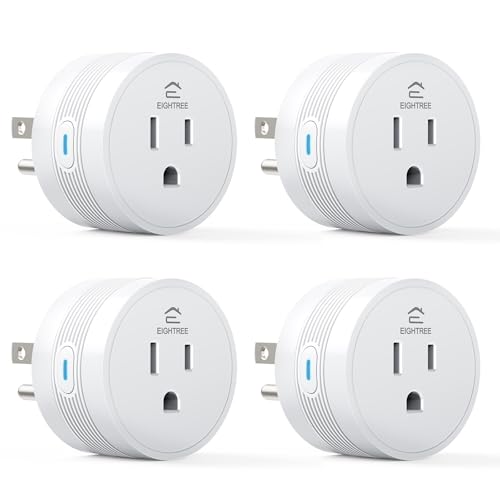
Pros
- 15A/1800W capacity for high-power appliances
- Compact 1.2-inch thickness fits crowded outlets
- Alexa and Google Home voice control
- FCC and ETL certified
- Four-pack supports grouped device control
Cons
- Requires 2.4GHz WiFi only
- Smart Life app required for setup

Pros
- Controls two devices separately or together
- Alexa and Google Home voice control
- Remote control, schedules, and scenes
- ETL certified, no hub required
Cons
- Wi-Fi required for connected features
- In-wall installation, not a plug-in unit

Pros
- Alexa and Google Assistant voice control
- Remote control through three compatible apps
- Schedules and timers for connected devices
- ETL and FCC listed
Cons
- 2.4GHz WiFi only
- Alexa setup requires the GHome app first

Pros
- Four-pack with 15A capacity
- Alexa and Google Assistant support
- Remote control, timers, and schedules
- Compact design for tight spaces
Cons
- Direct Alexa connection not supported
- Requires 2.4GHz WiFi and Smart Life app
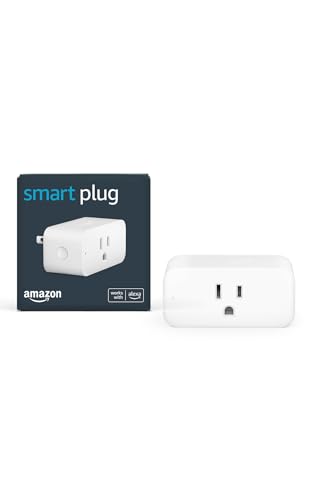
Pros
- No smart home hub required
- Compact design keeps second outlet free
- Alexa Routines automate everyday tasks
- Automatically reconnects after outages
Cons
- Requires Alexa app and compatible account
- Works only with physical on/off switches
Choose the outlet style first
A plug-in model is the easiest choice for renters, seasonal lights, bedside lamps, and appliances with a physical on/off switch. You can move it between rooms, control it from an app, and create schedules without changing the electrical box.
The Kasa Smart Plug KP200, In-Wall Smart Home Wi-Fi is different because it replaces an existing outlet and controls two connected devices independently or together. Its away mode can switch connected lights on and off at random times, but installation is more involved than plugging in a compact unit.
Before buying, check whether the device has a mechanical power switch that stays in the on position after an outage. A smart plug can interrupt power, but it cannot restart every appliance that requires a button press after power returns.
Pro Tip: Check the appliance switch before installation, then confirm your router offers a 2.4GHz network.
Match power and network limits
All six options rely on 2.4GHz Wi-Fi, so they are not the right fit if your setup only provides 5GHz access. Several models use Bluetooth during setup, but that does not remove the need for a compatible 2.4GHz connection.
The EIGHTREE 15A Smart Plug Works with Alexa & Google is specified for appliances such as coffee makers, air fryers, and heaters, with a 15A/1800W rating. Even with a high-rated plug, you should compare the appliance label and avoid using a smart plug beyond its stated electrical limits.
| Plug type | Main strength | Suitable location |
|---|---|---|
| Compact plug | Portable automation | Lamps and fans |
| 15A plug | Higher-power control | Kitchen appliances |
| In-wall outlet | Two-device control | Permanent room upgrades |
Certification is useful, but it does not make an overloaded connection safe. The EIGHTREE models list FCC and ETL certification, while the Kasa Smart Plug Ultra Mini 15A, EP10P2 lists UL certification, so treat those markings as product safety information rather than permission to exceed the rating.
For broader home automation context, you can also review the site’s smart sensors and home automation coverage. If your priority is smoke protection instead of outlet control, the Wi-Fi smoke and carbon monoxide detector selection addresses a different type of connected device.
Avoid High-Risk Loads: Never connect a plug to an appliance whose manufacturer prohibits remote or unattended operation, and do not use a smart plug as a substitute for proper electrical protection.
Keep setup simple and useful
Voice compatibility is not identical across these products. Kasa supports Alexa and Google Home directly through its stated integrations, while Amazon Smart Plug, Works with Alexa, Simple Setup is designed specifically for Alexa and is managed through the Alexa app.
EIGHTREE Smart Plug WiFi Outlet Works with Alexa requires Smart Life setup before Alexa or Google voice control is available. GHome Smart Plug, WiFi Smart Plugs that Work supports its own app, Smart Life, and Tuya, but it also requires initial network setup before voice services can be linked.
Schedules are often more useful than voice commands for daily routines. Set a lamp to follow a regular timetable, use a countdown for a temporary device, or group several outlets when you want one command to control a room.
Expert Examined
From Dana Whitfield

I keep seeing smart plugs placed where the Wi-Fi signal is weak or where the appliance has an electronic standby button. I would first confirm the network path and the appliance’s restart behavior, then build automation around a device that safely resumes operation.
Read more about Dana WhitfieldFor homes mixing several wireless standards, the site’s Z-Wave smoke detector coverage explains why protocol choice matters. Smart plugs in this selection are Wi-Fi products, not Z-Wave or Zigbee devices.
Which Plug Fits Your Room
I would point you to the Kasa Smart Plug Ultra Mini 15A, EP10P2 for a renter or apartment occupant who wants two compact outlets for lamps, fans, or seasonal lights. It supports Alexa and Google Home, offers schedules and remote app control, requires no hub, and includes a two-year warranty according to the supplied specifications.
For several rooms, I would choose the EIGHTREE 15A Smart Plug Works with Alexa & Google. Its four-pack, group control, timer functions, and 15A/1800W rating make it the more practical fit for a household automating multiple everyday appliances, provided each load stays within the stated limit.
I would reserve the Kasa Smart Plug KP200, In-Wall Smart Home Wi-Fi for a homeowner planning a permanent room upgrade. It controls two devices individually or together, saves surface outlet space, supports scenes and schedules, and adds an away mode for connected lights.
The Bottom Line
The mistake most buyers make is treating every smart plug as interchangeable. The 2.4GHz requirement, appliance restart behavior, electrical rating, and voice platform can matter more than the smallest purchase price.
If you only do one thing first, inspect the appliance you want to automate. Confirm its switch behavior and electrical demand, then select a compact plug, multipack, or in-wall outlet that fits the room and your preferred voice or app ecosystem.
FAQs
Some models are specified for higher-power appliances, including the EIGHTREE 15A Smart Plug Works with Alexa & Google. Check the appliance rating, the plug’s stated limit, and the manufacturer’s instructions before using remote or scheduled control. The products listed here require 2.4GHz Wi-Fi. A phone may use another band during setup, but the plug itself needs a compatible 2.4GHz network for normal operation. The plug loses power and may need to reconnect to Wi-Fi afterward. Whether the appliance resumes operation depends on its own physical or electronic power control, so check that behavior before creating an unattended routine. They identify compliance or certification information associated with electrical safety and regulatory requirements. They do not mean every appliance is safe to connect, nor do they allow you to exceed the plug’s stated electrical rating.Can a cheap smart plug control a heater or coffee maker?
Do these smart plugs work on 5GHz Wi-Fi?
What happens if the power goes out?
What do FCC, ETL, and UL markings mean?
Sources
- UL Solutions and Product Safety Standards www.ul.com
- US Consumer Product Safety Commission and Electrical Safety www.cpsc.gov