
Shopping for the best heavy duty smart plugs means separating everyday high-load compatibility from features that merely sound advanced. The key choice is whether you need Matter flexibility, Apple Home support, energy monitoring, or a compact multi-pack for lamps and small appliances.

Pros
- Matter support across major smart home platforms
- Compact design helps preserve nearby outlet access
- UL certified flame-retardant design
- Scheduling, timers, app, and voice control
Cons
- 2.4 GHz Wi-Fi only
- Limited to 15A/1800W maximum
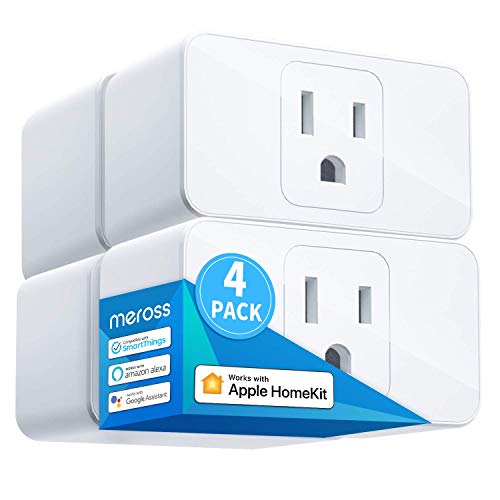
Pros
- Apple HomeKit, Alexa, Google Assistant compatible
- 15A capacity for appliances up to 1800W
- Compact design leaves room for two plugs
- Scheduling supports sunrise and sunset settings
Cons
- HomeKit remote control needs an online bridge
- Requires a 2.4GHz Wi-Fi network

Pros
- Apple HomeKit and Siri support
- Works with Alexa, Google Assistant, SmartThings
- Compact design preserves the adjacent outlet
- UL certified flame-retardant design
Cons
- 2.4GHz Wi-Fi only
- HomeKit remote control needs an Apple device

Pros
- Matter support for Apple Home, Alexa, Google Home
- Energy monitoring tracks usage over time
- Compact design helps preserve adjacent outlet space
- UL-certified flame-retardant design and 2-year warranty
Cons
- Requires 2.4GHz Wi-Fi
- 15A/1800W maximum load

Pros
- Matter support across major smart-home platforms
- 15A/1800W capacity for household electronics
- Remote control, timers, and scheduling
- FCC certified with overload protection
Cons
- Hub required for most listed platforms
- 2.4GHz Wi-Fi and IPv6 network only

Pros
- Matter support for major smart home platforms
- 15A/1800W capacity
- Remote app control from anywhere
- Voice control with Siri and Alexa
- Timers and schedules for automation
Cons
- Requires 2.4GHz Wi-Fi and IPv6
- Hub required for most Matter platforms
Match the Plug to the Appliance
Every model in this selection is rated for up to 15A and 1800W, so the comparison starts from a useful capacity baseline. That does not mean every appliance is an appropriate match. Check the appliance label and avoid using a plug for equipment whose startup demand or operating instructions exceed the plug’s rating.
These products are better suited to lamps, fans, humidifiers, holiday lights, and similar household electronics named in the product details. A smart plug should not be treated as a substitute for a properly rated switch, control device, or dedicated circuit.
Before You Plug In: Never connect a load that exceeds the listed 15A or 1800W capacity, and do not use a compact smart plug to solve an electrical problem that needs a qualified electrician.
Matter Versus Direct Ecosystem Support
Matter is the main dividing line among these models. The Matter options can work with certified platforms such as Apple Home, Amazon Alexa, Google Home, and Samsung SmartThings, while Matter local-network control can continue between compatible devices when the internet is unavailable.
That flexibility may require a Matter controller or hub, depending on the platform. The meross model directly highlights Apple HomeKit, but remote HomeKit control requires an Apple home hub such as a HomePod, Apple TV, or iPad that stays connected.
If your home already centers on Apple devices, the HomeKit device ecosystem may make platform consistency more valuable than adding another app. If you expect to mix platforms, Matter is the cleaner long-term direction.
| Control approach | Key requirement | Best fit |
|---|---|---|
| Matter platform | Certified controller may apply | Mixed ecosystems |
| Apple HomeKit | Apple home hub for remote control | Apple households |
| App control | 2.4GHz Wi-Fi network | Simple schedules |
Capacity, Placement, and Outlet Space
All six products use 2.4GHz Wi-Fi, so confirm that your setup supports that band before ordering. Compact designs help preserve the neighboring outlet, and the meross model specifically states that two mini plugs can be stacked in one outlet.
Safety certification is useful context, not permission to ignore electrical limits. Tapo and Kasa identify UL certification, while meross and Linkind identify ETL certification. UL Solutions explains the role of safety standards and certification in product evaluation.
Expert Examined
From Marcus Bell

I keep the plug close to the appliance rather than hiding it behind crowded furniture. The mistake I see is treating a smart plug as an extension cord for several demanding devices, so I prefer one clearly identified load per plug.
Read more about Marcus BellFor broader home automation planning, the smart sensors and home automation category can help you think about how schedules, sensors, and voice control fit together.
Pro Tip: Use the device label and the plug’s 15A/1800W rating before creating a schedule, especially for appliances with motors or heating elements.
Which Plug Fits Your Home
I would point Apple households toward the Tapo Apple HomeKit Smart Plug Mini, 15A when Siri control and compact design matter. Its Bluetooth onboarding, scheduling, and support for Alexa and Google Home also leave room for a mixed voice setup, though Apple Home remote control still needs an additional networked Apple device.
For a mixed-platform home, I would choose the TP-Link Tapo Matter Supported Smart Plug Mini. Matter support, local-network control, compact construction, UL certification, and a multi-pack make it a practical fit when you want one platform-independent approach.
I would reserve the Kasa Matter Smart Plug with Energy Monitoring for homes where tracking consumption is part of the decision. It combines Matter compatibility with energy monitoring, scheduling, voice control, and a compact UL-certified design.
The Bottom Line
The mistake most buyers make is treating a 15A rating as a universal license for any appliance. Smart control does not remove the need to check load requirements, use the correct Wi-Fi band, and follow the appliance’s instructions.
If you only do one thing first, identify your smart-home platform and the appliance you want to control. Then select a Matter model for cross-platform flexibility, an Apple HomeKit model for an Apple-centered setup, or energy monitoring when consumption data matters.
FAQs
These plugs are intended for compatible household electronics such as lamps, fans, humidifiers, and holiday lights. Confirm that the appliance’s operating and startup requirements remain within the plug’s 15A and 1800W limits. Matter-certified devices on the same local network can communicate directly when the internet is offline. Platform setup may still require a compatible Matter controller or hub, depending on the ecosystem. No. The listed models support 2.4GHz Wi-Fi only, so your network must provide that band during setup and operation. UL and ETL identify safety certification programs associated with product evaluation. Certification does not increase the plug’s electrical capacity, so you still need to stay within the stated rating.What type of appliance can use a heavy duty smart plug?
Do Matter smart plugs work without internet?
Do these smart plugs need 5GHz Wi-Fi?
What does UL or ETL certification mean on a smart plug?
Sources
- UL Solutions and Product Safety Certification www.ul.com
- National Fire Protection Association and Electrical Safety www.nfpa.org
- US Consumer Product Safety Commission and Electrical Safety www.cpsc.gov