
Choosing the best smart outlets starts with one practical split: do you need a plug-in control for an existing receptacle, or a permanent in-wall replacement? Renters and quick setups usually favor the first option, while homeowners may prefer discreet outlets with independent sockets and USB charging.

Pros
- Alexa and Google Home voice control
- Remote control through Kasa app
- Scheduling, timers, and countdowns
- UL certified with a 2-year warranty
Cons
- Requires 2.4GHz Wi-Fi
- App required for setup and remote control
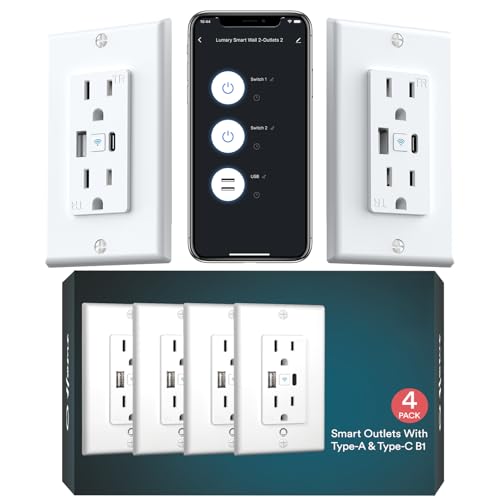
Pros
- USB-A and USB-C charging built in
- 15A, 110V maximum load
- Tamper-resistant shutters for child safety
- No hub required, Alexa and Google support
Cons
- 2.4GHz Wi-Fi only
- Requires wall-outlet replacement and wiring

Pros
- Controls two devices independently or together
- Matter certified for major smart-home platforms
- Energy monitoring for connected devices
- ETL certified with improved load capacity
Cons
- Requires neutral wiring for installation
- 2.4GHz Wi-Fi required for setup

Pros
- Two individually controlled outlets per unit
- Built-in fire-resistant housing
- Overload and overheating protection
- Alexa and Google Home compatible
Cons
- Neutral wire required for installation
- 2.4GHz Wi-Fi only

Pros
- Two independently controlled outlets
- Works with Alexa and Google Assistant
- No hub required
- UL and cUL certified
Cons
- Requires in-wall installation
- 2.4GHz Wi-Fi only

Pros
- 20A tamper-resistant duplex receptacle
- Two USB ports and two plugs
- GFCI receptacle meets UL 943 Class A
- ETL and FCC certified
Cons
- No sensing feature listed
- White color only
Plug-In Convenience or In-Wall Control
A plug-in model such as the Kasa Smart Plug Ultra Mini, EP10P2 leaves the existing wall receptacle in place and adds app, schedule, and voice control to a connected appliance. It requires 2.4GHz Wi-Fi and works with Alexa and Google Home, making it a practical fit for lamps, fans, humidifiers, and seasonal lights.
In-wall models create a cleaner finish and can control two sockets separately. Tapo, Geeni, and ELEGRP each offer this format, while the Tapo Smart Plug, Wi-Fi in-Wall Outlet, P210M adds Matter compatibility, energy monitoring, and local app control when the home internet is down.
Permanent replacement requires more planning than plugging in a compact adapter. Tapo and Geeni specify neutral wiring, so confirm the wiring in the box before buying an in-wall model.
Check the Wiring First: Confirm that the selected in-wall outlet matches the wiring available in your electrical box, especially when neutral wiring is required.
Features That Matter by Room
USB charging changes the role of an outlet in a bedroom, office, or kitchen. The Lumary Smart Outlet with USB-A/C Ports 110V 15A provides USB-A, USB-C, and traditional AC connections, with separate control for each power source through its app.
For rooms shared by children or pets, tamper-resistant shutters are worth prioritizing. Lumary, Geeni, ELEGRP, and 3GRACE list tamper-resistant designs, while Lumary also lists overheating and short-circuit protection, and Geeni lists fire-resistant housing plus overload and overcurrent protection.
The 3GRACE Smart Wall Outlet is the unusual option in this group because it lists a 20 amp, 125 volt GFCI duplex receptacle with two USB ports and two plugs. Its certification details may appeal in a utility area or office, but you should still match the receptacle to the circuit and intended load.
| Device type | Key distinction | Best placement |
|---|---|---|
| Plug-in smart plug | No wiring replacement | Lamps and fans |
| In-wall smart outlet | Permanent dual control | Kitchens and offices |
| USB wall outlet | AC and USB charging | Bedrooms and desks |
Wi-Fi, Voice Control, and Safety Labels
All six options rely on 2.4GHz Wi-Fi, so a 5GHz-only setup will not be enough for initial connection. App control, scheduling, countdown timers, and remote shutoff are common themes, but platform support differs: Matter on Tapo adds compatibility with Apple HomeKit and Samsung SmartThings alongside Alexa and Google Home.
Certification language deserves careful reading. UL, ETL, FCC, and cUL references describe different aspects of a product or its compliance claims, so do not treat every label as interchangeable. UL Solutions explains how its safety certification work relates to products and electrical safety.
Do Not Ignore Load Limits: Never use a smart outlet beyond its stated electrical rating, and do not assume USB charging ports have the same capacity as the AC receptacle.
For broader household risk planning, the Wi-Fi smoke and carbon monoxide detector choices can complement remote outlet control. Smart power management helps with routines, but it does not replace dedicated fire or carbon monoxide detection.
Expert Examined
From Jenna Castellano

I keep seeing outlet projects fail because the buyer chooses an in-wall design before checking the box wiring. The safer approach is to confirm the neutral requirement, circuit rating, and available space first, then decide whether a permanent outlet or plug-in model makes sense.
Read more about Jenna CastellanoWhich Outlet Fits Your Home
I would point renters, dorm residents, and anyone avoiding electrical work to the smart plugs and outlets category, with the Kasa Smart Plug Ultra Mini 15A, EP10P2 as the simplest match from these options. It is a compact 2-pack with Alexa and Google Home control, schedules, remote operation, and no hub requirement. Its 2.4GHz setup keeps the decision straightforward for lamps, fans, and holiday lights.
I would put the Tapo Smart Plug, Wi-Fi in-Wall Outlet, P210M in a home where permanent installation, independent socket control, and wider platform flexibility matter. Matter support, energy monitoring, overcharge prevention, and local app control make it especially appealing for a connected office or family room, provided neutral wiring is available.
For a kitchen, bedroom, or desk that needs charging built into the wall, I would choose the Lumary Smart Outlet with USB-A/C Ports 110V 15A. Its USB-A and USB-C ports can operate alongside the AC connection, while grouping, schedules, remote control, tamper-resistant shutters, and protective features address both convenience and everyday household safety.
The Bottom Line
The mistake most buyers make is treating a plug-in smart plug and an in-wall smart outlet as interchangeable. They solve different installation problems: one adds control without replacing the receptacle, while the other needs wiring, space, and a more permanent commitment.
If you do only one thing first, inspect the outlet location and wiring. Decide whether you need a removable plug-in device, two independently controlled wall sockets, USB charging, or a Matter connection before comparing brands.
FAQs
Choose a plug-in model when you want a quick, removable setup for lamps, fans, or other appliances. Choose an in-wall outlet when you want a cleaner permanent appearance, independent socket control, or built-in USB charging and have the required wiring. The products listed here specify 2.4GHz Wi-Fi for setup and operation. Check your router settings before installation, especially if your network uses separate bands or hides the 2.4GHz connection. The Tapo and Geeni in-wall models specify neutral wiring, so inspect the electrical box before purchase. If the required wire is not present, a plug-in smart plug may be the more practical choice. These labels are not identical. UL and ETL relate to safety certification claims, while FCC certification concerns applicable radio and electronic requirements, so read the product documentation rather than assuming one label covers every concern. Remote app control depends on the outlet and home network receiving power. A scheduled action may not occur during an outage, and operation after power returns depends on the product’s behavior and settings described by its manufacturer.Should I buy a plug-in smart plug or an in-wall outlet?
Do these smart outlets work on 5GHz Wi-Fi?
Do in-wall smart outlets need a neutral wire?
What do UL, ETL, and FCC labels mean on smart outlets?
Can smart outlets help during a power outage?
Sources
- UL Solutions electrical safety information. www.ul.com
- US Consumer Product Safety Commission electrical safety resources. www.cpsc.gov
- NFPA home electrical safety information. www.nfpa.org