
Shopping for the best wired doorbell cameras without subscription means separating genuinely useful local features from alerts that still require a paid plan. The key split is whether recordings stay on the doorbell or depend on cloud storage, which matters most for homeowners who want continuous power without monthly fees.

Pros
- Sharp 2K video with Head-to-Toe View
- Continuous power from hardwired connection
- Two-way audio with noise cancellation
- IP65 weather-resistant design
Cons
- Requires existing doorbell wiring
- Person detection requires separate Blink subscription
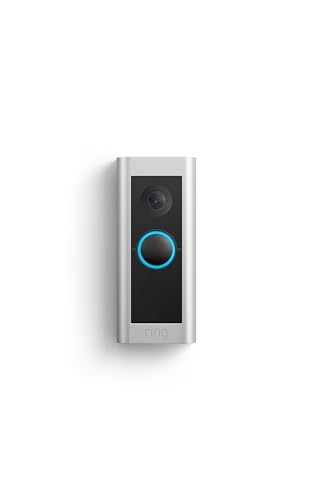
Pros
- 1536p Head-to-Toe HD+ video
- 3D Motion Detection for precise alerts
- Two-way Talk with Audio+
- Certified refurbished with same limited warranty
Cons
- Requires existing doorbell wiring
- Alexa Greetings and extra features require subscription

Pros
- Head-to-Toe 2K video
- Continuous hardwired power
- Included in-home Blink Chime
- Two-way audio with noise cancellation
Cons
- Hardwired installation requires existing wiring
- Person detection requires separate subscription

Pros
- 2K head-to-toe video
- Package and person detection
- Rechargeable or hardwired installation
- Included Chime 2 with 80+ dB siren
Cons
- Paid plan required after the trial
- Rechargeable setup needs periodic charging

Pros
- Retinal 4K video clarity
- Up to 10x Enhanced Zoom
- 3D Motion Detection alerts
- Two-Way Talk with Audio+
Cons
- Hardwired installation required
- Video Descriptions require a Ring subscription

Pros
- Dual cameras capture visitors and packages
- 2K video with color night vision
- Built-in 8GB local storage
- Wireless or wired installation
Cons
- Supports 2.4 GHz Wi-Fi only
- Rechargeable battery requires periodic charging
Local Storage Versus Subscription Features
A no-subscription setup should be judged by what remains available after any included trial ends. The eufy Security Video Doorbell E340, Dual Cameras has built-in 8GB local storage and states that it does not require a subscription, while Arlo says live streaming and basic alerts work without one but advanced detection and video history require a paid plan.
Ring and Blink models in this selection advertise useful detection and response tools, but some features are explicitly tied to their subscriptions. That does not make them poor choices, but you should decide whether basic live viewing is enough or whether you expect stored clips, richer alerts, or automated responses.
For delivery-heavy homes, head-to-toe coverage is especially useful because packages sit below the visitor’s face. A dual-camera design adds another perspective, while a wide view or head-to-toe frame can simplify installation where the mounting position cannot be changed.
Pro Tip: Before buying, confirm which clips and alerts remain available without activating a paid plan.
Power, Chimes, and Installation Constraints
Hardwired models need compatible existing doorbell wiring, and the Ring Wired Doorbell Pro specifically uses that wiring for continuous power and an indoor chime. Arlo offers a flexible alternative because it can run wire-free with a rechargeable battery or connect to existing wiring for trickle charging.
In-home alerts deserve equal attention. The Blink Wired Doorbell 2K+ (all-new) includes a Blink Chime, while the Blink Wired Doorbell 2K+ (newest model) requires Alexa or a Blink Chime for in-home alerts. Arlo includes an Arlo Chime 2, and eufy can connect with compatible chimes, existing mechanical chimes, Alexa, or Google Voice Assistant devices.
| Device format | Main distinction | Best placement |
|---|---|---|
| Hardwired | Continuous power | Homes with wiring |
| Wireless or wired | Battery flexibility | Renters or retrofit |
| Local storage | No monthly fee | Delivery-focused entryways |
Check the transformer and wiring before mounting a wired unit, rather than assuming every existing doorbell circuit is suitable. The instructions in how to hardwire a video doorbell safely can help you plan the electrical work without treating the camera as a simple battery accessory.
Before You Mount It: Never work on doorbell wiring while it is energized. Turn off the relevant circuit and follow the manufacturer’s installation instructions, or use a qualified electrician if the wiring is unclear.
Resolution, Detection, and Night Coverage
Resolution is only one part of useful identification. The Blink and Arlo choices provide 2K video with head-to-toe coverage, while Ring Wired Doorbell 4K Pro (Newest Model) adds Retinal 4K video, up to 10x enhanced zoom, 3D Motion Detection, and low-light color imaging.
Detection tools also change the number of interruptions you receive. Person detection appears on the Blink models, Arlo adds package, pet, person, and vehicle recognition, and Ring uses 3D Motion Detection for more precise alerts. Advanced notifications may still depend on a subscription, so read each feature description carefully.
Mounting angle affects whether a camera sees faces, parcels, or mostly the top of a visitor’s head. Use the advice in how to angle a video doorbell down if your porch is raised, your packages land close to the wall, or the frame misses the doorstep.
Expert Examined
From Marcus Bell

I keep seeing doorbell cameras aimed too high, leaving the delivery area outside the useful part of the frame. I would rather adjust the angle before tightening the mount, then confirm that both a face and the package drop zone are visible.
Read more about Marcus BellWhich Model Fits Your Entryway
I would point budget-focused households toward Blink Wired Doorbell 2K+ (all-new) when an indoor audible alert matters. Its included Blink Chime rings inside when the doorbell is pressed or detects motion, and the doorbell provides continuous hardwired power, 2K video, head-to-toe coverage, and two-way audio.
I would choose eufy Security Video Doorbell E340, Dual Cameras for a delivery-heavy entryway where avoiding recurring fees is the priority. Its front and downward cameras cover visitors and packages, while built-in 8GB local storage supports its no-subscription design.
For a homeowner who wants maximum detail and already has compatible wiring, I would consider Ring Wired Doorbell 4K Pro (Newest Model). Its 4K video, 10x zoom, low-light color view, and 3D Motion Detection suit a larger approach, though subscription requirements still apply to some notification features.
The Bottom Line
The mistake most buyers make is treating hardwired power as proof that every security feature is subscription-free. A camera can run continuously while stored video, advanced detection, or automated responses remain tied to a paid service.
First, write down whether you need local recordings, indoor chime alerts, or only live video and basic notifications. Then verify wiring compatibility and the no-subscription feature set before choosing a mounting position.
FAQs
Some wired doorbells provide live video and basic alerts without a subscription, while stored history and advanced detection may require a plan. Models with local storage can keep recordings on the device instead of relying on monthly cloud storage. Wired models provide continuous power when compatible wiring is available. Wireless or dual-power models are more flexible for homes without suitable wiring, but rechargeable batteries require ongoing maintenance. Aim the camera so it captures both a visitor’s face and the package drop zone. Adjust the angle if a raised porch or close wall causes the camera to point above the useful activity area. A hardwired doorbell depends on the home’s electrical supply for continuous operation. Check the manufacturer’s specifications and your network equipment before assuming video, alerts, or recordings will continue during an outage. IP65 indicates protection against dust and water jets under the applicable enclosure rating system. It does not mean the device should be submerged, and installation should still follow the manufacturer’s weather guidance.Do wired doorbell cameras still need a subscription?
Are wired or wireless doorbell cameras better?
Where should a video doorbell be mounted?
What happens to a wired doorbell during a power outage?
What does IP65 mean on a doorbell camera?
Sources
- UL Solutions www.ul.com
- US Consumer Product Safety Commission www.cpsc.gov
- NFPA www.nfpa.org