
Shopping for the best doorbell cameras that record 24/7 means choosing dependable power before chasing sharper video. Wired models support continuous coverage, while battery-ready options suit homes where installation access is limited. The right fit depends on your wiring, storage plan, and whether you need footage to continue during an internet interruption.

Pros
- 2K FHD video with a 4:3 head-to-toe view
- Human and motion detection
- Battery or hardwired power options
- No subscription or monthly fee
Cons
- Hardwiring requires bypassing the existing chime
- MicroSD card and HomeBase sold separately
Pros
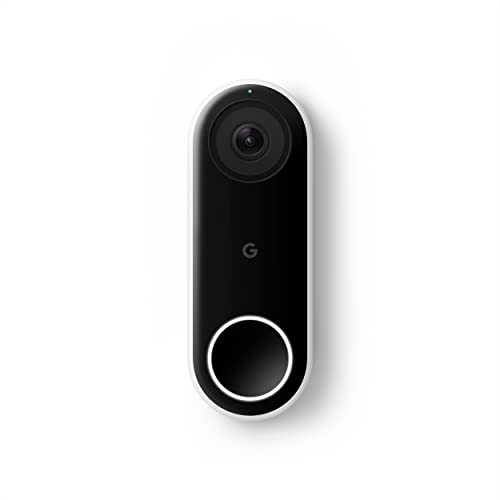
- 24/7 streaming with three-hour snapshot history
- Person alerts without requiring a doorbell ring
- HDR video and night vision
- 4:3 view shows people and packages
Cons
- Hardwired installation required
- Requires Nest app, not Google Home
- Chime sold separately

Pros
- 2K video with 180-degree diagonal view
- 4:3 aspect ratio covers more vertically
- Chime V2 included with 10 tunes
- No subscription for Reolink software service
Cons
- PoE power supply not included
- WiFi is not supported
Pros
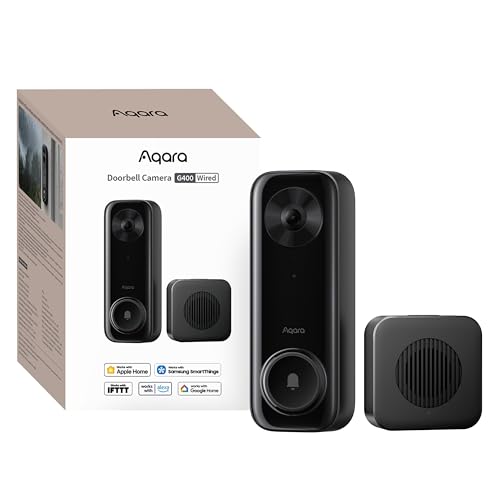
- 2K video with 165-degree head-to-toe view
- Local person and zone intrusion detection
- HomeKit, Alexa, Google, and SmartThings support
- PoE or 8–24V wired power options
Cons
- Requires wired power or PoE installation
- HomeKit needs iCloud+ and an Apple home hub

Pros
- Sharp 2K video with Head-to-Toe View
- Continuous power from hardwired connection
- Two-way audio with noise cancellation
- IP65 weather-resistant design
Cons
- Requires existing doorbell wiring
- Person detection requires separate Blink subscription

Pros
- Head-to-Toe 2K video
- Continuous hardwired power
- Included in-home Blink Chime
- Two-way audio with noise cancellation
Cons
- Hardwired installation requires existing wiring
- Person detection requires separate subscription
Continuous recording starts with power
A doorbell cannot record continuously if its battery must be removed for charging. The eufy Security Video Doorbell C31, 2K FHD offers battery or wired operation, but its listed 24/7 recording mode is tied to hardwiring. The wired Google Nest Doorbell (Wired), REOLINK Video Doorbell PoE 2K Wired Outdoor, Aqara Doorbell Camera G400 with Chime, Wired/PoE, and both Blink models are designed around constant wired power.
PoE can simplify data and power through one Ethernet connection, although the REOLINK model needs a compatible PoE switch, injector, or recorder and does not support Wi-Fi. Traditional doorbell wiring gives you a different installation path, but you should confirm voltage and chime compatibility before disconnecting anything. The safe hardwiring instructions are useful before you open the electrical box.
Before You Mount It: Never work on doorbell wiring while the circuit is energized. Turn off power at the breaker, and remember that some models require bypassing an existing chime.
Local footage changes the outage question
Internet access and recording continuity are not identical. REOLINK states that an internet break will not stop its 24/7 recording, while its footage can go to a microSD card, compatible Reolink NVR, FTP, or NAS. Aqara supports continuous recording to a microSD card and can back up local footage to an SMB-compatible NAS.
Google provides 24/7 streaming and continuous video recording, plus three-hour snapshot history, but its wired doorbell requires the Nest app. Blink advertises constant hardwired power and constant 2K video, while person detection requires a compatible subscription. For broader storage planning, see the explanation of why doorbell cameras disconnect.
| Recording route | Power format | Best placement |
|---|---|---|
| Local card or NAS | Wired or PoE | Internet-sensitive homes |
| Cloud history | Wired | Google smart homes |
| Subscription alerts | Hardwired | Alexa households |
The US Federal Trade Commission explains why connected-device security and account protection matter for cameras at ftc.gov. Keep account credentials unique, enable available security controls, and place storage equipment where visitors cannot easily reach it.
Mounting and field of view matter at the doorstep
Head-to-toe views are valuable because packages often sit below a face-level camera. Google uses a 4:3 view, eufy uses a 4:3 view, REOLINK provides a 4:3 aspect ratio with a 180-degree diagonal field of view, and Aqara uses a 3:4 view with a 165-degree field of view. Blink also specifies head-to-toe 2K video.
Use a wedge when the door faces a walkway at an awkward angle, and aim for both the visitor’s face and the landing area. The doorbell angle guide can help you avoid a view dominated by sky, siding, or a nearby wall.
Pro Tip: Check the live view from the visitor’s approach and from the package drop zone before tightening the mount.
Expert Examined
From Marcus Bell

I keep seeing doorbells aimed too high, especially after replacing a basic button with a taller camera. The fix is usually a wedge or a slightly different mounting position, not a higher-resolution model.
Read more about Marcus BellWhich doorbell fits your household
I would point you to the REOLINK Video Doorbell PoE 2K Wired Outdoor if your home already supports Ethernet at the entry. Its PoE connection, local storage choices, six-second pre-roll, and recording continuity during an internet break make it especially suitable for a homeowner who prioritizes local footage and stable connectivity.
For an Apple-centered home, I would choose the Aqara Doorbell Camera G400 with Chime, Wired/PoE. It supports HomeKit Secure Video, Alexa, Google Assistant, and SmartThings, while its 3:4 view, local detections, microSD recording, and NAS backup suit households that want several storage and automation paths.
If existing wiring is uncertain, I would consider the eufy Security Video Doorbell C31, 2K FHD. Its rechargeable battery allows easier setup, yet hardwiring enables continuous recording and five-second pre-roll. Remember that hardwiring requires bypassing the existing chime, so verify that change before installation.
The Bottom Line
The mistake most buyers make is treating “24/7” as a resolution feature. Continuous recording requires a dependable wired power path, and usable footage also depends on whether the camera stores video locally, keeps cloud history, or needs a subscription for certain alerts.
Start by checking the wiring, chime arrangement, and available storage location at your door. Once those constraints are clear, choose the field of view and smart-home compatibility that match the way your household handles visitors and deliveries.
FAQs
Battery operation alone is not enough for continuous recording because the battery needs recharging. The eufy Security Video Doorbell C31, 2K FHD supports 24/7 recording when hardwired, while its battery mode is intended for easier installation and event awareness. PoE can provide a wired data connection with stable power, which suits homes prepared for Ethernet installation. The REOLINK model uses PoE and does not support Wi-Fi, while Aqara supports PoE or Wi-Fi 6, giving you more installation flexibility. Aim for a view that includes faces and the ground immediately near the door. A wedge can correct an awkward approach angle, and you should verify the live view before securing the mount so packages are not hidden below the frame. Recording behavior depends on the device and storage method. REOLINK states that an internet break will not stop its 24/7 recording, while local storage options from REOLINK and Aqara can reduce reliance on a cloud connection. The indoor chime mainly affects how you hear visitors and motion alerts. Some models include a chime, while others require a separate accessory or chime arrangement, and installation may require bypassing the existing chime.Do battery doorbells record continuously?
Is PoE better than Wi-Fi for a doorbell camera?
Where should a continuous-recording doorbell be mounted?
What happens to recording during an internet outage?
Does a doorbell chime affect continuous recording?
Sources
- National Fire Protection Association www.nfpa.org
- US Consumer Product Safety Commission www.cpsc.gov
- UL Solutions www.ul.com