
Choosing the best video doorbells for gates means solving a viewing-angle and connection problem before choosing a brand. This selection suits homeowners who need alerts, visitor conversations, and useful footage at a gate rather than directly beside the house.

Pros
- 1080p video with infrared night vision
- AI human detection minimizes pet alerts
- Two-way audio through your smartphone
- Indoor receiver supports multiple receivers
Cons
- Cloud subscription required for live view and playback
- 2.4GHz Wi-Fi only

Pros
- 2K HD video with 166-degree wide-angle view
- Rechargeable wireless battery, no doorbell wiring
- Free seven-day loop cloud storage
- Included indoor chime and two-way talk
Cons
- 2.4 GHz Wi-Fi only, no 5 GHz support
- TF card storage requires a card purchase

Pros
- Dual cameras, front and bottom views
- Wireless battery setup, no wiring required
- 1080P video with IR night vision
- PIR alerts and two-way audio
Cons
- Cloud storage requires subscription after 24 hours
- TF card for local storage not included

Pros
- Solar power with built-in dual batteries
- 2K HDR head-to-toe video
- Radar, dual PIR, and AI detection
- Free local storage up to 128GB
- Alexa support and two-way audio
Cons
- MicroSD card not included
- Requires Wi-Fi for wireless operation
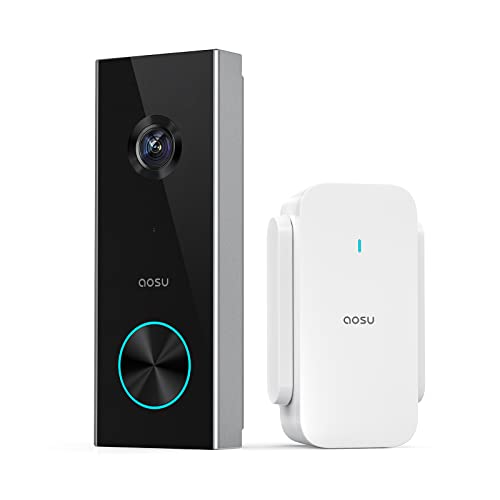
Pros
- 2K resolution with 166° ultra-wide view
- AI human detection reduces unnecessary alerts
- Local storage without a subscription
- Two-way talk with quick replies
- Included base adds Wi-Fi and chime
Cons
- 2.4 GHz Wi-Fi only, no 5 GHz support
- MicroSD card sold separately
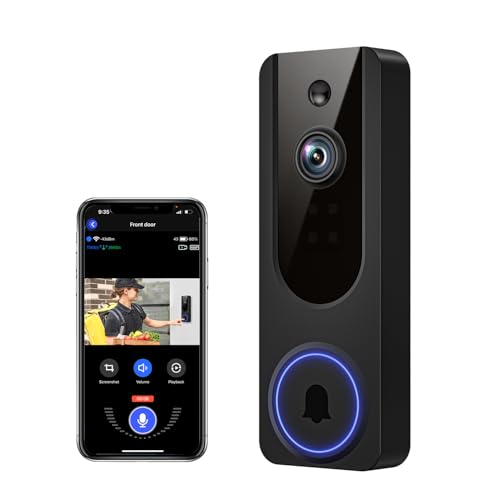
Pros
- AI human detection filters unnecessary motion alerts
- 1080p video with four-LED night vision
- Two-way audio from a smartphone
- Encrypted cloud storage with AES-128
Cons
- 2.4GHz WiFi only
- Cloud subscription required for recording storage
Start with the gate’s viewing geometry
A gate camera needs to show more than a face at arm’s length. A wide-angle or head-to-toe view can help include the visitor, the latch area, and packages left nearby. The KAMEP model offers a 166° lens, while aosu combines a 166° view with a 4:3 aspect ratio for a taller doorstep image.
Mount the unit where the gate structure does not block the lower part of the frame. If the gate opens toward the camera, leave room for movement and check that the doorbell will not be struck. A separate explanation of how to angle a video doorbell down can help when the mounting surface sits unusually high.
Pro Tip: Aim the camera across the visitor approach rather than directly along it. This gives human detection more time to identify movement and keeps faces visible as someone reaches the gate.
Match detection and storage to the location
Gates often see cars, animals, branches, and pedestrians, so human detection matters. Cookedixo, INNOSECU, KAMEP, anyfree, aosu, and VanaOrbi all describe human-focused detection or filtering, although the storage options differ between local cards, free cloud allowances, and subscription cloud access.
For footage you want available without a continuing cloud plan, KAMEP supports a TF card up to 128GB and seven-day loop cloud clips, while anyfree and aosu support local MicroSD storage up to 128GB. INNOSECU adds local TF storage up to 128GB plus 24 hours of free cloud storage. Read the storage terms carefully, since a local card must be purchased separately on these models.
| Camera type | Key viewing feature | Suitable gate position |
|---|---|---|
| Standard HD | Infrared night vision | Covered, nearby gate |
| Wide-angle 2K | Taller visitor view | Open pedestrian gate |
| Solar plus battery | Reduced charging | Sun-facing gate post |
Night coverage is another dividing line. Cookedixo and VanaOrbi use infrared LEDs, while KAMEP specifies night vision up to 33 feet and anyfree describes all-around night vision. For a gate set away from the house, confirm that the intended approach is inside the useful nighttime view.
Plan power and wireless access
Battery operation avoids running cable to a detached gate, but charging remains part of ownership. INNOSECU lists a 9000mAh rechargeable battery and up to 90 days of standby time, while KAMEP states up to 60 days under specified laboratory use. Actual runtime varies with activity and settings.
anyfree is the most distinctive power option because it combines a built-in battery with solar charging. It also supports 2.4GHz and 5GHz Wi-Fi, unlike the 2.4GHz-only Cookedixo, INNOSECU, KAMEP, aosu, and VanaOrbi models. A gate can expose weak coverage, so read why a doorbell camera keeps disconnecting before mounting the unit permanently.
Before You Mount It: Never place the device where the gate can swing into it, and do not assume a strong indoor signal reaches a metal gate or distant post. Confirm the mounting point, Wi-Fi path, and charging access first.
Expert Examined
From Marcus Bell

I keep seeing gate installations fail because the camera is mounted for convenience instead of the visitor’s approach. I would mark the frame with temporary tape, check the lower edge and face area, then decide whether the post or gate panel gives the cleaner view.
Read more about Marcus BellSome models include a receiver or chime, which matters when the gate is outside your immediate hearing range. Cookedixo includes an indoor receiver, INNOSECU includes a Wi-Fi chime, KAMEP includes an indoor chime, and aosu uses its aosuBase Mini as Wi-Fi support, local storage, and a chime. For more context, see what a doorbell chime kit is.
Which model fits your gate
I would point you to the anyfree Built-in Solar Doorbell Camera for a gate post that receives useful sunlight. Its solar and battery design reduces charging tasks, while 2K HDR, head-to-toe coverage, local storage, anti-tamper alerts, and dual-band Wi-Fi address several detached-gate concerns at once.
For a gate where packages or the area below the visitor matter most, I would choose the INNOSECU Wireless Battery Video Doorbell Dual. Its front and bottom cameras are designed to reduce blind spots, and its PIR detection, included chime, and long listed standby period suit a location that is not always within earshot.
I would choose the aosu 2K Wireless Doorbell Camera with aosuBase when reliable indoor connectivity and local storage are priorities. The base adds Wi-Fi coverage, a card slot, and a chime, while AI human detection, quick replies, and a voice changer add useful control for conversations with people at the gate.
The Bottom Line
The biggest mistake is treating a gate like a front door and ignoring the distance, approach angle, and wireless path. A camera can have clear resolution yet still miss the visitor if the post, gate movement, or viewing direction blocks the important area.
If you do only one thing first, stand where visitors will wait and mark the camera’s proposed field of view. Then select the model whose power method, storage plan, detection features, and chime arrangement fit that exact position.
FAQs
Human detection is usually more useful when a gate faces a street, driveway, or yard because it can reduce alerts caused by animals, vehicles, and other movement. General motion alerts may still be useful if you need awareness of every movement, but they can create more notifications. Mount it where the visitor’s face and approach remain visible without the gate striking the device. Check the lower frame for packages or the latch area, and keep the camera away from a position that is blocked when the gate opens. Charging depends on motion activity, recording frequency, Wi-Fi conditions, and settings. INNOSECU lists up to 90 days of standby time, KAMEP lists up to 60 days under specified conditions, and anyfree adds solar charging to its built-in battery. A certification mark can provide useful information about evaluated safety requirements, but the product data supplied here does not identify certifications for these models. Check the package and manufacturer documentation, and review information from UL Solutions before installation.Should a gate doorbell use human detection or general motion detection?
Where should a video doorbell be mounted on a gate?
How often will a wireless gate doorbell need charging?
Does a video doorbell need a safety certification for a gate?
Sources
- UL Solutions product safety information. www.ul.com
- US Consumer Product Safety Commission home safety information. www.cpsc.gov