
Shopping for the best wireless video doorbells without subscription means deciding how you want footage stored, not simply choosing the sharpest image. Renters, homeowners, and families each have different priorities around battery upkeep, indoor chimes, local storage, and phone alerts.

Pros
- 2K HD video with 166-degree wide view
- No subscription for alerts and playback
- HDR night vision up to 10 meters
- MicroSD storage support up to 128GB
Cons
- 2.4 GHz Wi-Fi only
- Built-in battery is non-removable

Pros
- Head-to-Toe 2K video resolution
- Three AA lithium batteries included
- Two-way audio with noise cancellation
- IP65 weather-resistant design
Cons
- Person detection requires a separate subscription
- Three AA batteries eventually need replacement

Pros
- 2K video with 165° head-to-toe view
- Color night vision for dark entrances
- 4.3-inch monitor with quick response button
- Free 4GB SD card, no subscription
Cons
- Indoor monitor requires a power cable
- Best connection within 5 metres

Pros
- 1:1 head-to-toe view, 150° × 150° coverage
- 1536x1536 HD+ video with color night vision
- Wire-free or AC hardwired installation
- Two-way audio and visitor auto-responses
Cons
- Chime options sold separately
- Micro SD card sold separately
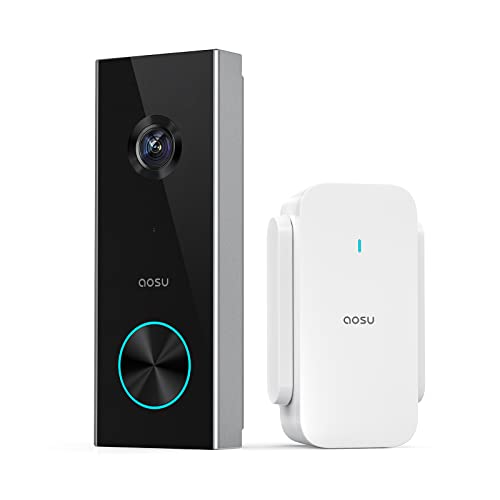
Pros
- 2K resolution with 166° ultra-wide view
- AI human detection reduces unnecessary alerts
- Local storage without a subscription
- Two-way talk with quick replies
- Included base adds Wi-Fi and chime
Cons
- 2.4 GHz Wi-Fi only, no 5 GHz support
- MicroSD card sold separately
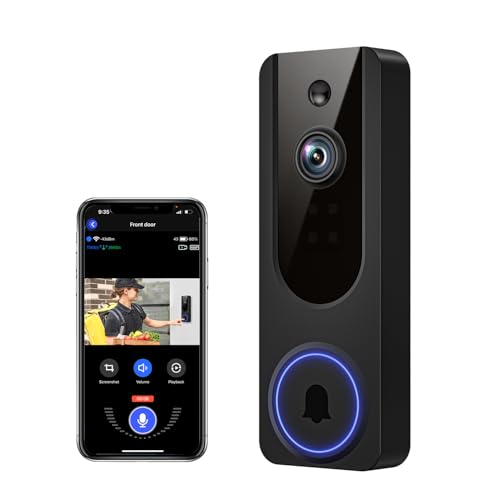
Pros
- AI human detection filters unnecessary motion alerts
- 1080p video with four-LED night vision
- Two-way audio from a smartphone
- Encrypted cloud storage with AES-128
Cons
- 2.4GHz WiFi only
- Cloud subscription required for recording storage
Storage matters more than resolution
A no-fee doorbell should keep its core functions available without forcing a cloud plan. BOIFUN Video Doorbell Camera supports human detection, live viewing, two-way audio, playback, and microSD storage up to 128GB. The aosu 2K Wireless Doorbell Camera with aosuBase also supports local recording, while SwitchBot includes a 4GB SD card and supports cards up to 512GB.
Cloud access can still be useful, but the products do not all handle it the same way. VanaOrbi keeps two-way audio, human detection, and real-time alerts available without a subscription, while its cloud storage requires a plan. Wyze supports local storage with a separately purchased microSD card, and Blink lists a compatible subscription requirement for person detection.
For a broader look at placement and ecosystem choices, see these HomeKit doorbell camera options before you commit to a platform.
Pro Tip: Choose a microSD card capacity that matches how often motion occurs, and check whether the card is included before mounting the doorbell.
Match the view to your doorway
Wide viewing angles help with visitors standing close to the door and packages placed below the camera. BOIFUN and aosu list 166-degree views, SwitchBot lists 165 degrees with a head-to-toe 16:9 view, and Wyze uses a 1:1 head-to-toe format with a 150 by 150-degree field of view. Blink also emphasizes head-to-toe 2K coverage.
Mounting height and angle still shape what the camera sees. If the lens points too high, a package may disappear from the lower edge; if it points too low, faces may be less useful. The advice in how to angle a video doorbell down can help you correct that before final installation.
| Doorbell type | Key storage choice | Best placement |
|---|---|---|
| Phone-first | Local or cloud | Standard front door |
| Monitor included | Local SD card | Family entryway |
| Hub or chime | Base-assisted storage | Weak Wi-Fi area |
Power, Wi-Fi, and indoor alerts
Wireless does not mean maintenance-free. BOIFUN uses a built-in rechargeable battery, Wyze offers a rechargeable battery or AC hardwiring, Blink uses three AA Energizer lithium batteries, and SwitchBot lists a 5000 mAh battery. aosu and VanaOrbi require 2.4 GHz Wi-Fi, while BOIFUN also supports only 2.4 GHz.
Indoor notification style may decide the purchase. SwitchBot includes a 4.3-inch color monitor that needs a power cable and works best within five metres of the exterior doorbell. aosuBase Mini combines Wi-Fi extension, local storage, and an indoor digital chime, while BOIFUN includes a chime.
Before You Mount It: Do not assume a wireless model will work well at any distance from the router or indoor monitor. Confirm the 2.4 GHz coverage, keep the monitor near the door when required, and plan battery access before fixing the bracket.
Connection problems can also come from router placement, interference, or a weak signal rather than the camera itself. These troubleshooting steps for a doorbell camera that keeps disconnecting are useful before relocating the device.
Expert Examined
From Dana Whitfield

I keep the charging point and storage plan visible in the household routine. The mistake I see is mounting a battery doorbell where removing it means moving furniture or climbing awkwardly, so choose an accessible position before you worry about fine-tuning the viewing angle.
Read more about Dana WhitfieldWhich Doorbell Fits Your Home
I would point renters and budget-focused buyers toward the Blink Battery Doorbell 2K+ (newest model) when battery installation and head-to-toe 2K coverage matter. It uses three AA Energizer lithium batteries and can work completely wire-free, though person detection requires a compatible subscription. That makes its fee structure worth checking before purchase.
I would put the BOIFUN Video Doorbell Camera at a front door where free core features and local storage are priorities. It combines a 166-degree view, human detection, two-way audio, night vision, a chime, and microSD support up to 128GB. Its built-in battery is rechargeable and non-removable, so charging access matters.
For a household that wants a screen inside rather than relying only on phones, I would choose the SwitchBot Video Doorbell Camera. The 4.3-inch monitor, included 4GB SD card, 2K video, and 5000 mAh battery suit an entryway where family members need quick access to live or recorded views.
The Bottom Line
The biggest mistake buyers make with subscription-free doorbells is treating the phrase as a promise that every feature works without a plan. Person detection, cloud recording, playback, and local storage vary by model, so read the storage and alert details together.
If you do one thing first, decide whether you want a microSD card, an included base, or an indoor monitor. That choice narrows the field faster than resolution alone and helps you plan Wi-Fi coverage, charging access, and the right mounting position.
FAQs
Not always. BOIFUN, SwitchBot, and aosu list core features and local storage without a subscription, while VanaOrbi keeps core alerts and detection available without cloud service. Blink states that person detection requires a compatible subscription. Choose a model with microSD support or an included storage base. SwitchBot includes a 4GB SD card, while BOIFUN and aosu support separately added microSD cards. Wyze also supports local storage with a separately purchased card. Maintenance depends on activity, settings, weather, and battery design. Blink uses three AA lithium batteries, while BOIFUN, SwitchBot, and Wyze use rechargeable batteries. Install the device where you can safely access it for charging or replacement. A certification should identify a specific safety, electrical, or environmental standard, but the supplied product details do not list certifications for these models. Check the packaging and manufacturer documentation for the exact mark and standard before relying on it.Do wireless video doorbells need a subscription for alerts?
Which doorbell type is best for local recording?
How often do battery doorbells need maintenance?
What does a doorbell certification mean?
Sources
- National Fire Protection Association www.nfpa.org
- UL Solutions www.ul.com