
Shopping for the best Wi-Fi smart locks gets easier once you decide whether your home needs a fingerprint reader, flexible guest codes, or a complete handle set. This selection is for households replacing a front-door deadbolt and weighing convenience against installation fit, battery upkeep, and security certification.

Pros
- Fingerprint access in under one second
- Built-in Wi-Fi, no bridge required
- Up to eight months with eight AA batteries
- BHMA Grade 3 certification
Cons
- Requires eight AA batteries
- IP53 protection, not fully waterproof

Pros
- Eight entry methods, including fingerprint and voice
- 0.2-second fingerprint recognition
- Built-in 2.4GHz Wi-Fi, no hub needed
- IP65 weatherproof matte black finish
Cons
- Requires eight AA batteries, not included
- Supports 2.4GHz Wi-Fi only
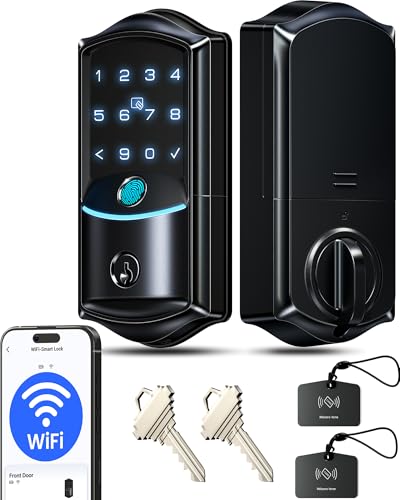
Pros
- Built-in Wi-Fi, no hub required
- 0.2-second fingerprint entry
- IP65 weatherproof, ANSI Grade 3
- Remote codes, logs, and security alerts
Cons
- Eight batteries required, not included
- Two-year warranty requires product registration

Pros
- Fingerprint, passcode, app, key, and voice entry
- Built-in Wi-Fi, no extra hub needed
- Up to 100 custom passcodes
- Auto-lock adjustable from 10 to 180 seconds
Cons
- Batteries not included
- Supports 2.4GHz Wi-Fi only

Pros
- Built-in WiFi, no hub required
- Fingerprint entry in 0.3 seconds
- One-time and recurring PIN codes
- Matching handle set included
Cons
- Requires 2.4GHz WiFi within 33 feet
- Batteries not included, alkaline only
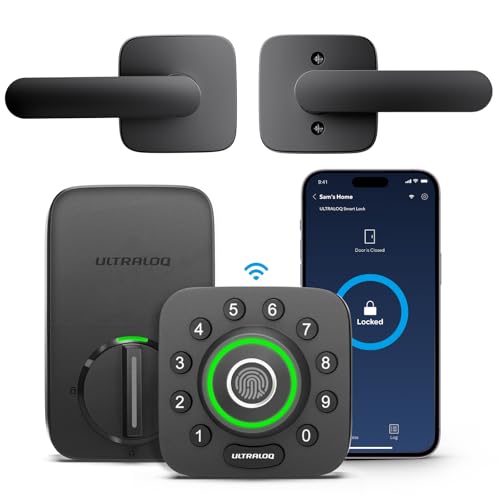
Pros
- AI-powered fingerprint entry
- Built-in Wi-Fi, no extra hub
- ANSI Grade 1 security rating
- Works with Alexa and Google Assistant
Cons
- 2.4GHz Wi-Fi only
- Smartphone app required for remote access
Start With Your Door and Entry Routine
A fingerprint reader suits a busy household that wants quick daily access without remembering a code. Keypads are more practical for guests, cleaners, and rentals because you can issue or remove codes without handing out a physical key. App control matters when you need to check status or manage access while away.
Also check the hardware format before choosing a model. The Philips WiFi Keypad Deadbolt with Handle includes a matching handle set, while the other choices focus on deadbolt replacement or a deadbolt and knob combination. A handle set can simplify a front-door upgrade, but it also means measuring the existing hardware carefully.
For background on the hardware behind the deadbolt, read why the strike plate matters. A smart lock cannot compensate for a loose frame or a bolt that already rubs against the plate.
Pro Tip: Measure your door thickness, bore size, and existing deadbolt before ordering. A quick fit check prevents a smart lock purchase from becoming a hardware replacement project.
Compare Entry Methods Before Features
These products cover several combinations of fingerprint access, passcodes, physical keys, cards, fobs, voice assistants, and phone apps. The Veise VE027-K WiFi Smart Deadbolt Locks with 2 provides eight listed entry methods, while the Philips Wi-Fi Smart Deadbolt Lock supports app, passcode, fingerprint, key, and voice access.
For families with frequent visitors, scheduled or one-time codes are more useful than a long fingerprint list. The Veise VE027 WiFi Smart Lock Fingerprint Keyless supports permanent, recurring, scheduled, and one-time codes, while the Philips WiFi Keypad Deadbolt with Handle offers similar flexible passcode types.
| Entry priority | Useful feature | Best household fit |
|---|---|---|
| Fast daily access | Fingerprint reader | Busy family |
| Visitor access | Scheduled codes | Guests or rentals |
| Hardware upgrade | Handle included | Door replacement |
Remote access uses the lock’s built-in Wi-Fi, so no bridge is required for these models. Several specify 2.4GHz Wi-Fi, and the Philips Wi-Fi Smart Deadbolt Lock advises keeping the router and lock within a stated range. If your network is crowded or distant from the door, read what a smart lock bridge does before assuming every wireless setup behaves the same.
Expert Examined
From Ray Okafor

I keep seeing the same avoidable mistake with connected locks: the buyer focuses on app features while the door itself needs force to turn the bolt. I would correct the alignment first, then choose the entry methods that match the people using the door.
Read more about Ray OkaforBattery, Weather, and Security Grade
Battery claims vary by model and usage. The eufy Security Smart Lock C220 lists up to eight months with eight AA batteries, the Veise VE027-K lists up to 240 days, and the Philips WiFi Keypad Deadbolt with Handle lists up to six months. Batteries are not included with several products, so plan replacements and pay attention to low-battery alerts.
Outdoor exposure also separates the choices. The Veise models and ULTRALOQ U-Bolt Pro WiFi Fingerprint Smart Lock carry IP65 ratings, while the eufy Security Smart Lock C220 is IP53. BHMA or ANSI Grade 3 appears on several models, while ULTRALOQ lists ANSI Grade 1, a higher residential security grade.
Before You Mount It: Do not disable every backup entry method without understanding the battery procedure. Keep the physical key or external power option available, and confirm the lock can operate correctly when the batteries are depleted.
Certification is not a promise that every installation is equally strong. It describes a standard for the lock, so the frame, strike plate, screws, and door alignment still matter. For broader context about digital risks, read how smart locks can be hacked.
Which Lock Fits Your Household
I would point families that want the widest entry mix toward the Veise VE027-K WiFi Smart Deadbolt Locks with 2. Its fingerprint, card, code, key, app, voice, authorization, and sharing options give different household members a practical route inside, and its automatic locking window can be set from 10 to 180 seconds.
I would choose the eufy Security Smart Lock C220 for someone who wants a simpler deadbolt replacement with built-in Wi-Fi, six entry methods, and an ecosystem connection to a eufy doorbell. Its listed eight-month battery life and 15-minute installation target also suit a straightforward front-door upgrade.
For a stronger stated security grade and door-status awareness, I would point you to the ULTRALOQ U-Bolt Pro WiFi Fingerprint Smart Lock. It adds a sensor, approach-based automatic access, web portal, eKey sharing, and ANSI Grade 1 certification, making it the most feature-focused choice for a connected household or rental property.
The Bottom Line
The mistake most buyers make is treating Wi-Fi access as the main decision. The better choice starts with door compatibility, the people who need entry, and whether you prefer fingerprints, codes, keys, or a handle replacement.
If you do only one thing first, measure the existing deadbolt and door thickness, then confirm the available 2.4GHz Wi-Fi signal at the entry. That simple check narrows the six options before app features distract you.
FAQs
Fingerprint access is fast for regular household members, while keypad access is easier to share with guests, cleaners, or renters. A model with both gives you flexibility, but code management may matter more than biometric speed in a busy home. Install it on a compatible exterior door with a properly aligned standard deadbolt. Check the door thickness, bore size, router distance, and 2.4GHz network requirement before installation. The listed estimates range from about six months to eight months or 240 days, depending on the model and usage. Use the specified AA batteries, watch app alerts, and keep the physical key or backup power method available. These labels identify performance standards for the lock hardware. Grade 1 is a higher stated security grade than Grade 3, but installation quality, door alignment, and the strike plate still affect the finished door.Are fingerprint smart locks better than keypad locks?
Where should a Wi-Fi smart lock be installed?
How often do smart lock batteries need replacement?
What does BHMA or ANSI Grade 1 mean?
Sources
- UL Solutions and lock standards information. www.ul.com
- National Fire Protection Association and home safety resources. www.nfpa.org