
Shopping for the best water leak sensors for home gets easier once you decide between direct Wi-Fi alerts, a dedicated hub, and long-range communication for difficult rooms. Renters, homeowners, and anyone protecting a basement need different coverage priorities.

Pros
- Detects water levels as low as 0.5 mm
- Phone alerts and local hub alarm
- IP67 waterproof housing
- Compact wireless placement, no screws required
Cons
- Requires a separately sold Aqara Hub
- Not compatible with other brands' hubs

Pros
- Detects water levels as low as 0.5 mm
- Phone notifications and local hub alarm
- Compact wireless placement, no screws required
- IP67 waterproof housing with rust-proof coating
Cons
- Requires a separately sold Aqara Hub
- Not compatible with hubs from other brands

Pros
- No hub required for app and email alerts
- Detects water levels as low as 0.5mm
- Loud 100dB alarm
- IP67 waterproof shell
- Up to two-year battery life
Cons
- 2.4GHz WiFi required for remote alerts
- Uses two AAA batteries per detector

Pros
- Up to 2034-foot open-air LoRa range
- Replaceable AAA batteries included
- Battery life exceeds five years
- Alerts through mobile app, email, and SMS
Cons
- Hub required for full functionality
- Does not connect directly to WiFi
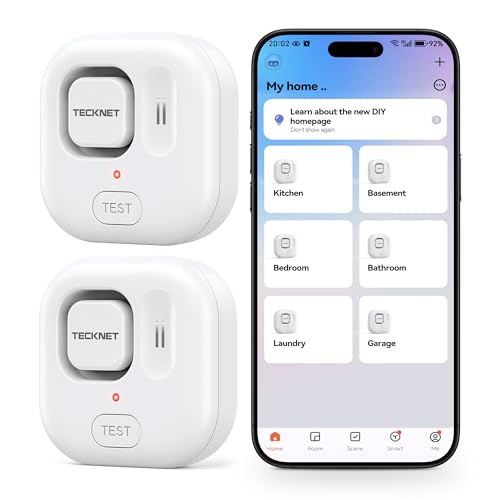
Pros
- Six-sensor detection from top and bottom probes
- Adjustable 120dB alarm
- IP67 waterproof housing
- No hub required, 2.4GHz WiFi
Cons
- Does not support 5GHz WiFi
- SMS and calls require a subscription

Pros
- Six sensors with built-in 105 dB alarms
- Up to 2,034-foot open-air LoRa range
- App, email, and SMS alerts
- Up to five-year battery life
- Works during internet outages with YoLink Control-D2D
Cons
- Each sensor requires two AAA batteries
- Water leak and freeze monitoring only
Start With the Connection Your House Can Support
A Wi-Fi sensor can be simple if the monitored room has a dependable 2.4GHz network. The SwitchBot and TECKNET options connect without a separate hub, while Aqara requires an Aqara Hub and YoLink requires its own hub for full app functionality.
Hub-based systems make more sense when you want several sensors tied to one ecosystem. YoLink uses LoRa rather than Wi-Fi and advertises up to 2,034 feet in open air, making it particularly suited to detached garages, outbuildings, and basements where ordinary wireless coverage may struggle.
Pro Tip: Place the sensor where the first drops will reach it, not where a visible puddle usually forms. Under sinks, beside water heaters, near washing machines, and by sump pumps are practical starting points.
Match Detection and Alerts to the Room
All six choices are designed for leak monitoring, but their alert styles differ. Aqara detects water as low as 0.5mm and can trigger an Aqara Hub alarm or other Aqara devices. SwitchBot adds a 100dB alarm, while TECKNET uses a 120dB adjustable siren with top and bottom probes.
Local sound matters when your phone is muted or internet access is unavailable. Remote notifications matter when you are away. YoLink provides app, email, and SMS alerts through its hub, and its Control-D2D behavior can continue local device actions during certain Wi-Fi, internet, or power interruptions.
| Connection type | Key alert feature | Suitable location |
|---|---|---|
| Wi-Fi direct | App and email alerts | Connected rooms |
| Aqara Zigbee | Hub automation | Smart-home interiors |
| YoLink LoRa | Long-range coverage | Remote structures |
For broader placement advice, review where water leaks start in a house before deciding how many sensors you need.
Before You Mount It: Do not treat a sensor as an automatic shutoff valve. A detector can alert you, but stopping the water may still require a person or a separate compatible shutoff system.
Plan Battery Checks and Hub Placement
Battery convenience varies. YoLink lists up to five years from two replaceable AAA batteries, while SwitchBot and TECKNET list up to two years. Actual service depends on use, so app reminders should be acted on rather than ignored.
Aqara’s compact Zigbee sensors should stay within about 10 meters of the Aqara Hub, with the hub and router on the same local network. Before mounting, confirm the signal reaches the intended room and leave enough access to replace the battery.
Expert Examined
From Jenna Castellano

I keep sensors slightly beyond the edge of equipment rather than hidden under it, because a fully concealed unit is easy to forget. The mistake I see most often is protecting the main floor while leaving the water heater, basement pump, or laundry area uncovered.
Read more about Jenna CastellanoIf your main concern is flooding around a sump pump, related advice on what a sump pump alarm does can help you plan overlapping alerts. For emergency preparation, the US Consumer Product Safety Commission is a useful safety authority.
Which Sensor Fits Your Coverage Plan
I would point renters or anyone avoiding extra equipment to the TECKNET WiFi Water Leak Detector. It connects directly to 2.4GHz Wi-Fi, includes two sensors and batteries, and combines app alerts with an adjustable 120dB alarm. Keep the 2.4GHz requirement in mind before ordering.
For a large property with a detached structure or weak Wi-Fi, I would choose the . It includes the hub and six sensors, uses LoRa for long-range communication, provides 105dB local alarms, and lists up to five years of battery life.
The Bottom Line
The biggest mistake is buying a sensor without checking its connection requirement. A compact Zigbee unit is not a complete system without its matching hub, and a direct Wi-Fi model still needs reliable 2.4GHz coverage.
If you only do one thing first, map every likely leak source and note whether each location has usable Wi-Fi or needs long-range coverage. Then choose the sensor system that can reach those spots and alert you in the way you will actually notice.
FAQs
Wi-Fi models avoid a separate hub, while Zigbee models can fit neatly into a compatible smart-home ecosystem. Choose based on the network already available near the leak points and whether you want automation through a matching hub. Place them near toilets, sinks, dishwashers, washing machines, water heaters, sump pumps, and fish tanks. Put the sensor where early drips can reach it, while keeping it accessible for battery replacement and signal checks. Battery life depends on the model and usage. The listed products range from up to two years to up to five years, and app reminders can indicate when replacement is needed. IP67 describes protection against dust and temporary water immersion under specified conditions. It does not mean the sensor should be permanently submerged or that its wireless signal will work through every obstruction.Are Wi-Fi or Zigbee water leak sensors better for a home?
Where should I place water leak sensors?
How often do water leak sensor batteries need attention?
What does an IP67 rating mean on a water sensor?
Sources
- US Consumer Product Safety Commission www.cpsc.gov
- NFPA www.nfpa.org
- UL Solutions www.ul.com