
Shopping for the best water leak detectors for home gets easier once you decide whether remote phone alerts or a standalone siren matters more. Renters, homeowners, and anyone protecting a basement need a detector that fits the room, network, and maintenance routine.

Pros
- Detects water levels as low as 0.5 mm
- Phone notifications and local hub alarm
- Compact wireless placement, no screws required
- IP67 waterproof housing with rust-proof coating
Cons
- Requires a separately sold Aqara Hub
- Not compatible with hubs from other brands

Pros
- No hub required for app and email alerts
- Detects water levels as low as 0.5mm
- Loud 100dB alarm
- IP67 waterproof shell
- Up to two-year battery life
Cons
- 2.4GHz WiFi required for remote alerts
- Uses two AAA batteries per detector
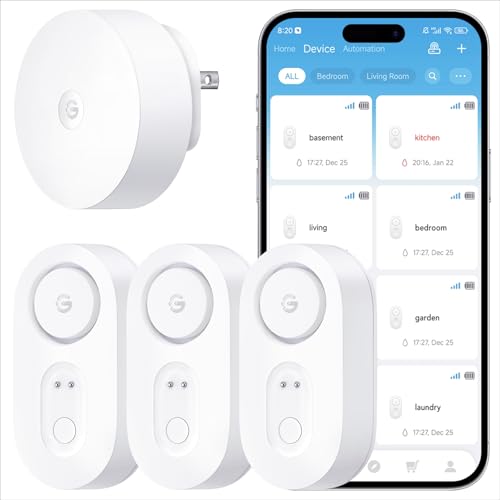
Pros
- 1,804-foot range through up to five walls
- SMS, email, and app push alerts
- 105 dB alarm with four volume levels
- IP67 waterproofing and five-year battery life
Cons
- Gateway supports 2.4 GHz Wi-Fi only
- Gateway pairs only with select GoveeLife sensors

Pros
- Up to five years of battery life
- 100dB alarm with four volume settings
- Low-battery buzzer and LED warning
- IP66 waterproof construction
- Three-pack for multiple locations
Cons
- No Wi-Fi connectivity
- Battery replacement required after five years

Pros
- 1968-foot LoRa receiving range
- SMS, email, and app push alerts
- Up to 100dB leak alarm
- IP66 rating for damp areas
Cons
- Gateway supports 2.4GHz Wi-Fi only
- Alerts depend on gateway and app connection

Pros
- Top and bottom probes detect drips and pooling
- 120dB alarm with four volume levels
- IP66 waterproof ABS and stainless steel build
- Three-pack includes six AAA batteries
Cons
- No WiFi or Bluetooth connectivity
- Requires AAA battery replacements
Start With the Alert You Will Hear
A local alarm is useful when you are home, especially near a washing machine, sink, or water heater. TECKNET reaches up to 120 dB, while SwitchBot reaches 100 dB and GoveeLife Upgraded Smart Water Leak Detector 1s reaches 105 dB with adjustable volume.
Remote alerts matter when you are asleep, at work, or away from a vacation property. SwitchBot sends app and email notifications without a hub, while both GoveeLife systems can send SMS, app, and email alerts through their gateways. Aqara sends phone alerts through an Aqara Hub and can also trigger a local hub alarm.
Pro Tip: Place one sensor where a leak would first appear, not only where water would eventually pool.
Match Connectivity to the Property
A hub-free setup is appealing if you already have reliable 2.4GHz Wi-Fi and want fewer accessories. SwitchBot connects through Wi-Fi and Bluetooth, while the GoveeLife packages include gateways that use 2.4GHz Wi-Fi. The GoveeLife Upgraded model uses Sub-1G wireless communication for distances up to 1,804 feet, including through five dense walls.
Aqara is the better fit for an Aqara-centered smart home, but its hub is required and hubs from other brands are not compatible. Keep the sensor within about 10 meters of the Aqara hub, and remember that Zigbee2MQTT and similar third-party USB dongles are not officially supported. For context on response plans, see whether water sensors shut water off.
Before You Mount It: A leak detector alerts you to water but does not automatically stop the supply unless it is part of a separate shutoff system. Know the location of your main valve before placing sensors near appliances or plumbing.
Compare Range, Sealing, and Battery Needs
Waterproof ratings help protect the device from damp rooms and accidental contact with water, but they do not remove the need for sensible placement. Aqara, SwitchBot, and GoveeLife Upgraded use IP67 housings, while GoveeLife Smart Water Leak Detector 2, BLIZONTE, and TECKNET use IP66 protection.
Battery schedules also differ. SwitchBot lists up to two years with two AAA batteries, TECKNET lists more than two years with two AAA batteries, and both GoveeLife models list five-year battery life. BLIZONTE also lists five-year battery life and provides a low-battery warning, which is useful for less accessible locations.
| Detector type | Key difference | Suitable location |
|---|---|---|
| Hub required | Aqara Zigbee | Smart-home automation |
| No hub | SwitchBot Wi-Fi | Kitchens and laundry rooms |
| Gateway range | GoveeLife long range | Basements and outbuildings |
For sensors in a basement or detached structure, long-range communication can matter more than smart-home compatibility. GoveeLife Smart Water Leak Detector 2 supports up to 100 sensors through its gateway, while the Upgraded model includes a gateway paired specifically with its listed sensors.
Place Sensors Where Leaks Begin
Good locations include under toilets, near water heaters, beside washing machines, beneath dishwashers, under sinks, near sump pumps, and by fish tanks. A sensor should sit on a flat surface where its probes can contact water quickly without being blocked by dust, storage items, or appliance panels.
Do not hide a detector so thoroughly that you cannot silence it or replace its battery. The common starting points for household leaks are more useful than simply placing every sensor in the lowest part of the room.
Expert Examined
From Jenna Castellano

I keep seeing people place a sensor beside a machine instead of beneath the connection most likely to drip. I would map each water source first, then position the detector where a small leak reaches the probes before it spreads across the floor.
Read more about Jenna CastellanoIP ratings describe resistance to dust and water exposure, not a promise that every installation is suitable for submersion or outdoor use. For broader electrical safety terminology, consult UL Solutions and follow the product instructions for the specific device.
Which Detector Fits Your Home
I would point you to SwitchBot 3 Pack Water Leak Detector for Home if you want app and email alerts without purchasing a hub. Its 100 dB alarm, 0.5 mm detection level, IP67 housing, and two-year battery claim suit a kitchen, laundry room, or water heater area where you want a straightforward Wi-Fi connection.
For a large property with a distant basement, shed, or detached space, I would choose GoveeLife Upgraded Smart Water Leak Detector 1s. Its included gateway, 1,804-foot stated range, SMS, email, and app alerts, 105 dB alarm, and five-year battery claim make it the most suitable match for wide coverage.
I would use Aqara Water Leak Sensor 3 Pack in an Aqara smart-home setup where automation matters. It can trigger other Aqara devices, detects water as low as 0.5 mm, and uses an IP67 housing, but the required Aqara Hub and 10-meter Zigbee placement limit make it less flexible for a standalone installation.
The Bottom Line
The mistake most buyers make is treating every water sensor as interchangeable. A loud local alarm cannot provide remote awareness by itself, while a connected detector may depend on Wi-Fi, a gateway, or a brand-specific hub.
If you only do one thing first, identify every water source and the network conditions around it. Then choose a local-only alarm, hub-free Wi-Fi model, or gateway-based system that can alert you from the locations you actually need to protect.
FAQs
A local alarm is useful when someone is home and can hear it quickly. A connected model adds app, email, or SMS notifications, but it depends on the stated Wi-Fi, gateway, or hub requirements. Place them under or near toilets, sinks, water heaters, washing machines, dishwashers, sump pumps, and other plumbing connections. Keep the probes exposed and position the device where a small leak can reach it before water spreads. Battery life varies by model, from listings of more than two years to claims of up to five years. Check low-battery alerts and inspect devices periodically, especially when they are installed in basements or behind appliances. These ratings indicate protection against dust and water exposure under defined conditions. They do not replace proper placement, and the rating alone does not mean the detector should be left submerged or used outside its stated purpose.Should I choose a local alarm or a connected sensor?
Where should water leak detectors be placed?
How often do leak detector batteries need attention?
What does an IP66 or IP67 rating mean?
Sources
- UL Solutions www.ul.com
- US Consumer Product Safety Commission www.cpsc.gov
- NFPA www.nfpa.org