
Shopping for the best video doorbells with long battery life means deciding whether you prefer replaceable batteries, a rechargeable pack, or a high-capacity built-in cell. Renters, busy households, and homes with frequent porch activity need different answers because motion events can shorten runtime.

Pros
- 2K HD video with 166-degree wide view
- No subscription for alerts and playback
- HDR night vision up to 10 meters
- MicroSD storage support up to 128GB
Cons
- 2.4 GHz Wi-Fi only
- Built-in battery is non-removable

Pros
- Head-to-Toe 2K video resolution
- Three AA lithium batteries included
- Two-way audio with noise cancellation
- IP65 weather-resistant design
Cons
- Person detection requires a separate subscription
- Three AA batteries eventually need replacement

Pros
- Retinal 2K video with wide-angle coverage
- Up to 6x Enhanced Zoom
- Live View and Two-Way Talk
- Real-time phone motion notifications
Cons
- USB-C charging cable not included
- Ring Protect subscription sold separately

Pros
- 2K video with 165° head-to-toe view
- Color night vision for dark entrances
- 4.3-inch monitor with quick response button
- Free 4GB SD card, no subscription
Cons
- Indoor monitor requires a power cable
- Best connection within 5 metres

Pros
- 2K video with color night vision
- 150-degree wide-angle view
- Battery or wired installation
- Motion detection with real-time alerts
Cons
- AI alerts require a separate monitoring plan
- Battery must be removed for USB-C charging
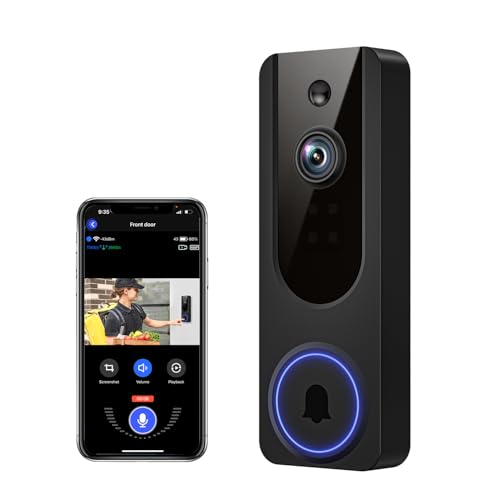
Pros
- AI human detection filters unnecessary motion alerts
- 1080p video with four-LED night vision
- Two-way audio from a smartphone
- Encrypted cloud storage with AES-128
Cons
- 2.4GHz WiFi only
- Cloud subscription required for recording storage
Battery format matters more than resolution
Battery-powered doorbells are convenient, but runtime depends on how often the camera wakes, records, and sends alerts. BOIFUN states up to 60 days under laboratory conditions with 30 daily motion activations and 10-second recordings, while Blink describes months of operation from three AA Energizer lithium batteries.
A removable battery can reduce downtime because you can keep a spare ready, although the Ring model uses a built-in battery removed from the mount for USB-C charging. SwitchBot uses a 5000 mAh battery and includes an indoor monitor that requires its own power cable, making it a different fit from a completely wire-free setup.
Pro Tip: For fewer charging sessions, narrow motion zones and reduce sensitivity near busy sidewalks, exactly as the BOIFUN usage guidance recommends.
Match coverage to the entrance
Wide viewing angles help when packages sit below the camera or visitors stand close to the door. BOIFUN reaches 166 degrees, SwitchBot reaches 165 degrees with a head-to-toe 16:9 view, and Chamberlain provides a 150-degree view. Blink also emphasizes a head-to-toe 2K view.
Night visibility differs too. BOIFUN uses HDR and invisible 940 nm infrared for night viewing up to 10 meters, while SwitchBot specifies color night vision and VanaOrbi uses four infrared LEDs. If you are unsure whether the camera will include a delivery area, review how to angle a video doorbell down before mounting.
| Battery approach | Standout coverage | Suitable placement |
|---|---|---|
| Replaceable AA cells | Head-to-toe 2K view | Renters and busy entrances |
| Built-in rechargeable cell | Wide-angle 2K video | Typical front doors |
| 5000 mAh with monitor | 165-degree head-to-toe view | Homes wanting indoor viewing |
Consider Wi-Fi, storage, and alerts
Several models rely on 2.4 GHz Wi-Fi, which can offer useful range through walls. BOIFUN supports only 2.4 GHz, VanaOrbi also specifies 2.4 GHz only, and SwitchBot adds a Wi-Fi repeater in its monitor. A nearby monitor can be especially useful because SwitchBot says the doorbell and monitor should stay within 5 metres for a strong connection.
Storage and subscription rules are not identical. BOIFUN provides core alerts, human detection, two-way audio, and playback without a subscription, with microSD support up to 128GB. SwitchBot includes a free 4GB SD card and supports cards up to 512GB, while VanaOrbi keeps core alerts and human detection available without cloud service. Blink person detection and Ring history features require their respective subscriptions.
For troubleshooting wireless reliability, keep common doorbell disconnection causes in mind before blaming battery life.
Before You Mount It: A battery doorbell still needs a safe, weather-appropriate position and a reachable charging or battery-access plan. Do not mount it where frequent motion will constantly trigger recording, and follow the maker’s installation instructions.
Expert Examined
From Dana Whitfield

I keep the charging plan in view before choosing a wireless doorbell. The mistake I see is mounting a camera high or behind a tight fixture, then discovering that removing it for charging is awkward. Leave clear access to the mount and check the Wi-Fi path first.
Read more about Dana WhitfieldWhich doorbell fits your home
I would point renters toward the video doorbell category options that install without drilling complications. The Blink Battery Doorbell 2K+ (newest model) uses three AA Energizer lithium batteries, installs in minutes, and offers head-to-toe 2K video. Its person detection requires a compatible subscription, so include that ongoing service requirement in your decision.
I would choose BOIFUN Video Doorbell Camera for a front porch where local storage and subscription-free core features matter. Its wide 166-degree view, 940 nm night vision, microSD support, and stated laboratory battery estimate make it a practical combination for many entrances.
For a household that wants someone indoors to see and answer visitors, I would put SwitchBot Video Doorbell Camera first. The 4.3-inch monitor, 5000 mAh battery, local 4GB card, and operation without internet suit homes where a phone should not be the only way to respond.
The Bottom Line
The mistake most buyers make is treating a battery-life claim as universal. Motion frequency, detection settings, Wi-Fi conditions, recording length, and weather can all change how often charging is needed.
If you only do one thing first, inspect the entrance for motion traffic and confirm where the camera, mount, and charging access will go. Then choose the battery format and storage approach that fit that physical location.
FAQs
A model with a high-capacity rechargeable battery may reduce charging frequency, but motion activity and settings still matter. A doorbell using replaceable lithium batteries can also be convenient because you can prepare fresh batteries before removing the device. Mount it where the camera can see faces and deliveries without constant traffic triggering alerts. Check the viewing angle, keep charging or battery access reachable, and confirm the Wi-Fi signal before finalizing the position. Reduce unnecessary motion zones and lower sensitivity where appropriate. Avoid placing the camera toward busy walkways, and use the manufacturer’s recommended charging or battery format. A certification should identify a recognized safety or compliance evaluation, but the supplied product information does not list certifications for these models. Check the actual packaging and manufacturer documentation rather than assuming a mark applies.Which video doorbell type usually needs the least maintenance?
Where should a battery video doorbell be mounted?
How can I extend a doorbell battery's runtime?
What does a certification on a doorbell box mean?
Sources
- UL Solutions www.ul.com
- U.S. Consumer Product Safety Commission www.cpsc.gov