
Shopping for the best video doorbells with local storage means deciding whether you want built-in memory, a removable microSD card, or a complete indoor monitor system. That choice matters most for households that want recorded visitors and deliveries without depending on a monthly cloud plan.

Pros
- Sharp 2K video resolution
- 160° ultra-wide field of view
- Person detection with instant alerts
- Up to 180 days of battery use
Cons
- Chime not included
- MicroSD card sold separately

Pros
- 5MP Ultra HD video with 4:3 framing
- 166° head-to-toe view
- 8GB local storage with 60-day loop
- Wireless or wired power options
Cons
- Wireless mode requires periodic battery recharging
- Advanced AI and extended storage need cloud plans

Pros
- 7-inch 1080p touchscreen monitor
- No wiring or drilling required
- 160° wide-angle view with night vision
- Local TF-card storage, no subscription
Cons
- Motion alerts cover movement within 5 meters
- Phone features depend on Wi-Fi and app access
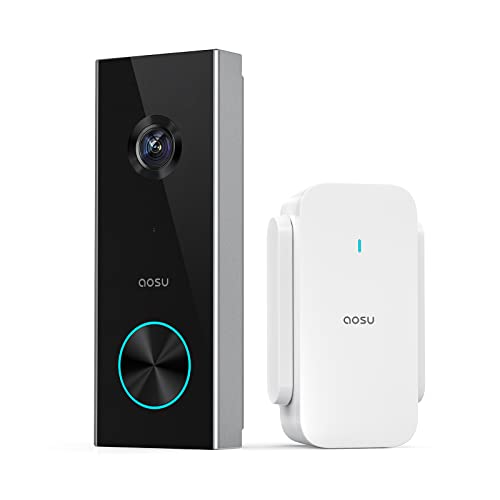
Pros
- 2K resolution with 166° ultra-wide view
- AI human detection reduces unnecessary alerts
- Local storage without a subscription
- Two-way talk with quick replies
- Included base adds Wi-Fi and chime
Cons
- 2.4 GHz Wi-Fi only, no 5 GHz support
- MicroSD card sold separately

Pros
- 2K QHD video with 180-degree viewing
- Wired or battery-powered installation
- Person, package, and vehicle detection
- Local storage without a subscription
Cons
- 2.4GHz Wi-Fi required, no 5GHz support
- microSD card required for local storage

Pros
- Dual cameras capture visitors and packages
- 2K video with color night vision
- Built-in 8GB local storage
- Wireless or wired installation
Cons
- Supports 2.4 GHz Wi-Fi only
- Rechargeable battery requires periodic charging
Storage Types That Change the Ownership Experience
Built-in storage is the simplest option because the recording memory arrives with the doorbell system. The aosu 5MP Ultra HD Wireless & Wired Video Doorbell and eufy Security Video Doorbell E340, Dual Cameras each include 8GB of local storage, while the aosu model also specifies 60-day loop recording through its aosuBase Mini.
Removable storage gives you more control over capacity, but you must supply the card and manage its compatibility. The aosu 2K Wireless Doorbell Camera with aosuBase accepts a microSD card up to 128GB, and the Tapo 2K+ Wired or Battery Powered Smart Video supports cards up to 512GB. Both offer local recording without requiring a subscription.
If you want footage available on a dedicated indoor screen, the WISDOM VIEW Wireless Smart Video Doorbell stores events on the included TF card inside its monitor. That arrangement can suit someone who wants to answer visitors from a living room, bedroom, or kitchen rather than relying only on a phone.
Pro Tip: Check whether the storage is included before mounting the doorbell. A removable-card model may need the card installed and formatted before it can preserve useful event history.
Coverage and Detection at the Front Door
A wide view is particularly useful when packages land below the camera. The eufy Security Video Doorbell E340, Dual Cameras uses a second downward-facing camera for packages, while the Tapo 2K+ Wired or Battery Powered Smart Video provides a 180-degree head-to-toe view. The aosu models use a 166-degree view with 4:3 framing for visitors and items near the threshold.
Detection features also affect how useful local recordings become. Tapo’s D225 identifies people, packages, and vehicles, whereas the Tapo D205 focuses on person detection. The aosu 5MP model combines radar, PIR infrared sensing, and AI human recognition, which gives it a more layered approach to activity alerts.
Mounting angle still matters even with a wide lens. If the camera points too far outward, a package at your feet may sit outside the useful frame. Use these doorbell angle tips before finalizing the bracket position.
Before You Mount It: Do not place the camera where glare, a porch light, or a nearby wall fills much of the frame. Check the daytime and nighttime view, and keep the lens accessible for safe cleaning.
Power Choices and Network Limits
Battery power makes placement easier, but charging becomes part of ownership. Tapo lists up to 180 days for the D205, while its D225 lists up to eight months and adds a 10,000mAh battery. The eufy E340 uses a rechargeable battery that can also be topped up through 16 to 24V wiring.
Hardwiring can reduce charging interruptions, but compatibility deserves attention before you remove an existing doorbell. The Tapo D225 supports 8 to 24V wiring and can provide continuous recording when hardwired. The aosu 5MP model supports either wireless or wired operation and works on 2.4GHz and 5GHz Wi-Fi, while several alternatives require 2.4GHz only.
Doorbell disconnects can interrupt alerts and leave gaps in local recordings. Review these common doorbell connection problems if your entryway has weak wireless coverage, and confirm the required band before buying.
Expert Examined
From Dana Whitfield

I keep the storage hub or card away from the exterior whenever the design allows it. The mistake I see is treating a local-storage doorbell as fully independent from the home network, so I first check signal strength at the mounting point and the indoor recording location.
Read more about Dana WhitfieldQuick Fit by Storage and Placement
| Storage approach | Main distinction | Best placement |
|---|---|---|
| Built-in memory | Included 8GB storage | Front entry needing simplicity |
| MicroSD storage | Expandable capacity | Homes wanting flexible retention |
| Monitor-based storage | Indoor TF card access | Bedrooms or shared living spaces |
Local storage does not eliminate every installation concern. You still need a suitable power source, a stable Wi-Fi connection, and a mounting position that captures faces and packages without excessive sky or wall space.
For wiring questions, use a cautious procedure rather than guessing from the old chime. The safe hardwiring instructions can help you identify the practical issues before connecting a powered unit. UL Solutions also explains why recognized product safety requirements matter when electrical equipment is installed near the home entry.
Which Doorbell Fits Your Entryway
I would point you to the aosu 5MP Ultra HD Wireless & Wired Video Doorbell for a front porch where detail, broad framing, and storage included in the system matter. Its 5MP camera, 166-degree view, 8GB local storage, and triple-sensor detection create a strong fit for households watching visitors and packages without a required subscription. Wireless and wired power also leave room to change the installation later.
I would choose the Tapo 2K+ Wired or Battery Powered Smart Video for a home that wants the widest listed view and more flexible event categories. Its 180-degree coverage, person, package, and vehicle detection, optional hardwiring, and support for a large microSD card suit a busy entrance where package visibility is a priority.
For someone who wants an indoor screen rather than phone-only monitoring, I would put the WISDOM VIEW Wireless Smart Video Doorbell near the top of the shortlist. Its 7-inch 1080P monitor, included TF-card storage, two-way audio, and wireless installation make it especially practical for households that want a visible answering station in a shared room.
The Bottom Line
The biggest mistake is treating all local storage as equivalent. Built-in memory is convenient, a microSD slot gives you expandable capacity, and a monitor-based system changes where you view and manage recordings.
If you only do one thing first, verify the storage method and the required Wi-Fi band against your home. Then check the mounting angle and power route, because a camera with excellent specifications still needs a clear view and dependable connection.
FAQs
Built-in storage is simpler because the memory is included and ready for the system. A microSD card gives you more control over capacity, but you must buy a compatible card and install it correctly before relying on local recordings. Mount it where faces and packages remain inside the frame, avoiding direct glare and obstructions. A wide-angle model can still miss items placed below the lens if the bracket points too far outward. Battery life varies by model and activity, and the listed figures are usage estimates rather than a universal schedule. Frequent motion, repeated live views, and heavy alert activity can increase charging needs, so choose wired operation when a suitable power route exists. Weather resistance indicates that the device is designed to handle stated outdoor conditions, but it does not make poor placement harmless. Keep the lens clear, avoid locations where water collects, and follow the manufacturer’s installation instructions.Is built-in storage better than a microSD card?
Where should a video doorbell be mounted?
How often do wireless doorbells need charging?
What does weather resistance mean for a doorbell camera?
Sources
- UL Solutions, Product safety information. www.ul.com
- National Fire Protection Association, Home safety resources. www.nfpa.org