
Shopping for the best smart thermostats starts with one practical split: do you need a C-wire and conventional HVAC compatibility, or a model built for no-C-wire and specialized heating? Your wiring, heating equipment, and preferred room control should decide the shortlist.

Pros
- Included RedLINK room sensor
- 5-inch touchscreen
- VOC and CO2 sensing
- Matter, Alexa, and Google support
Cons
- Multicolor finish limits neutral color matching
- No specific warranty details provided

Pros
- 7-day flexible scheduling
- Geofencing with automatic home and away
- ENERGY STAR certified
- Alexa ready
Cons
- C-wire power adapter required
- Limited with heating-only oil furnaces

Pros
- No C-wire installation
- 95-240VAC, 50-60Hz operation
- App and voice control
- TFT color touchscreen display
Cons
- 5-35°C temperature calibration range
- IP20 protection rating

Pros
- Learns schedules and outdoor temperature effects
- Temperature Sensor included for hot and cold spots
- No C wire required in most homes
- Works with Google Home, Alexa, and Siri
Cons
- C wire may be needed in some homes
- System compatibility varies by heating setup
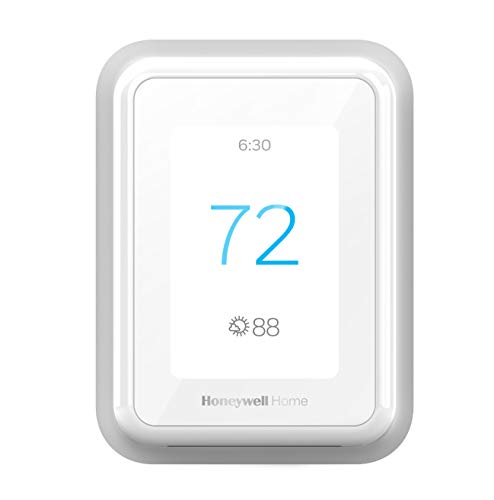
Pros
- Smart Response learns heating and cooling patterns
- Mobile control with automatic home and away mode
- Optional sensors focus comfort across multiple rooms
- Alexa and Google Assistant compatibility
Cons
- C-wire required for installation
- Room sensors sold separately

Pros
- Five-inch touchscreen display
- Wireless room sensor included
- VOC and CO2 sensing
- Matter, Alexa, and Google compatible
Cons
- Heat pump systems limited to 4H/2C
- Conventional systems limited to 3H/3C
Match the thermostat to your system
System compatibility matters more than app features. The Honeywell Home T5 Smart Wi-Fi Thermostat requires a C-wire power adapter and works with most heat and cool oil furnace systems, while the Honeywell Home T9 WIFI Smart Thermostat supports forced air, hot water, steam, and heat pumps with electric backup. The T9 does not work with electric baseboard heat.
If you have underfloor heating, water heating, wall-mounted boilers, or electric heating, the Asixxsix Smart Thermostat is the specialized option in this group. It operates across a 95 to 240VAC range and does not require a C-wire, so it should be considered only after confirming that your equipment matches those stated applications.
Before You Wire It: Confirm the thermostat’s voltage, heating type, and C-wire requirement before removing your existing control. A model intended for a different system can leave you with an incompatible installation, even if the display and app look appealing.
Room sensors change the comfort strategy
A thermostat near a hallway may not represent the bedroom, nursery, or main living space. The Honeywell Home YTHX1200B6/U ElitePRO S1200 includes a RedLINK room sensor, while the Google Nest Learning Thermostat (4th gen) includes a Nest Temperature Sensor (2nd gen). The Honeywell Home T9 WIFI Smart Thermostat can add Smart Room Sensors separately.
Room sensing is useful when one part of the home regularly feels warmer or cooler than the thermostat location. Google also describes temperature targeting by room and time in the Google Home app, while the T9 focuses on multiple-room comfort and sends filter and temperature alerts.
| Device type | Key distinction | Best fit |
|---|---|---|
| Room-sensor model | Included remote sensor | Uneven room temperatures |
| C-wire model | Conventional HVAC focus | Existing compatible wiring |
| No-C-wire model | 95 to 240VAC support | Specialized heating systems |
For broader smart-home integration, both ElitePRO S1200 models list Matter, Alexa, and Google compatibility. The Nest model lists Matter plus control through Google Home, Alexa, and Siri voice control.
Scheduling versus automatic adjustment
Some households want a predictable weekly schedule, while others prefer location-based or learned adjustments. The T5 offers seven-day scheduling, geofencing, auto home and away mode, monthly energy reports, and ENERGY STAR certification. The T9 adds an adaptive schedule, geofencing, and smart response alerts.
The Google Nest Learning Thermostat (4th gen) learns how outdoor conditions affect indoor temperature and asks for permission before schedule changes. Its larger display and Dynamic Farsight are useful if you want information visible from across the room.
Pro Tip: Check whether your utility offers rebates or demand-response enrollment before buying. The T5 and T9 specifically describe utility programs that may provide rewards or adjust settings during high demand.
Expert Examined
From Jenna Castellano

I keep seeing thermostat projects stall because the homeowner checks the app features before checking the equipment. I would photograph the existing wiring and identify the heating type first, then compare that information with the manufacturer’s compatibility requirements.
Read more about Jenna CastellanoFor related smart-home planning, you can also review these HomeKit doorbell camera options if combining climate control with connected security is part of your setup.
Which thermostat fits your home
I would point you to the Honeywell Home T5 Smart Wi-Fi Thermostat for a compatible conventional system when seven-day programming, geofencing, energy reports, and ENERGY STAR certification are the priorities. It is especially suitable for households that want clear scheduling instead of a learning-focused approach.
I would choose the Google Nest Learning Thermostat (4th gen) for a home that needs broad 24V compatibility, usually does not need a C-wire, and would benefit from an included room sensor. Its Matter support and Google Home controls also suit a mixed voice-assistant household.
For uneven temperatures across rooms, I would put the Honeywell Home YTHX1200B6/U ElitePRO S1200 on the shortlist because its RedLINK room sensor is included. The white ElitePRO model is another option when its listed residential or commercial system support and video-streaming features match your installation.
The Bottom Line
The mistake most buyers make is treating every smart thermostat as a universal replacement. C-wire needs, voltage, heating type, and compatibility with electric baseboard or oil systems can eliminate a model before smart features matter.
If you only do one thing first, identify your current system and wiring. Then choose between a scheduled thermostat, a learning model, or a room-sensor system based on the comfort problem you are actually trying to solve.
FAQs
A room sensor is useful when the thermostat location does not reflect the temperature in the room you care about most. The ElitePRO S1200 and Google Nest Learning Thermostat (4th gen) include sensors, while the T9 supports separately purchased Smart Room Sensors. The Asixxsix Smart Thermostat is described as wireless and no-C-wire-required, with 95 to 240VAC support for listed heating applications. The Google Nest Learning Thermostat (4th gen) says no C-wire is required in most homes, but compatibility still needs to be checked. The Honeywell Home T9 WIFI Smart Thermostat specifically does not work with electric baseboard heat rated at 120 to 240V. The Asixxsix model lists electric heating and a 95 to 240VAC range, but you should confirm the exact system type before installation. ENERGY STAR certification identifies the T5 as a certified energy-focused model with scheduling, energy reports, and personalized energy-use tips. It does not remove the need to confirm wiring and HVAC compatibility. Check the existing wiring, heating and cooling type, voltage, and whether a C-wire or adapter is required. You can also consult the US Consumer Product Safety Commission for general consumer safety information before starting electrical work.Do smart thermostats need a room sensor?
Which smart thermostat works without a C-wire?
Can I use these thermostats with electric baseboard heat?
What does ENERGY STAR certification mean for a thermostat?
What should I check before installing a smart thermostat?
Sources
- US Consumer Product Safety Commission www.cpsc.gov
- ENERGY STAR www.energystar.gov