
Choosing the best smart thermostats for energy savings means matching automation to your HVAC setup, especially its power requirements. You will get the most value from a model whose scheduling, geofencing, or occupancy features fit your routine.

Pros
- 7-day flexible scheduling
- Geofencing with automatic home and away
- ENERGY STAR certified
- Alexa ready
Cons
- C-wire power adapter required
- Limited with heating-only oil furnaces

Pros
- ENERGY STAR certified
- Common wire not required in most applications
- Alexa compatible with remote access
- Usage reports and maintenance reminders
Cons
- Some applications require a common wire
- HVAC compatibility varies by home

Pros
- Energy Star certified
- Color touchscreen and app control
- Works with Alexa, Google Assistant, and HomeKit
- Compatible with 85% of systems
Cons
- Power Extender Kit sold separately
- SmartSensor sold separately

Pros
- DIY installation with built-in level
- ENERGY STAR certified, saves about 23% on HVAC energy
- Remote control through Android and iOS apps
- Privacy policy excludes selling personal information
Cons
- Some systems require a C-wire or power accessory
- Smart features depend on app and WiFi access

Pros
- Energy Star certified
- Works with conventional systems and heat pumps
- Free C-wire adapter included
- Remote control through iOS and Android app
Cons
- Not compatible with mini split systems
- Remote features depend on the mobile app
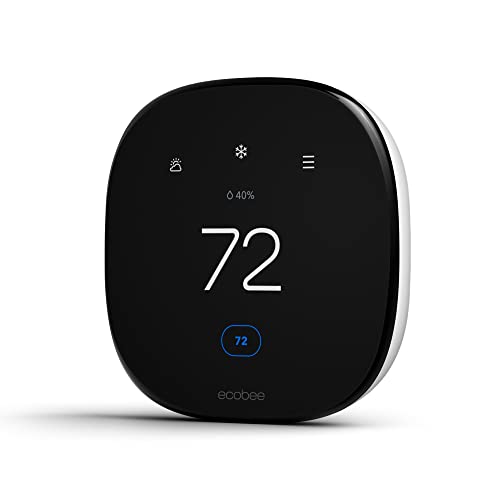
Pros
- Up to 26% potential annual energy savings
- Built-in occupancy sensing adjusts comfort automatically
- Power Extender Kit included for homes without C-wire
- Works with Alexa, Google Assistant, and HomeKit
Cons
- SmartSensors for room-by-room comfort sold separately
- HVAC compatibility should be confirmed before installation
Start With HVAC Compatibility
A thermostat can only save energy if it can control your heating and cooling equipment correctly. Check the system type before buying, including whether you have conventional equipment, a heat pump, oil heat, boilers, or another supported 24 VAC setup.
Power is the next major split. The Honeywell Home T5 Smart Wi-Fi Thermostat requires a C-wire power adapter, while Sensi Smart Thermostat, Wi-Fi, DIY, Alexa and Sensi Lite Smart Thermostat, WiFi, Alexa, DIY work without a C-wire in most applications. The ecobee models include or support power solutions for homes without a C-wire, depending on the model.
Check Wiring First: Do not assume a thermostat is compatible because the wall wiring looks familiar. Confirm the HVAC system and C-wire requirements before removing the existing control.
If you are uncertain about your equipment, use the ecobee compatibility checker for either ecobee model, or review the equipment requirements for the model you are considering. The Smart Energy & Climate Control category also provides useful context for related home energy devices.
Choose Automation You Will Actually Use
Scheduling is the basic energy-saving tool across these products. Honeywell Home T5 offers seven-day scheduling, location-based temperature control, automatic home and away mode, monthly energy reports, and personalized energy tips.
Sensi models add flexible scheduling, remote access, usage reports, and geofencing. The ecobee Smart Thermostat Essential automatically follows a set schedule, while the ecobee Smart Thermostat Enhanced adds occupancy sensing, preference learning, away and sleep adjustments, and humidity adjustments.
Cielo Smart Thermostat Eco for Central HVAC uses home, away, and asleep schedules, plus vacation mode and energy-use patterns. Its broader smart-home support includes Alexa, Google Assistant, Siri Shortcuts, SmartThings, IFTTT, Home Assistant, and Cielo Linked.
| Automation type | Main energy feature | Best fit |
|---|---|---|
| Schedule | Planned temperature changes | Predictable routines |
| Geofencing | Location-based adjustments | Variable schedules |
| Occupancy sensing | Home and away detection | Changing occupancy |
Remote access is useful, but it should not replace a sensible schedule. For more connected-home ideas, see the HomeKit device recommendations.
Pay Attention to Energy Feedback
Energy reporting helps you see whether your settings are reducing unnecessary heating and cooling. Honeywell Home states that high use of its scheduling feature saved customers between 8 and 16% on heating and cooling bills, although actual results vary with consumption.
Sensi products advertise savings of about 23% through scheduling, remote access, and usage reports. The ecobee Smart Thermostat Essential advertises savings of up to 23% annually, while the ecobee Smart Thermostat Enhanced advertises savings of up to 26% annually. These figures are manufacturer claims and should not be treated as a promise for every home.
Expert Examined
From Jenna Castellano

I keep the thermostat decision tied to the household routine rather than the feature count. The mistake I see is choosing advanced automation without checking wiring first, so I would confirm compatibility before planning any energy strategy.
Read more about Jenna CastellanoENERGY STAR certification is a useful signal that the thermostat meets that program’s efficiency criteria, but it does not guarantee a particular bill reduction. The ENERGY STAR program explains the certification framework, while your results still depend on settings, weather, equipment, and household behavior.
Which Thermostat Fits Your Routine
I would point you to Sensi Smart Thermostat, Wi-Fi, DIY, Alexa if you want a familiar button-based design, step-by-step app installation, privacy protection, and no C-wire in most applications. Its alerts and maintenance reminders also make it practical for households that want useful HVAC information without a complicated interface.
For a home with changing arrival times, I would consider ecobee Smart Thermostat Enhanced. Its built-in occupancy sensing, automatic away and sleep adjustments, humidity adjustments, included Power Extender Kit, and support for SmartSensors suit households that want comfort to change with occupancy.
I would choose Honeywell Home T5 Smart Wi-Fi Thermostat for someone who prefers either a seven-day schedule or location-based control and wants monthly energy reports. It is also worth considering utility rebates and demand response programs, but confirm the C-wire requirement before ordering.
The Bottom Line
The mistake most buyers make is focusing on advertised savings while overlooking HVAC compatibility and power requirements. A thermostat that needs an adapter, does not support your equipment, or does not match your routine will not deliver its full energy-saving potential.
If you only do one thing first, identify your HVAC type and confirm the C-wire situation. Then choose the automation style you will maintain consistently, whether that is a fixed schedule, geofencing, or occupancy-based adjustment.
FAQs
Scheduling, geofencing, and occupancy-based adjustments can all reduce heating and cooling when the home is empty. The best choice depends on whether your routine is predictable, changes often, or needs automatic occupancy detection. Not always. Sensi models work without a C-wire in most applications, the ecobee Essential can use a separately sold Power Extender Kit, and the Enhanced includes a Power Extender Kit, while the Honeywell Home T5 requires a C-wire power adapter. ENERGY STAR certification indicates that the thermostat meets the program’s efficiency criteria. It does not promise a specific reduction in your utility bill because results depend on equipment, weather, settings, and household use. Some models support heat pumps, but compatibility varies by product and system configuration. Cielo lists support for heat pumps, and ecobee lists supported heat pump configurations, so confirm the exact system before installation. Yes. The products in this selection offer app-based remote control or related location features. Remote access lets you adjust settings away from home, while geofencing or occupancy features can automate some changes.Which smart thermostat feature saves the most energy?
Do smart thermostats need a C-wire?
What does ENERGY STAR certification mean for a thermostat?
Can a smart thermostat work with a heat pump?
Can I control a smart thermostat while away?
Sources
- ENERGY STAR www.energystar.gov
- U.S. Consumer Product Safety Commission www.cpsc.gov