
Shopping for the best smart thermostats for Apple Home starts with one wiring decision: line-voltage electric heat or conventional HVAC. That distinction matters most for homeowners who want reliable Apple Home control without buying a thermostat their system cannot support.

Pros
- Works with 120V to 240V electric heating
- Humidity sensor and touchscreen
- Scheduling and geofencing support
- Apple Home, Alexa, and Google compatible
Cons
- Requires a neutral or second live wire
- Limited to electric baseboards and fan-forced heaters

Pros
- Matter support across major smart-home platforms
- Flexible 24/7 heating and cooling schedules
- Remote app and voice control
- Alerts for filters and system malfunctions
Cons
- C-wire required for some wiring configurations
- Not compatible with electric baseboard heaters
- Compatibility check required before purchase

Pros
- Matter support across major smart-home platforms
- No new app or account required
- Local and remote control through existing app
- Supports conventional and heat-pump systems
Cons
- Matter controller required for outside-home connectivity
- Not compatible with 120V or 240V systems
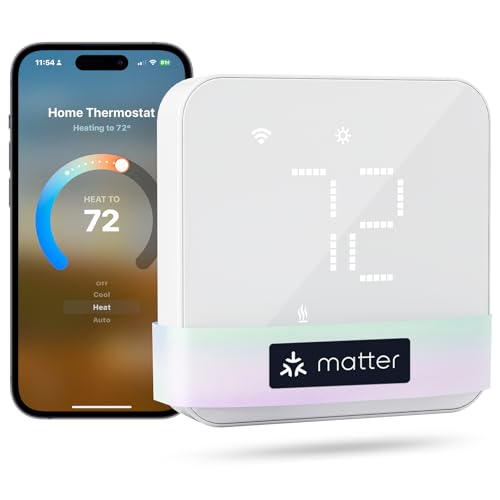
Pros
- Matter support for major smart-home platforms
- Flexible 24/7 heating and cooling schedules
- Remote app and voice control
- Smart alerts for filters and malfunctions
Cons
- C-wire may be required and is not included
- Not compatible with electric baseboard heaters

Pros
- ENERGY STAR certified
- Customizable 4.3-inch touchscreen
- Humidity monitoring for indoor air quality
- Works with Alexa, Matter, Apple Home, Google
Cons
- C-wire required for installation
- Not compatible with 120-240V electric baseboard heat

Pros
- Supports 120V and 240V electric heating
- 7-day scheduling with no subscription
- HomeKit, Alexa, and Google compatibility
- Remote control, geofencing, and vacation mode
Cons
- Requires four wires, including neutral or second live
- Not compatible with 24V furnaces or heat pumps
Match the thermostat to your heating system
Electric baseboard, fan-forced, wall, convector, and radiant ceiling heaters use line voltage, so they need a different thermostat class from a furnace or heat pump. The Mysa models are designed for 120V or 240V systems, while the meross, LUX, and Honeywell Home options are intended for conventional HVAC configurations.
Do not treat Apple Home compatibility as proof that a thermostat fits your wiring. The meross models do not support electric baseboard heat, and the LUX and Honeywell Home models also exclude 120V or 240V line-voltage systems. For conventional equipment, check the terminal layout and whether a C-wire is available before ordering.
Before You Mount It: A line-voltage thermostat can expose you to dangerous electrical power. Turn off the breaker and verify the circuit before handling wires, or use a licensed electrician when local codes or your experience require it.
| System type | Key requirement | Suitable models |
|---|---|---|
| Line-voltage heat | 120V or 240V wiring | Mysa V2, Mysa LITE |
| Conventional HVAC | C-wire compatibility | meross, LUX, Honeywell |
Matter and Apple Home setup differences
Matter is useful when you want the thermostat to work through Apple Home while retaining flexibility with other platforms. The meross and LUX options use Matter, and the Honeywell Home X7B is Matter certified, so each can fit a household that also uses Alexa, Google Home, or SmartThings.
The LUX model requires a Matter controller or smart speaker for connectivity outside the home, while the meross models also provide app-based remote control and flexible schedules. If you prefer fewer separate accounts, LUX keeps configuration at the device and uses the smart-home app already on your phone.
Apple Home shoppers may also value a clean display and room information. Honeywell Home provides humidity monitoring and a customizable 4.3-inch display, while Mysa V2 adds a humidity sensor and touchscreen for electric heating. For related smart-home planning, see these HomeKit doorbell cameras.
FYI: Matter connects compatible devices across supported smart-home platforms, but it does not remove system compatibility requirements such as voltage limits or a required C-wire.
Scheduling, sensors, and everyday control
Scheduling is valuable when your household follows a repeatable routine. Mysa V2 and Mysa LITE support scheduling, geofencing, and remote control, while the meross thermostats offer 24/7 flexible schedules for home, away, and sleep periods.
Humidity monitoring can add useful context in rooms where comfort changes with moisture. Mysa V2 includes a humidity sensor, and Honeywell Home X7B monitors humidity and indoor air quality, although additional HVAC equipment or accessories may be needed for broader air-quality control.
Expert Examined
From Ray Okafor

I keep seeing thermostat purchases go wrong because the buyer starts with the phone platform instead of the wire labels. I would photograph the existing terminals, identify the system voltage or equipment type, and confirm compatibility before removing the old thermostat.
Read more about Ray OkaforRemote access is available across several choices, but the route differs. Mysa uses its app with 2.4 GHz WiFi and needs no hub, while the LUX model depends on a Matter controller for remote connectivity. That distinction matters if you want control during travel without adding another smart-home device.
For broader home automation planning, the Home Assistant smoke detector options show why protocol compatibility should be considered across the whole household, not only one thermostat.
Which thermostat fits your home
I would point you to the Mysa Smart Thermostat V2 for Electric Baseboard if your rooms use 120V to 240V electric baseboards or electric fan-forced heaters and you want a touchscreen, humidity sensor, scheduling, geofencing, and Apple Home support. Its requirement for a neutral or second live wire still needs confirmation first.
For a lower-cost conventional HVAC choice, I would consider the meross Matter Smart Thermostats for Home. It suits many heat pump, furnace, boiler, humidifier, and dehumidifier systems, with app control, alerts, schedules, and local Matter integration, but it is not for line-voltage baseboard heat and some wiring setups require a C-wire.
I would choose the Honeywell Home X7B Smart Wi-Fi Programmable when a large customizable display and humidity monitoring matter more than baseboard compatibility. It supports Apple Home and Matter, but it excludes 120V and 240V electric baseboards. For home safety context, the smart thermostats category is a useful place to compare compatible climate devices.
The Bottom Line
The biggest mistake Apple Home buyers make is selecting by platform support before checking the heating system. A thermostat can work with Apple Home and still be incompatible with line-voltage heaters, two-wire systems, or a setup that lacks the required C-wire.
If you only do one thing first, identify the equipment type and wiring at the wall. Then compare voltage, C-wire needs, Matter requirements, and the sensor features that fit the room before choosing the model.
FAQs
Electric baseboard systems need a line-voltage thermostat rated for the system, typically 120V or 240V. In this selection, the Mysa Smart Thermostat V2 for Electric Baseboard and Mysa Smart Thermostat LITE for Electric Baseboard are the models designed for that category, subject to their wiring requirements. Some conventional HVAC thermostats require a C-wire, while others may include or sell an adapter. The meross models identify C-wire requirements for some configurations, LUX lists an adapter separately, and Honeywell Home includes a voucher for an adapter when one is needed. Matter is a smart-home connectivity standard that lets compatible devices work with supported platforms such as Apple Home, Alexa, Google Home, and SmartThings. A Matter thermostat still needs compatible HVAC wiring and may require a Matter controller for remote access. A thermostat connected to powered HVAC equipment cannot actively control that equipment during an outage. When power returns, app access and scheduled operation depend on the thermostat, router, HVAC system, and smart-home devices restarting normally.Which thermostat type works with electric baseboard heat?
Do Apple Home thermostats require a C-wire?
What does Matter mean for a thermostat?
Do smart thermostats work during a power outage?
Sources
- U.S. Consumer Product Safety Commission www.cpsc.gov
- UL Solutions www.ul.com
- National Fire Protection Association www.nfpa.org