
Choosing the best smart sockets for home assistant depends less on voice control than on whether you want Matter over Wi-Fi or Zigbee through an existing hub. Renters and quick setup shoppers may prefer compact plugs, while permanent upgrades can benefit from an in-wall outlet.

Pros
- Matter support across major smart home platforms
- Compact design helps preserve nearby outlet access
- UL certified flame-retardant design
- Scheduling, timers, app, and voice control
Cons
- 2.4 GHz Wi-Fi only
- Limited to 15A/1800W maximum
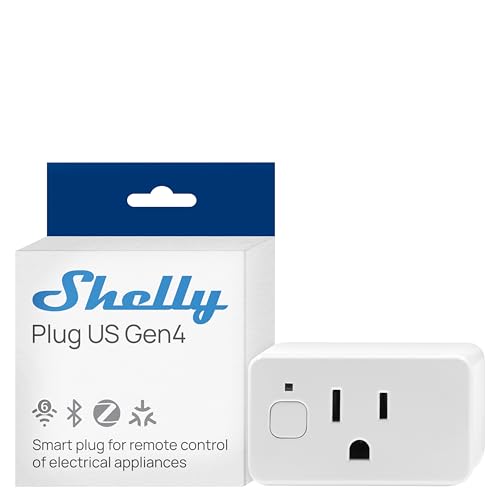
Pros
- Real-time power monitoring
- Wi-Fi, Matter, Bluetooth, and Zigbee
- UL Certified
- Built-in schedules and timer
- Three-year warranty and support
Cons
- Best suited to small appliances
- App-based control requires setup

Pros
- Controls two devices independently or together
- Matter certified for major smart-home platforms
- Energy monitoring for connected devices
- ETL certified with improved load capacity
Cons
- Requires neutral wiring for installation
- 2.4GHz Wi-Fi required for setup

Pros
- Real-time energy monitoring
- 15A outlet rating
- Zigbee repeater functionality
- ETL certified
- Space-saving design preserves adjacent socket
Cons
- Zigbee hub required
- Energy monitoring needs supported hub

Pros
- Matter support across major smart-home platforms
- 15A/1800W capacity for household electronics
- Remote control, timers, and scheduling
- FCC certified with overload protection
Cons
- Hub required for most listed platforms
- 2.4GHz Wi-Fi and IPv6 network only

Pros
- Matter support for major smart home platforms
- 15A/1800W capacity
- Remote app control from anywhere
- Voice control with Siri and Alexa
- Timers and schedules for automation
Cons
- Requires 2.4GHz Wi-Fi and IPv6
- Hub required for most Matter platforms
Match the Socket to Your Home Assistant Setup
Matter is the simpler route if your household already uses Apple Home, Alexa, Google Home, or Samsung SmartThings. The TP-Link Tapo Matter Supported Smart Plug Mini and both Linkind Matter Smart Plug options use 2.4GHz Wi-Fi, while Linkind also requires a Matter-certified controller for those major platforms. Its AiDot app can operate without that hub.
Zigbee makes more sense if Home Assistant already has a compatible coordinator or hub. The THIRDREALITY ZigBee Smart Plug 4 Pack requires a Zigbee hub, but its compatibility includes Home Assistant, SmartThings, Hubitat, and selected Echo devices. It can also act as a Zigbee repeater, which may help build a broader mesh.
For a wider protocol mix, the Shelly Smart Plug UL WiFi Bluetooth Zigbee Matter supports Wi-Fi, Bluetooth, Zigbee, and Matter. That flexibility is useful when your smart-home equipment spans several standards, although you should still confirm the controller and integration you plan to use.
Pro Tip: Confirm your Home Assistant radio, Matter controller, or Zigbee hub before ordering multiple sockets.
Decide Between Plug-In and In-Wall Control
A compact plug is the least disruptive option for lamps, fans, humidifiers, seasonal lights, and other movable appliances. The TP-Link Tapo model is designed not to block the adjacent outlet, and the Linkind models also use a compact form factor. Their schedules and timers suit routines that do not need electrical work.
The Tapo Smart Plug, Wi-Fi in-Wall Outlet, P210M is a different commitment. It controls two devices independently or together from one wall location, but installation requires neutral wiring and 2.4GHz Wi-Fi. Energy monitoring and local app control remain available, including when the home internet connection is down.
| Device type | Key requirement | Best location |
|---|---|---|
| Plug-in Matter | 2.4GHz Wi-Fi, controller | Lamps and fans |
| Plug-in Zigbee | Zigbee hub required | Mesh expansion |
| In-wall outlet | Neutral wiring | Permanent wall control |
Use an in-wall model only where the wiring and installation conditions are suitable. For a rental, a compact plug avoids modifying the electrical box and can move with the appliance.
Energy Monitoring and Safety Details Matter
Energy monitoring separates several of these choices from basic on and off control. Shelly provides real-time power monitoring, while the Tapo in-wall outlet and THIRDREALITY plug pack also describe energy-use tracking. That information can help identify appliances that consume more electricity than expected.
Load ratings and certification deserve attention before connecting an appliance. The Tapo mini and Linkind plugs specify 15A and 1800W capacity, while the listed products identify UL or ETL certification in their specifications. Certification is not permission to exceed the socket’s rating, and heating appliances deserve particular care.
Check the Appliance: Never connect a load that exceeds the socket rating, and do not treat scheduling as a substitute for safe appliance operation or supervision.
For broader household safety planning, the Home Assistant smoke detector options are a useful companion category. You can also review smart sensors and home automation devices before building routines around power events.
Expert Examined
From Ray Okafor

I keep power-control devices away from damp locations and crowded adapters. The mistake I see is choosing a protocol first, then discovering that the hub, wiring, or appliance load does not fit; map those constraints before assigning rooms.
Read more about Ray OkaforWhich Socket Fits Your Household
I would point Home Assistant households with an established Zigbee setup toward the Zigbee device ecosystem and the THIRDREALITY ZigBee Smart Plug 4 Pack. It is the clearest match when you want energy monitoring, repeater behavior, and a four-pack for several lamps or appliances, provided your Zigbee hub is ready.
For a mixed-platform home, I would choose the Shelly Smart Plug UL WiFi Bluetooth Zigbee Matter. Its combination of Wi-Fi, Bluetooth, Zigbee, and Matter gives you more protocol flexibility, while power monitoring, local schedules, a child-conscious design, and a three-year warranty add useful household controls.
I would reserve the Tapo Smart Plug, Wi-Fi in-Wall Outlet, P210M for an owner who wants two controlled outlets in one permanent location. Choose it only if neutral wiring is available. For renters, the compact TP-Link Tapo Matter Supported Smart Plug Mini is the easier fit because it avoids in-wall work and supports major Matter platforms.
The Bottom Line
The biggest mistake is buying a Matter or Zigbee socket without matching it to the controller already running Home Assistant. Protocol support, hub availability, Wi-Fi requirements, and neutral wiring can matter more than the app or voice assistant name on the box.
If you only do one thing first, identify the room, appliance, and hub connection together. Then choose a compact plug for a movable load, Zigbee for an existing mesh, or an in-wall outlet for a permanent two-device upgrade.
FAQs
Neither is automatically better. Matter Wi-Fi models suit homes that already use a Matter controller and major platform, while Zigbee can be a strong fit when Home Assistant already has a compatible hub or coordinator. Check your existing hardware before choosing the protocol. The Tapo Smart Plug, Wi-Fi in-Wall Outlet, P210M can control two devices independently or simultaneously. The plug-in models listed here are individual sockets, although multiple units can be grouped through compatible software or hubs. Matter devices can communicate over the local network after setup, and the Tapo in-wall outlet specifies local app control when internet service is down. Remote control from outside the home may still depend on the relevant app, controller, or network connection. It indicates that the product carries the stated certification from a recognized safety organization, but it does not remove load limits or safe-use requirements. Keep the connected appliance within the socket’s listed capacity and follow the manufacturer’s instructions. Yes. The THIRDREALITY ZigBee Smart Plug 4 Pack specifically requires a compatible Zigbee hub or Echo device with a built-in Zigbee hub. Home Assistant, SmartThings, Hubitat, and other listed platforms can provide compatible control when configured correctly.Are Matter or Zigbee sockets better for Home Assistant?
Can these smart sockets control two devices?
Do these smart plugs work without internet?
What does UL or ETL certification mean for a smart plug?
Does a Zigbee smart plug need a hub?
Sources
- UL Solutions www.ul.com
- US Consumer Product Safety Commission www.cpsc.gov