Shopping for the best smart power outlets means deciding whether your priority is simple remote switching or a permanent in-wall upgrade with extra charging ports. The right choice depends on your wiring, smart-home platform, and the room where the outlet will serve you.
Pros
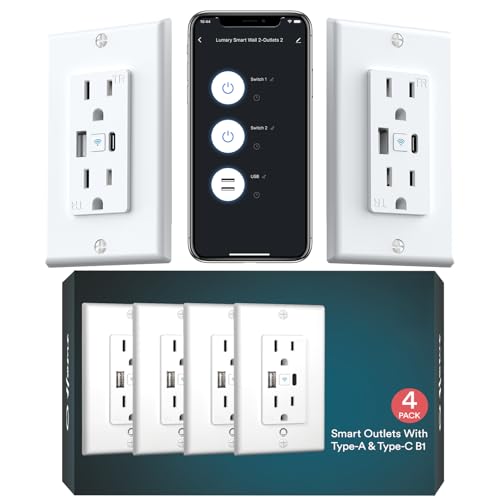
- USB-A and USB-C charging built in
- 15A, 110V maximum load
- Tamper-resistant shutters for child safety
- No hub required, Alexa and Google support
Cons
- 2.4GHz Wi-Fi only
- Requires wall-outlet replacement and wiring

Pros
- Controls two devices separately or together
- Alexa and Google Home voice control
- Remote control, schedules, and scenes
- ETL certified, no hub required
Cons
- Wi-Fi required for connected features
- In-wall installation, not a plug-in unit

Pros
- Controls two devices independently or together
- Matter certified for major smart-home platforms
- Energy monitoring for connected devices
- ETL certified with improved load capacity
Cons
- Requires neutral wiring for installation
- 2.4GHz Wi-Fi required for setup

Pros
- Two individually controlled outlets per unit
- Built-in fire-resistant housing
- Overload and overheating protection
- Alexa and Google Home compatible
Cons
- Neutral wire required for installation
- 2.4GHz Wi-Fi only

Pros
- Two independently controlled outlets
- Works with Alexa and Google Assistant
- No hub required
- UL and cUL certified
Cons
- Requires in-wall installation
- 2.4GHz Wi-Fi only

Pros
- 20A tamper-resistant duplex receptacle
- Two USB ports and two plugs
- GFCI receptacle meets UL 943 Class A
- ETL and FCC certified
Cons
- No sensing feature listed
- White color only
Start With the Wiring and Wi-Fi
Most products in this category are in-wall receptacles, so installation is a more permanent decision than adding a plug-in adapter. Tapo P210M and Geeni require neutral wiring, while the product information for other models emphasizes standard wall replacement or Wi-Fi setup rather than battery operation.
These outlets use 2.4GHz Wi-Fi, which matters if your router separates its network bands. Before removing an existing receptacle, confirm the electrical box, wiring arrangement, and circuit requirements. If the box does not have the needed conductors, a qualified electrician is the safer choice.
Check the Circuit First: Confirm the neutral wire and available box space before buying an in-wall outlet. Turn off the circuit breaker and verify that the existing receptacle is not energized before any wiring work.
Match Features to the Room
A basic dual-outlet model suits lamps, fans, televisions, and other appliances that you want to switch independently. Kasa Smart Plug KP200, In-Wall Smart Home Wi-Fi and ELEGRP Smart in-Wall Outlet both provide separate control for two connected devices, while voice commands add convenient hands-free operation.
USB charging changes the use case. Lumary Smart Outlet with USB-A/C Ports 110V 15A adds USB-A, USB-C, and AC control, with the USB ports delivering 5V 2.1A DC output. That combination is useful beside a bed, desk, or kitchen counter where phones and small electronics compete for sockets.
| Outlet type | Standout feature | Suitable location |
|---|---|---|
| Dual smart outlet | Independent socket control | Lamps and media areas |
| USB smart outlet | USB-A and USB-C charging | Bedsides and desks |
| Matter outlet | Broad platform support | Mixed smart homes |
Safety, Certification, and Automation
Tamper-resistant shutters are valuable in homes with children, and several products add protection against overload, overheating, short circuits, or fire. ELEGRP is UL and cUL certified, Tapo P210M is ETL certified, and Lumary is FCC certified. Those labels describe compliance or radio requirements, not permission to exceed the outlet’s electrical rating.
Schedules and away modes can reduce unnecessary runtime and make ordinary lighting appear occupied while you are away. Tapo adds energy monitoring and Matter compatibility, while Lumary can control its AC, USB-A, and USB-C sources separately through its app. For broader electrical-safety information, consult UL Solutions.
Do Not Exceed the Rating: Do not connect a high-demand appliance simply because the outlet responds to an app or voice command. Follow the product rating and the appliance requirements, and never treat remote control as a substitute for correct wiring.
I keep the outlet’s physical load limit visible during installation because app control can make an ordinary receptacle feel more capable than it is. The mistake I see is choosing features first and checking the circuit later, so I would confirm the wiring and appliance load before planning automations.
Expert Examined
From Jenna Castellano

I keep smart outlets away from damp locations unless the product and installation specifically support that environment. The common household mistake is placing a convenient charger where spills can reach it, so I prefer a dry, accessible wall location with the receptacle’s safety features intact.
Read more about Jenna CastellanoFor broader connected-home planning, the site’s smart sensors and home automation category can help you think about how outlets fit with switches and other devices.
Which Outlet Fits Your Room
I would point you to Tapo Smart Plug, Wi-Fi in-Wall Outlet, P210M for a mixed-platform home where Matter support, energy monitoring, and control through Alexa, Siri, Google Assistant, or Samsung Bixby matter. Its local control through the Tapo app when internet access is down is another useful distinction.
For a straightforward two-device replacement, I would choose . Its two sockets can operate together or independently, and the Kasa app adds schedules, scenes, grouping, and away mode. It is a sensible fit when you already use Alexa or Google Assistant and do not need USB charging.
The Bottom Line
The biggest mistake buyers make is treating every smart outlet as a drop-in accessory. In-wall units require attention to wiring, box space, Wi-Fi, electrical ratings, and safety certification before the app features matter.
If you do only one thing first, switch off the circuit and confirm the wiring requirements for the exact model you want. Then select the outlet by room: USB charging for bedside or desk use, Matter for a mixed platform, or independent dual-socket control for lamps and appliances.
FAQs
Many in-wall models require a neutral wire, including Tapo P210M and Geeni. Check the exact product requirements and the wiring in your electrical box before purchase; a missing neutral conductor can prevent installation. Yes. Kasa KP200, Tapo P210M, Geeni, and ELEGRP describe two individually controlled outlets. That lets you schedule or switch a lamp and another connected device independently from the same wall location. Most rely on 2.4GHz Wi-Fi for setup and remote features. Tapo P210M specifically states that local control through the Tapo app remains available when the home internet connection is down. Tamper-resistant shutters help prevent objects from entering the contact openings unless a plug is inserted correctly. They are especially relevant in homes with children, but they do not replace proper supervision or safe electrical installation. UL and ETL markings relate to product certification through recognized safety organizations, while FCC certification concerns applicable radio-frequency requirements. A certification label does not mean the outlet can safely exceed its stated electrical load.Do smart power outlets need neutral wiring?
Can a smart outlet control two devices separately?
Do these smart outlets work without internet?
What does tamper-resistant mean on an outlet?
What do UL, ETL, and FCC labels indicate?
Sources
- UL Solutions and Electrical Safety. www.ul.com
- US Consumer Product Safety Commission and Electrical Safety. www.cpsc.gov