
Shopping for the best smart plugs for home assistant starts with one practical split: do you want Matter over Wi-Fi or Zigbee through a compatible hub? That choice affects setup, local control, and how easily the plug fits into your existing automation system.

Pros
- Matter support across major smart home platforms
- Compact design helps preserve nearby outlet access
- UL certified flame-retardant design
- Scheduling, timers, app, and voice control
Cons
- 2.4 GHz Wi-Fi only
- Limited to 15A/1800W maximum
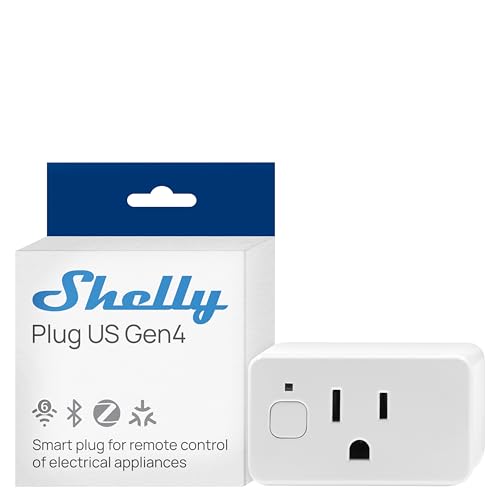
Pros
- Real-time power monitoring
- Wi-Fi, Matter, Bluetooth, and Zigbee
- UL Certified
- Built-in schedules and timer
- Three-year warranty and support
Cons
- Best suited to small appliances
- App-based control requires setup

Pros
- Controls two devices independently or together
- Matter certified for major smart-home platforms
- Energy monitoring for connected devices
- ETL certified with improved load capacity
Cons
- Requires neutral wiring for installation
- 2.4GHz Wi-Fi required for setup

Pros
- Real-time energy monitoring
- 15A outlet rating
- Zigbee repeater functionality
- ETL certified
- Space-saving design preserves adjacent socket
Cons
- Zigbee hub required
- Energy monitoring needs supported hub

Pros
- Matter support across major smart-home platforms
- 15A/1800W capacity for household electronics
- Remote control, timers, and scheduling
- FCC certified with overload protection
Cons
- Hub required for most listed platforms
- 2.4GHz Wi-Fi and IPv6 network only

Pros
- Matter support for major smart home platforms
- 15A/1800W capacity
- Remote app control from anywhere
- Voice control with Siri and Alexa
- Timers and schedules for automation
Cons
- Requires 2.4GHz Wi-Fi and IPv6
- Hub required for most Matter platforms
Choose the Protocol Before the Plug
Matter models are appealing if your home already uses a Matter controller and you want broad platform compatibility. The TP-Link Tapo Matter Supported Smart Plug Mini and Linkind Matter Smart Plug, Work with Apple Home can communicate over a local network after setup, while the Tapo P210M adds two independently controlled in-wall outlets.
Zigbee takes a different route. The THIRDREALITY ZigBee Smart Plug 4 Pack requires a Zigbee hub, but it is specifically listed for Home Assistant and can also act as a Zigbee repeater. That makes it a better fit for a household already building a Zigbee network rather than someone seeking a plug with no hub requirement.
| Connection type | Main requirement | Best placement |
|---|---|---|
| Matter Wi-Fi | 2.4G network and controller | Everyday rooms |
| Zigbee | Compatible hub | Larger mesh networks |
| In-wall outlet | Neutral wiring | Permanent installations |
Pro Tip: Confirm your Home Assistant radio, hub, or Matter controller before ordering. Protocol compatibility is more important than choosing the smallest plug.
Local Control and Energy Visibility
Local operation matters if you want automations to keep working during an internet outage. Matter devices from Tapo and Linkind support communication on the local network after configuration, while the Tapo P210M also describes local app control without Wi-Fi.
Energy monitoring is useful for appliances whose consumption you want to observe over time. Shelly Smart Plug UL WiFi Bluetooth Zigbee Matter provides real-time power monitoring, and the THIRDREALITY ZigBee Smart Plug 4 Pack supports energy monitoring through Home Assistant, SmartThings, Hubitat, or the THIRDREALITY hub.
If you are building a broader automation system, protocol choice also affects future expansion. Home Assistant users comparing Zigbee accessories may find the coverage of Zigbee devices for Home Assistant useful when planning which hub and radio to keep in service.
Before You Mount It: Never connect a plug to a load that exceeds its stated capacity, and do not treat a smart plug as a substitute for a properly rated control device. Keep heating appliances and other high-load equipment within the product specifications.
Safety, Wiring, and Everyday Placement
Compact designs help preserve the neighboring outlet, which is useful behind furniture, near lamps, and in crowded power strips. The Tapo mini, Linkind plugs, and THIRDREALITY multipack all emphasize space-saving construction, while the Shelly model adds a protective socket cover and child-conscious design.
An in-wall model needs more planning than a plug-in accessory. The Tapo Smart Plug, Wi-Fi in-Wall Outlet, P210M requires neutral wiring and 2.4GHz Wi-Fi, so verify the electrical box before choosing it. Its two outlets can be controlled independently or together, which suits a permanent installation where two devices share one location.
Certification is another useful screening detail, but it does not remove the need for correct installation or load selection. You can review general consumer product safety information from the US Consumer Product Safety Commission, and you can also explore related smart sensors and home automation equipment before expanding the system.
Expert Examined
From Ray Okafor

I keep seeing people choose a protocol first and check their hub afterward. The safer order is to identify the controller and wiring available in the room, then select the plug that fits those limits.
Read more about Ray OkaforWhich Plug Fits Your Home Assistant Setup
I would point you to the THIRDREALITY ZigBee Smart Plug 4 Pack if Home Assistant is already using a compatible Zigbee setup. Its four-pack is practical for several lamps or small appliances, and its energy monitoring and repeater function can add useful depth to a Zigbee mesh.
For a Matter-first home, I would choose the TP-Link Tapo Matter Supported Smart Plug Mini. Its compact form, Bluetooth onboarding, 2.4G Wi-Fi connection, and compatibility with Apple Home, Alexa, Google Home, and SmartThings make it a flexible choice for rooms where you want a simple plug-in device.
I would reserve the Tapo Smart Plug, Wi-Fi in-Wall Outlet, P210M for a permanent location with confirmed neutral wiring. It gives you two independently controlled outlets, energy monitoring, Matter compatibility, and local app control, so it suits a kitchen, office, or media area where replacing a standard outlet makes sense.
The Bottom Line
The mistake most buyers make is treating Matter and Zigbee as interchangeable setup details. Matter Wi-Fi plugs need the right network and controller, while the THIRDREALITY option requires a compatible Zigbee hub.
If you only do one thing first, identify the Home Assistant connection already available in your home. Then check wiring for an in-wall model or choose a compact plug-in design that matches the room and appliance load.
FAQs
Neither is automatically better. Matter suits homes with a compatible Matter controller and 2.4GHz network, while Zigbee is useful when Home Assistant already has a compatible Zigbee hub or radio and you want to expand a mesh. Matter models listed here support local network communication after setup. The Tapo P210M also describes local app control without Wi-Fi, while Zigbee operation depends on the compatible hub and Home Assistant setup. Yes. The Tapo P210M requires neutral wiring and 2.4GHz Wi-Fi. Confirm the electrical box and installation requirements before selecting an in-wall outlet rather than a plug-in model. Matter certification indicates compatibility with certified smart home platforms, subject to the required controller and network conditions. It can reduce dependence on separate manufacturer apps, but it does not remove setup requirements.Are Matter or Zigbee plugs better for Home Assistant?
Can these smart plugs work when the internet is down?
Does an in-wall smart outlet need special wiring?
What does Matter certification mean for a smart plug?
Sources
- UL Solutions and Product Safety Standards. www.ul.com
- US Consumer Product Safety Commission and Home Safety. www.cpsc.gov