
Choosing the best smart plugs for Google Nest means checking more than voice control: the real split is between simple 2.4GHz Wi-Fi plugs, an in-wall outlet, and Matter models that require a compatible controller. Renters, homeowners, and anyone automating lamps or kitchen appliances can use that distinction to narrow the field.

Pros
- Alexa and Google Home voice control
- Remote control through Kasa app
- Scheduling, timers, and countdowns
- UL certified with a 2-year warranty
Cons
- Requires 2.4GHz Wi-Fi
- App required for setup and remote control
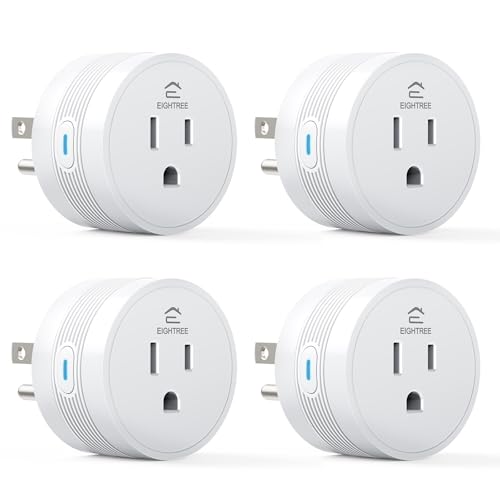
Pros
- 15A/1800W capacity for high-power appliances
- Compact 1.2-inch thickness fits crowded outlets
- Alexa and Google Home voice control
- FCC and ETL certified
- Four-pack supports grouped device control
Cons
- Requires 2.4GHz WiFi only
- Smart Life app required for setup

Pros
- Four-pack of compact smart plugs
- Alexa and Google Assistant voice control
- Bluetooth or WiFi connection
- Schedules and group controller
- ETL and FCC certified
Cons
- 2.4GHz WiFi only
- Requires the Govee Home app

Pros
- Controls two devices separately or together
- Alexa and Google Home voice control
- Remote control, schedules, and scenes
- ETL certified, no hub required
Cons
- Wi-Fi required for connected features
- In-wall installation, not a plug-in unit

Pros
- Alexa and Google Assistant voice control
- Remote control through three compatible apps
- Schedules and timers for connected devices
- Group control and family sharing
- ETL and FCC listed
Cons
- 2.4GHz WiFi only
- Alexa and Google setup requires the GHome app first

Pros
- Matter support for major smart home platforms
- 15A/1800W capacity
- Remote app control from anywhere
- Voice control with Siri and Alexa
- Timers and schedules for automation
Cons
- Requires 2.4GHz Wi-Fi and IPv6
- Hub required for most Matter platforms
Start With Your Google Nest Setup
Google Assistant compatibility appears across the standard Wi-Fi plugs here, including Kasa Smart, Govee, EIGHTREE, and GHome Smart models. Most connect through a 2.4GHz network, so your setup process should leave that band available rather than assuming a 5GHz-only network will work.
Linkind takes a different route with Matter support. It can work with Google Home, but the product information says a Matter-certified controller such as a Nest device, Echo Dot, HomePod, or SmartThings Hub is required for those platforms. That makes it appealing for a broader smart-home system, but less direct if you want the fewest setup requirements.
Pro Tip: Keep your phone, plug, and Google Home account ready before pairing, and confirm that your home network offers 2.4GHz Wi-Fi.
Match the Outlet to the Room
A compact plug works well behind furniture, beside a lamp, or in a crowded outlet. EIGHTREE specifically lists a 1.2-inch thickness, while the Govee model emphasizes a compact design. Kasa’s KP200 is different because it replaces an existing wall outlet and controls two plugged-in devices separately or together.
For a rental, a removable plug is the simpler choice. For a permanent living room, kitchen, or bedroom upgrade, the KP200 avoids adding a block to the receptacle, though installation is a more involved decision than plugging in a small accessory.
| Format | Key requirement | Suitable location |
|---|---|---|
| Standard plug | 2.4GHz Wi-Fi | Lamps and fans |
| Matter plug | Compatible controller | Multi-platform homes |
| In-wall outlet | Wall installation | Permanent room upgrades |
If you are also planning connected safety equipment, the site’s coverage of smart sensors and home automation can help you think about how plugs fit alongside other devices.
Power Ratings and Everyday Automation
Power capacity matters more for heaters, air fryers, coffee makers, and similar appliances than for lamps. EIGHTREE and Linkind list 15A and 1800W capacity, while Govee lists 10A and 1200W in its feature information. Match the plug to the appliance requirements instead of treating every smart outlet as interchangeable.
Scheduling is common across the selection, with timers, countdowns, or recurring schedules available through the relevant app. Group control is useful when several lights or outlets should respond together, while remote control lets you switch connected equipment from away from home.
Before You Connect a High-Power Appliance: Check the appliance requirements and the plug’s stated capacity before connecting it. A voice assistant cannot compensate for an unsuitable electrical load, and a smart plug should not be treated as a replacement for proper appliance safety practices.
Expert Examined
From Ray Okafor

I keep seeing smart plugs assigned to appliances without checking the electrical rating first. The better habit is to identify the appliance’s requirements, then choose a plug whose listed capacity suits that use before creating any schedule or voice routine.
Read more about Ray OkaforCertification is another useful screening detail. The listed products include ETL, FCC, UL, or UP certification information, but those labels do not remove the need to follow the manufacturer’s installation and usage instructions. For broader electrical-safety information, consult UL Solutions.
Which Plug Fits Your Home
I would point renters and value-focused shoppers toward the Kasa Smart Plug Ultra Mini 15A, EP10P2. Its two-pack format, Google Home support, scheduling, remote control, and 2.4GHz setup cover the basics without requiring a hub. The listed two-year warranty is also useful if you want a familiar support path.
For several rooms, I would consider the EIGHTREE 15A Smart Plug Works with Alexa & Google. Its four-pack, 15A rating, compact shape, Smart Life grouping, and remote status control suit a home with multiple lamps or higher-power devices. I would choose the Kasa Smart Plug KP200, In-Wall Smart Home Wi-Fi for a homeowner who wants two controlled receptacles built into a room instead of separate plug-in modules.
The Bottom Line
The biggest mistake is assuming every Google Assistant-compatible plug works the same way. Network band, electrical capacity, outlet format, and the need for a Matter controller can change whether a model fits your room.
If you only do one thing first, identify the device you want to control and its electrical requirements. Then confirm whether you need a removable plug, an in-wall outlet, or Matter compatibility before connecting it to Google Home.
FAQs
The listed models support Google Assistant or Google Home in their product information. Linkind uses Matter and requires a compatible Matter-certified controller for Google Home, while the other listed plugs use their stated app and 2.4GHz Wi-Fi setup. The products listed here specify 2.4GHz Wi-Fi, and several explicitly say they do not support 5GHz. Check your router and keep the 2.4GHz network available during setup. Some models list higher power capacity, including EIGHTREE and Linkind at 15A and 1800W. Always compare the appliance requirements with the plug’s listed rating before connecting it. ETL and FCC certification information indicates that the product has been assessed or listed under the relevant certification information supplied by the manufacturer. It does not replace following the installation, load, and usage instructions.Do these smart plugs work with Google Nest?
Do smart plugs need 5GHz Wi-Fi?
Can I use a smart plug with a heater or air fryer?
What does ETL or FCC certification mean on these plugs?
Sources
- UL Solutions www.ul.com
- US Consumer Product Safety Commission www.cpsc.gov