
Shopping for the best smart plugs for Echo Dot means first deciding whether you want direct 2.4GHz Wi-Fi or a Zigbee plug that depends on a compatible hub. Renters, busy households, and anyone automating lamps or small appliances need the option that matches their existing Alexa setup.

Pros
- Zigbee switching, responsive and stable
- Works as a range extender
- Alexa and Google Home compatible
- Fire-resistant PC material, 750°C rated
Cons
- Hub required for operation
- Not compatible with SmartThings 1st gen or Tuya

Pros
- Four-pack covers multiple appliances
- Works with Alexa and Google Assistant
- Remote control from anywhere via Kasa app
- Timer and countdown scheduling
- UL certified for safety
Cons
- Requires a 2.4GHz Wi-Fi connection
- Kasa app required for setup and remote control

Pros
- Four-pack of compact smart plugs
- Alexa and Google Assistant voice control
- Bluetooth or WiFi connection
- Schedules and group controller
- ETL and FCC certified
Cons
- 2.4GHz WiFi only
- Requires the Govee Home app
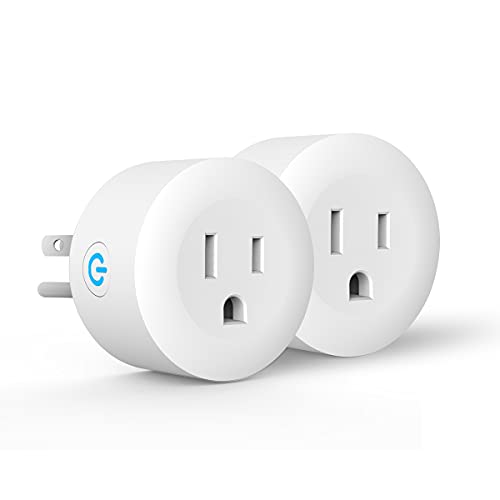
Pros
- Zigbee alternative to unstable Wi-Fi
- Works with ST Hub and compatible Echo devices
- Alexa and Google Assistant voice control
- 12-month warranty plus lifetime technical support
- Two-pack configuration
Cons
- Hub required for operation
- Does not work with HomeKit
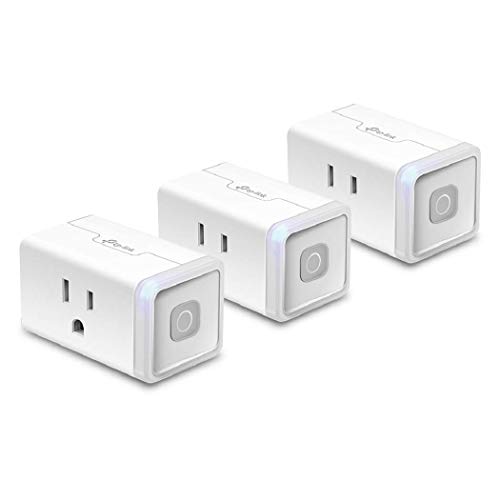
Pros
- Three-pack for multiple appliances
- Alexa and Google Assistant voice control
- Remote control through the Kasa app
- Scheduling and countdown timers
- UL certified for safety use
Cons
- Requires a 2.4GHz Wi-Fi connection
- Smart features depend on the Kasa app

Pros
- ETL certified 15A outlet
- Compact design preserves adjacent outlet
- Zigbee repeater extends network reach
- Alexa and SmartThings compatibility
Cons
- Compatible Zigbee hub required
- Hub needed for Amazon Alexa
Choose the Connection Before the Outlet
Wi-Fi models are the simpler route for most Echo Dot owners. Kasa Smart and Govee connect through a 2.4GHz network, support Alexa voice commands, and provide app control and scheduling without a separate hub. Govee also supports Bluetooth, while its plugs do not support 5G Wi-Fi.
Zigbee models make more sense when your home already has compatible equipment. CMARS, DOGAIN, and SONOFF require a Zigbee hub or compatible Echo device, but they can help keep additional devices off a crowded Wi-Fi network. Check your exact Echo model before ordering, because compatibility varies.
Pro Tip: Confirm your Echo Dot’s connected network and your available hub before opening the package. A hub-required plug is not a direct replacement for a no-hub Wi-Fi model.
Match the Plug to Your Alexa Setup
A direct Wi-Fi plug is practical for a lamp, fan, humidifier, or seasonal lights when you want quick app setup. Kasa offers remote control, countdowns, and schedules through its app, while Govee adds group control for managing multiple plugs together.
A Zigbee plug is a better fit for a home already organized around SmartThings, Echo Plus, Echo Studio, or another compatible bridge. The CMARS plug can function as a range extender, and SONOFF supports sunrise and sunset routines. For broader household compatibility, see our smart sensors and home automation coverage.
| Connection type | Hub requirement | Best placement |
|---|---|---|
| Wi-Fi | No separate hub | Everyday lamps |
| Bluetooth or Wi-Fi | No separate hub | Grouped appliances |
| Zigbee | Compatible hub | Hub-based homes |
Safety, Load, and Network Details
Check the appliance rating before connecting anything. The listed models are intended for ordinary household electronics, but their stated ratings differ: several are 15A, while Govee is rated at 10A and 1200W. Do not treat a smart plug as a substitute for a purpose-built controller for equipment outside its specifications.
Certifications also differ. Kasa identifies UL certification, Govee identifies ETL and FCC certification, and SONOFF identifies ETL certification. UL Solutions explains how recognized safety certification helps buyers understand product evaluation, but you should still follow the plug’s instructions.
Before You Connect It: Never exceed the product’s stated electrical rating, and do not use a smart plug where the appliance maker prohibits switched power. Keep the plug dry and accessible for manual shutoff.
Expert Examined
From Ray Okafor

I keep seeing homes with several smart plugs competing for a weak wireless signal, followed by missed schedules. The better fix is to place Wi-Fi plugs where coverage is reliable or move suitable devices to a compatible Zigbee hub.
Read more about Ray OkaforWhich Plug Fits Your Echo Dot Home
I would point you to the Kasa Smart Plug HS103P4, Smart Wi-Fi Outlet if you want a straightforward four-pack for lamps, fans, or holiday lights. It works with Alexa and Google Assistant, supports remote control and schedules, requires 2.4GHz Wi-Fi, and carries UL certification. The four-pack also suits homes adding several controlled outlets at once.
I would choose the Govee Smart Plug, WiFi Outlet Compatible for a household that wants group control and a Bluetooth fallback alongside Wi-Fi. Its compact design can help in crowded outlet areas, though the 2.4GHz-only requirement remains important. For a hub-based setup, I would choose the CMARS Smart Plug, ZigBee Switch Mini Smart Outlet, especially where network congestion is a concern and a compatible bridge is already available.
The Bottom Line
The mistake most Echo Dot buyers make is overlooking the connection requirement. A no-hub Wi-Fi plug and a Zigbee plug may both respond to Alexa, but they do not install the same way or depend on the same equipment.
If you only do one thing first, identify your available network and hub, then select the plug type that matches it. After that, confirm the appliance rating and create one simple schedule before expanding automation.
FAQs
Some do, while others need a compatible Zigbee hub. Kasa and Govee provide Wi-Fi options without a separate hub, while CMARS, DOGAIN, and SONOFF require compatible Zigbee equipment or an Echo device with the needed bridge function. Choose Wi-Fi for simpler setup and direct app control when your 2.4GHz coverage is reliable. Choose Zigbee if you already have a compatible hub or want to reduce the number of devices relying on Wi-Fi. The product information names lamps, fans, humidifiers, Christmas lights, and ordinary household electronics as examples. Always check the plug’s stated load and the appliance maker’s instructions before connecting a device. They identify different compliance or certification claims shown in the product information. UL and ETL relate to safety evaluation, while FCC concerns applicable electromagnetic compatibility requirements. A marking does not remove the need to follow load and installation instructions.Do smart plugs work directly with Echo Dot?
Should I choose Wi-Fi or Zigbee for Alexa?
What appliances can I control with these plugs?
What do UL, ETL, and FCC markings mean?
Sources
- UL Solutions product safety information. www.ul.com
- Federal Communications Commission consumer information. www.fcc.gov