
Shopping for the best smart outlets for Home Assistant means deciding first between direct Wi-Fi Matter control and Zigbee devices that depend on a compatible hub. Renters, families, and automation-focused homeowners each need a different balance of setup effort, local control, and outlet capacity.

Pros
- Matter support across major smart home platforms
- Compact design helps preserve nearby outlet access
- UL certified flame-retardant design
- Scheduling, timers, app, and voice control
Cons
- 2.4 GHz Wi-Fi only
- Limited to 15A/1800W maximum
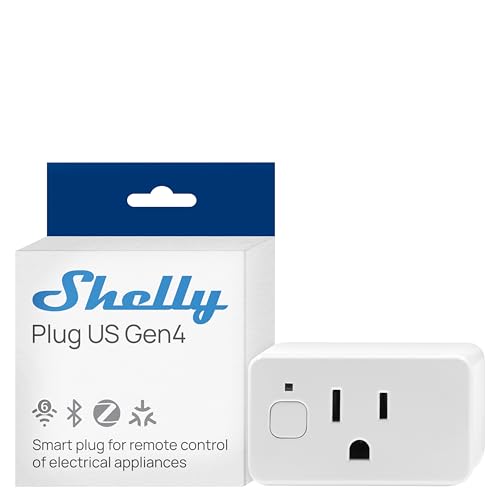
Pros
- Real-time power monitoring
- Wi-Fi, Matter, Bluetooth, and Zigbee
- UL Certified
- Built-in schedules and timer
- Three-year warranty and support
Cons
- Best suited to small appliances
- App-based control requires setup

Pros
- Controls two devices independently or together
- Matter certified for major smart-home platforms
- Energy monitoring for connected devices
- ETL certified with improved load capacity
Cons
- Requires neutral wiring for installation
- 2.4GHz Wi-Fi required for setup

Pros
- Real-time energy monitoring
- 15A outlet rating
- Zigbee repeater functionality
- ETL certified
- Space-saving design preserves adjacent socket
Cons
- Zigbee hub required
- Energy monitoring needs supported hub

Pros
- Matter support across major smart-home platforms
- 15A/1800W capacity for household electronics
- Remote control, timers, and scheduling
- FCC certified with overload protection
Cons
- Hub required for most listed platforms
- 2.4GHz Wi-Fi and IPv6 network only

Pros
- Matter support for major smart home platforms
- 15A/1800W capacity
- Remote app control from anywhere
- Voice control with Siri and Alexa
- Timers and schedules for automation
Cons
- Requires 2.4GHz Wi-Fi and IPv6
- Hub required for most Matter platforms
Choose the Connection Your Hub Supports
Home Assistant shoppers should verify their existing radio setup before choosing an outlet. The THIRDREALITY ZigBee Smart Plug 4 Pack requires a Zigbee hub, but its listed compatibility includes Home Assistant, ZHA, and Zigbee2MQTT. It can also act as a Zigbee repeater, which may help extend a mesh network through a home.
Matter models take a different route. The TP-Link Tapo Matter Supported Smart Plug Mini and both Linkind Matter Smart Plug, Works with Apple Home packages use local network communication after setup, while the Linkind products require a Matter controller for major platforms. Shelly Smart Plug UL WiFi Bluetooth Zigbee Matter offers Wi-Fi, Bluetooth, Zigbee, and Matter, giving advanced users more connection choices.
FYI: Matter is a smart-home standard, not a wireless signal. A Matter outlet still needs a supported transport and, for some platforms, a compatible controller or hub.
Match Monitoring and Control to the Room
Energy monitoring is useful for appliances whose consumption you want to understand, such as space heaters, televisions, or other plug-in devices. The Shelly Smart Plug UL WiFi Bluetooth Zigbee Matter provides real-time power monitoring, while the Tapo Smart Plug, Wi-Fi in-Wall Outlet, P210M and THIRDREALITY ZigBee Smart Plug 4 Pack also list energy monitoring.
For simple lamps, fans, humidifiers, or seasonal lighting, scheduling may matter more than detailed readings. The Tapo and Linkind Matter plugs support timers and schedules, and the TP-Link Tapo model adds Bluetooth onboarding for a simpler initial setup. Use the smart sensors and home automation section to plan how an outlet will interact with switches and sensors.
| Connection type | Key requirement | Best placement |
|---|---|---|
| Matter Wi-Fi | 2.4GHz network, controller | Lamps and small appliances |
| Zigbee | Compatible hub required | Mesh automation rooms |
| In-wall Matter | Neutral wiring required | Permanent wall locations |
Check Wiring, Safety, and Outage Behavior
The Tapo Smart Plug, Wi-Fi in-Wall Outlet, P210M is not a simple plug-in accessory. It requires neutral wiring and a 2.4GHz Wi-Fi connection, so confirm the electrical box is suitable before planning a replacement. Its two independently controllable outlets can make sense where a permanent installation is more useful than a loose plug.
Compact designs help preserve the neighboring receptacle, but electrical load still matters. Several options list 15A or 1800W capacity, and certifications such as UL or ETL indicate that the product was evaluated against applicable safety requirements, not that every connected appliance is automatically safe.
Before You Connect a Load: Never use a smart outlet as permission to exceed its stated capacity. Be especially careful with heaters, irons, hair tools, and other high-draw appliances, and follow the product instructions for the connected device.
Local control is another important distinction during an internet outage. Matter devices can continue communicating across the local network after configuration, while Home Assistant users should also consider whether their hub, Wi-Fi, or Zigbee coordinator remains powered during an outage. The Zigbee devices for Home Assistant coverage explains why coordinator placement and mesh planning deserve attention.
Expert Examined
From Ray Okafor

I keep seeing smart-home routines fail because the owner chooses a radio standard first and checks hub compatibility later. I would identify the Home Assistant connection already in use, then place the outlet close enough to maintain that network rather than assuming every Matter or Zigbee product behaves the same way.
Read more about Ray OkaforWhich Outlet Fits Your Home Assistant Setup
I would point you to the Home Assistant-compatible automation approach if your priority is a coordinated local system. For households already using Zigbee, the THIRDREALITY ZigBee Smart Plug 4 Pack is the clearest fit because it explicitly supports Home Assistant, ZHA, and Zigbee2MQTT. Its four-pack format also suits several rooms, provided you have a compatible Zigbee hub.
I would choose the TP-Link Tapo Matter Supported Smart Plug Mini for a compact Wi-Fi option that works with major smart-home platforms and supports local Matter communication. It is a practical match for lamps, fans, and scheduled lighting where you want simple setup without committing to Zigbee.
For a permanent installation, I would select the Tapo Smart Plug, Wi-Fi in-Wall Outlet, P210M only after confirming neutral wiring. Its independent control of two devices and energy monitoring make it more appropriate for a planned wall location than for a quick plug-in automation.
The Bottom Line
The biggest mistake is treating Matter, Zigbee, and Wi-Fi as interchangeable labels. Your existing Home Assistant coordinator, Matter controller, network band, and wiring determine whether an outlet will fit the system you already have.
If you only do one thing first, identify the connection method your Home Assistant installation can actually use. Then match the outlet to the room, load, monitoring needs, and installation type before adding schedules or voice control.
FAQs
A Zigbee outlet can be a strong fit if your Home Assistant setup already has a compatible Zigbee hub or coordinator. Matter and Wi-Fi options can also work, but you should confirm controller, network, and local-control requirements before buying. A plug-in outlet does not require household rewiring. The Tapo Smart Plug, Wi-Fi in-Wall Outlet, P210M is different because it requires neutral wiring and a suitable 2.4GHz Wi-Fi connection for setup. Matter devices listed here can communicate locally after setup when the local network remains available. A powered-off router, hub, coordinator, or outlet can still interrupt automation, so internet independence does not mean the entire system works without power. UL and ETL are safety certification marks associated with evaluation against applicable standards. They do not remove the need to follow the outlet’s capacity limits, installation instructions, and appliance safety guidance. The UL Solutions site provides additional information about its certification work.Which smart outlet type works best with Home Assistant?
Does a smart outlet need a neutral wire?
Will smart outlets work if internet service goes down?
What do UL and ETL certifications mean for smart outlets?
Sources
- UL Solutions and Product Safety Information. www.ul.com
- US Consumer Product Safety Commission and Home Electrical Safety. www.cpsc.gov