
Shopping for the best smart locks with proximity unlock means deciding whether convenience should come from Bluetooth, geofencing, NFC, or several access methods together. Your phone ecosystem, door handing, and backup plan matter most, especially if you want reliable entry for a busy household.

Pros
- Matter over Thread, compatible with major platforms
- Bluetooth app access-code management
- Backlit, fingerprint-resistant touchpad
- Proximity wakeup for faster code entry
Cons
- Hands-free entry depends on Bluetooth and geofencing
- Thread features require a compatible smart-home platform
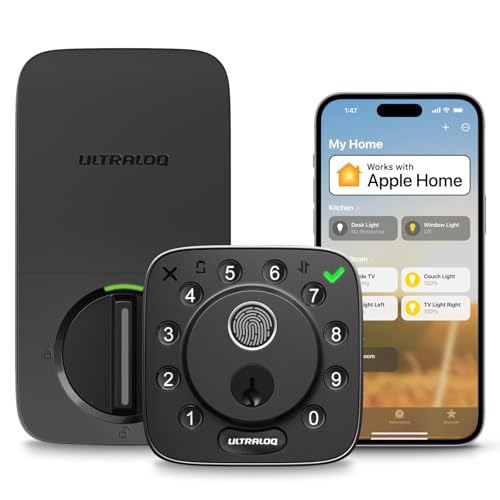
Pros
- Fingerprint, passcode, app, and voice access
- Apple Home, Alexa, Google, SmartThings support
- Included sensor monitors door status
- ANSI/BHMA Grade 2 certification
- Up to one year on eight AA batteries
Cons
- 2.4 GHz Wi-Fi only
- Router should stay within 70 feet

Pros
- Door sensor supports auto-locking and open-door alerts
- Apple Home Key and Android NFC support
- BHMA Grade 1 certified zinc alloy construction
- IP65 weather resistance for year-round use
Cons
- 2.4 GHz Wi-Fi only
- Requires eight AA batteries

Pros
- Backlit keypad supports up to 250 codes
- No hub required for Wi-Fi control
- Geofence auto-unlock and automatic locking
- Lifetime mechanical and finish warranty
Cons
- One-year electronics warranty
- Remote features depend on the Kwikset app
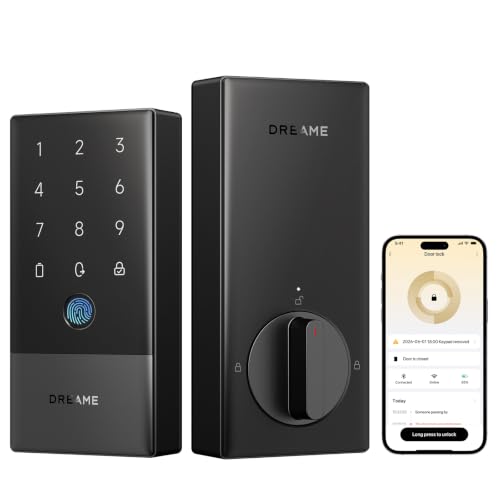
Pros
- Seven entry methods, including fingerprint access
- Built-in 2.4GHz Wi-Fi, no extra hub
- BHMA Grade 2 certified security
- Up to 8-month battery life, USB-C backup
Cons
- Designed for left-handed doors only
- Matter over Thread requires compatible hub

Pros
- 0.3-second fingerprint recognition
- Supports up to 100 fingerprints
- 12-month Triple Power battery system
- Alexa and Google Assistant compatible
Cons
- Accessory kit sold separately for some locks
- Not directly compatible with European locksets
How proximity access actually works
These locks do not all respond to arrival in the same way. The Kwikset Aura Reach Smart Lock Matter Over Thread uses Bluetooth and geofence technology through the Kwikset app, while the Kwikset Halo Wi-Fi Smart Lock also uses geofencing and connects directly over Wi-Fi.
ULTRALOQ offers geofence access on both Bolt models, but the NFC version adds a deliberate tap from an iPhone, Apple Watch, or Android NFC phone. That distinction matters if you prefer the door to respond automatically or want a physical action before entry.
Before choosing, confirm that your phone platform is supported and that location permissions can run reliably. A lock that depends on an app, Wi-Fi, or a hub should have another entry method available for visitors, family members, and phone battery failures.
Pro Tip: Keep a mechanical key or another configured access method available before relying on arrival-based entry.
Compare the access and connection choices
Connectivity is the main dividing line among these models. Matter over Thread appears on the Kwikset Aura Reach Smart Lock Matter Over Thread and Dreame A10 Smart Lock, Fingerprint Keyless Entry, while the SwitchBot model supports Matter through the SwitchBot Hub mini.
The ULTRALOQ Bolt Fingerprint WiFi Smart Lock and ULTRALOQ Bolt NFC Smart WiFi Deadbolt Lock require 2.4 GHz Wi-Fi, with the manufacturer recommending a router within 70 feet. The Dreame A10 has built-in 2.4 GHz Wi-Fi but requires a compatible Thread Border Router or hub for Matter over Thread features.
| Connection type | Entry highlight | Best fit |
|---|---|---|
| Bluetooth and geofence | Phone arrival access | Simple phone control |
| Wi-Fi and geofence | Remote app management | Connected households |
| NFC and geofence | Tap or arrival access | Apple or Android users |
| Matter over Thread | Multi-platform control | Smart home ecosystems |
For broader smart-home compatibility, Matter can be useful, but it may add setup requirements. Read the hub details carefully rather than assuming every Matter label means the lock works without additional equipment.
Learn what a smart lock bridge does before selecting a model that depends on one.
Backup entry, batteries, and door fit
Proximity access should never be your only way inside. The ULTRALOQ Bolt Fingerprint WiFi Smart Lock stores fingerprints and passcodes and includes two backup keys. The Bolt NFC model adds NFC devices, passcodes, a key fob, an eKey, and two mechanical keys.
The Dreame A10 adds fingerprint recognition, NFC cards, physical keys, passcodes, and a USB-C emergency charging port. SwitchBot supports fingerprint entry and can provide additional methods with its hub, while the Kwikset models focus on app access and keypad codes.
Battery expectations also vary. The ULTRALOQ models use eight AA batteries for up to one year under typical use, the Dreame A10 provides up to eight months, and SwitchBot lists twelve months through its Triple Power System. Check door handing before ordering the Dreame A10 because its specifications say it is for left-handed doors only.
Before You Mount It: A proximity feature cannot correct a mismatched door. Confirm handing, lock type, door thickness, Wi-Fi placement, and any required hub before removing the existing hardware.
For broader door hardware context, review whether you need both a deadbolt and a knob lock.
Expert Examined
From Ray Okafor

I keep seeing access problems start with a forgotten backup plan rather than the electronic feature itself. I would set up at least two entry methods, then confirm the app can show lock status and low-battery alerts before depending on arrival access.
Read more about Ray OkaforWhich lock fits your household
I would point Apple Home households toward the ULTRALOQ Bolt NFC Smart WiFi Deadbolt Lock. It supports Apple Home Key and Android NFC, so you can choose a tap from a supported phone or watch instead of relying only on geofencing. It also includes remote management, codes, a key fob, and mechanical keys for a flexible entry plan.
I would put the Kwikset Aura Reach Smart Lock Matter Over Thread on a door where Matter compatibility and a clean keypad experience matter. Its Thread connection, Bluetooth app controls, proximity wakeup, and geofence feature suit someone who wants major smart-home platform compatibility without giving up keypad entry.
For a household that values biometrics and remote monitoring, I would choose the ULTRALOQ Bolt Fingerprint WiFi Smart Lock. It offers fingerprint storage, up to 50 codes, a door sensor, activity history, door-left-open alerts, and direct 2.4 GHz Wi-Fi without a bridge.
The Bottom Line
The biggest mistake is treating proximity access as a universal feature with identical behavior. Bluetooth, geofencing, NFC, Wi-Fi, and Matter each create different requirements for phones, hubs, permissions, network coverage, and backup entry.
If you do only one thing first, check your door handing and your home network location. Then choose a model with a second access method that your household will actually remember to use.
FAQs
Bluetooth and geofencing suit people who want arrival-based access, while NFC provides a deliberate tap from a compatible phone or watch. Fingerprints, passcodes, and mechanical keys provide useful alternatives when a phone is unavailable. The ULTRALOQ models specify 2.4 GHz Wi-Fi and recommend keeping the router within 70 feet. Walls, doors, and interference can affect connectivity, so check the lock location before installation. Monitor battery alerts, keep the app and firmware current, and maintain at least one backup entry method. Replace or recharge the power source before it reaches an emergency level. BHMA certification indicates the lock has been evaluated under a residential hardware performance standard. The listed products carry different grades, so compare the stated grade rather than assuming every certification represents the same level.Which access method is best for a smart lock?
Where should the Wi-Fi router be for these locks?
How should I maintain a proximity smart lock?
What does BHMA certification mean for a smart lock?
Sources
- Builders Hardware Manufacturers Association and ANSI standards information. www.buildershardware.com
- UL Solutions and residential security standards information. www.ul.com