
Shopping for the best smart locks with key backup means balancing convenient code or app entry against a traditional fallback when batteries, connectivity, or routines fail. The important split is whether you want simple keypad access, remote control, or a specialized entry method, and this selection suits homeowners comparing those choices.

Pros
- Keypad, app, and Apple Watch entry
- Optional Bluetooth Auto-Unlock
- Auto-Lock helps secure the door
- Custom codes for guests and service people
Cons
- Wi-Fi or Z-Wave modules sold separately
- Bluetooth configuration requires the Yale Access app

Pros
- DoorSense detects a fully closed door
- BHMA Grade 2 certified durability
- Keypad, phone, Apple Watch, backup key
- Scheduled, revocable access codes
- Wi-Fi Bridge extends battery life and range
Cons
- Remote app control limited to US and Canada
- Wi-Fi network needed for remote app features
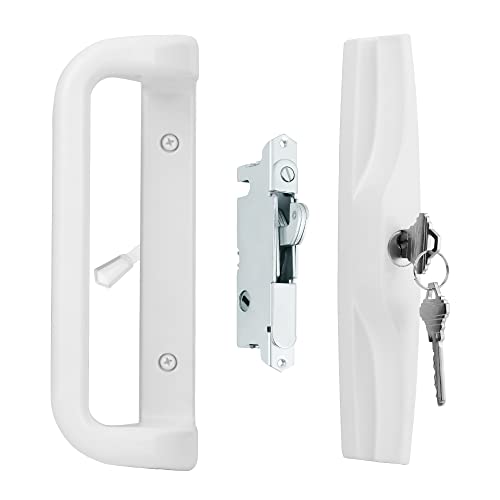
Pros
- Fits 3-15/16-inch screw-hole spacing
- Works with 1-3/16 to 2-inch doors
- Reversible left- or right-handed design
- Mortise lock, keys, and screws included
Cons
- Strike plate or keeper not included
- Requires compatible door measurements before ordering

Pros
- Up to 20 unique entry codes
- Auto-lock secures the deadbolt
- Backlit keypad for day or night
- BHMA Grade 3 residential durability
Cons
- No app, phone, or Wi-Fi control
- Codes are created directly at the lock

Pros
- Keypad, smartphone, Apple Watch, and backup-key entry
- Direct 2.4 or 5 GHz Wi-Fi, no hub needed
- Scheduled codes for guests and service providers
- BHMA Grade 2 durability certification
Cons
- Remote app control limited to US and Canada
- Smart features depend on Wi-Fi connectivity
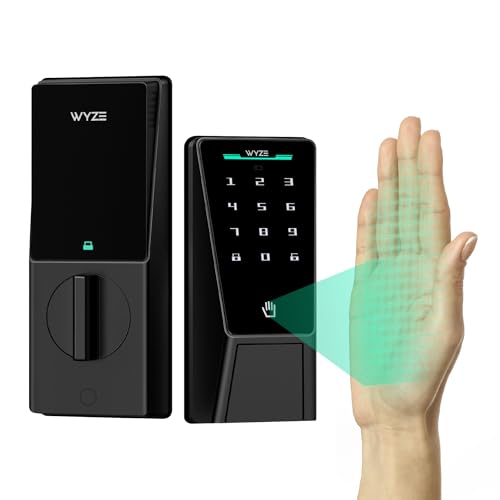
Pros
- Contactless palm-vein recognition
- Dual batteries with USB-C emergency charging
- Up to 50 guest access codes
- IP53 weather resistance, BHMA3 certified
Cons
- Wi-Fi needed for remote control
- Large 12.71-inch lock assembly
Choose the Entry Method You Will Actually Use
Keypad locks are the most direct alternative to carrying keys. The Yale Digital Keypad Deadbolt avoids apps, phones, and Wi-Fi while allowing up to 20 codes, and its backlit keypad is useful after dark. Auto-Lock adds a safeguard if you leave without turning the deadbolt.
Connected models add more flexibility for households that share access. The Yale WiFi Smart Lock Deadbolt with Keypad connects directly to 2.4 or 5 GHz Wi-Fi, while the Yale Extended Range WiFi Smart Lock Deadbolt uses an included bridge to manage that connection and extend battery life and range.
Pro Tip: Check that your existing deadbolt and door preparation match the replacement before ordering.
Match the Lock to the Door and Household
Most products here are deadbolts for standard entry doors, but the House Guard White Sliding Glass Door Handle Set serves a different purpose. It fits selected sliding patio doors with 3-15/16-inch screw spacing and doors from 1-3/16 to 2 inches thick. Measure the old handle, lock position, and door thickness first.
The House Guard set includes a mortise lock, outside key cylinder, matching keys, and mounting screws, but not a strike plate or latch keeper. Its reversible handle works on either side, yet you should confirm key rotation and latch engagement before tightening everything.
Before You Mount It: Do not assume a sliding-door handle set fits because the finish looks right. Incompatible screw spacing or door thickness can leave the latch misaligned and the door less secure.
| Entry type | Main distinction | Best fit |
|---|---|---|
| Keypad deadbolt | Codes without phone | Simple front doors |
| Wi-Fi deadbolt | Remote alerts and control | Connected households |
| Sliding-door handle | Mortise lock and key | Compatible patio doors |
Plan for Batteries, Connectivity, and Backup Entry
A backup key matters most when the electronic route is unavailable, but each lock handles daily access differently. Yale models offer keypad or app entry, and the WYZE Palm Lock, Smart Door Lock with Palm Vein adds palm recognition, Wi-Fi control, keypad codes, and a mechanical key option.
Battery planning also varies. The WYZE model uses a main battery backed by a secondary battery and provides USB-C emergency charging with a power bank. Yale models provide low-power alerts, while the digital keypad model keeps the system deliberately offline. For connected products, read more about what a smart lock bridge does before choosing a bridge-based setup.
Expert Examined
From Jenna Castellano

I keep a spare key where household members can reach it without advertising its location from the street. The mistake I see is treating the backup key as an afterthought, so decide who can access it and check the lock’s battery alerts before an urgent moment.
Read more about Jenna CastellanoRemote access also brings account responsibility. Use individual codes instead of sharing one permanent number, remove temporary access when it is no longer needed, and review app permissions. For broader account and device concerns, see how smart locks can be hacked.
Which Lock Fits Your Door
I would point you to the Yale Digital Keypad Deadbolt for a front door where the household wants keyless entry without phone setup or wireless connectivity. It supports up to 20 codes, includes Auto-Lock, has a backlit keypad, and retains a backup key. That combination keeps the routine familiar while removing daily key handling.
I would choose the Yale WiFi Smart Lock Deadbolt with Keypad when remote control, alerts, scheduled codes, or temporary access matter. It connects directly to Wi-Fi without a hub or bridge, recognizes arrival for automatic unlocking, and includes DoorSense to indicate whether the door is fully closed.
For a compatible sliding patio door, the House Guard White Sliding Glass Door Handle Set is the sensible fit because it is built around the door’s mortise-lock format rather than a deadbolt. If you want biometric entry and extra power resilience, I would instead consider the WYZE Palm Lock, Smart Door Lock with Palm Vein for its palm recognition, dual-battery design, emergency USB-C charging, and mechanical key.
Before settling on any model, compare your door measurements with the listed fit requirements and decide whether remote access is genuinely useful in your household. The key lock box versus smart lock safety comparison can also help if you are weighing controlled key access against electronics.
The Bottom Line
The mistake buyers make most often is treating every keyed smart lock as a universal replacement. Deadbolts, sliding-door mortise sets, bridge-based systems, direct Wi-Fi models, and offline keypads solve different access problems.
If you only do one thing first, measure the door and identify its existing hardware. Then decide whether your priority is codes, remote control, biometric entry, or a simple keypad, and keep the backup key accessible to the people who may need it.
FAQs
A keypad is the simpler choice when several people need individual codes or you want access without a phone. A biometric model can reduce code entry, but it adds a specialized recognition method, so confirm that your household prefers palm access and still keep the mechanical key available. Keep it in a controlled location that household members can reach but passersby cannot easily identify. Avoid leaving it in an obvious nearby hiding place, and make sure temporary guests or service workers receive only the access method they need. Pay attention to low-power alerts and replace batteries before they are depleted. Models with dual batteries or USB-C emergency charging add another recovery option, but you should still know where the mechanical key is and confirm that it operates smoothly. BHMA certification indicates a durability classification for the lock. Grade 2 is described for commercial-grade durability in the Yale Wi-Fi models, while Grade 3 is described for residential-grade durability in the Yale digital keypad model, so compare the stated grade with your household needs.Are keypad or biometric smart locks better for daily entry?
Where should I keep the backup key for a smart lock?
How should I maintain a battery-powered smart lock?
What does a BHMA Grade 2 or Grade 3 rating mean?
Sources
- Builders Hardware Manufacturers Association and ANSI/BHMA standards information. www.buildershardware.com
- UL Solutions and residential security information. www.ul.com