
Shopping for the best smart locks with geofencing means deciding whether your priority is automatic arrival-based unlocking, broad smart-home compatibility, or flexible entry for guests and family. The right choice also depends on your phone connection, hub setup, and door handing.

Pros
- Matter over Thread, compatible with major platforms
- Bluetooth app access-code management
- Backlit, fingerprint-resistant touchpad
- Proximity wakeup for faster code entry
Cons
- Hands-free entry depends on Bluetooth and geofencing
- Thread features require a compatible smart-home platform

Pros
- Backlit keypad supports up to 250 codes
- No hub required for Wi-Fi control
- Geofence auto-unlock and automatic locking
- Lifetime mechanical and finish warranty
Cons
- One-year electronics warranty
- Remote features depend on the Kwikset app
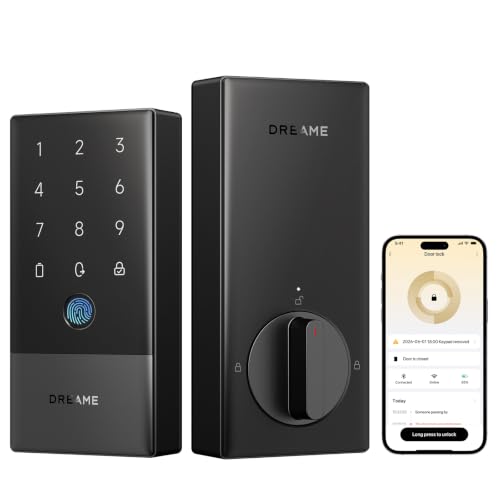
Pros
- Seven entry methods, including fingerprint access
- Built-in 2.4GHz Wi-Fi, no extra hub
- BHMA Grade 2 certified security
- Up to 8-month battery life, USB-C backup
Cons
- Designed for left-handed doors only
- Matter over Thread requires compatible hub
Geofencing Is Only Part of the Access Plan
Geofencing is most useful when you want the door to respond as you approach home instead of reaching for keys or opening an app. The Kwikset Aura Reach Smart Lock Matter Over Thread pairs Bluetooth with the Kwikset app for hands-free auto unlocking, while the Kwikset Halo Wi-Fi Smart Lock offers geofence auto-unlock alongside remote control from anywhere.
The Dreame A10 Smart Lock, Fingerprint Keyless Entry adds several alternatives if automatic unlocking does not suit every arrival. You can use fingerprint recognition, NFC cards, pass codes, physical keys, voice control, or the DREAME App, giving household members different ways to enter.
Pro Tip: Confirm that everyone who needs automatic unlocking uses the required app and phone connection before relying on geofencing for daily entry.
Connection Choices Affect Setup
Matter over Thread is the main distinction between the Kwikset Aura Reach Smart Lock Matter Over Thread and the Dreame A10 Smart Lock, Fingerprint Keyless Entry. Aura Reach is described as compatible with Apple Home, Amazon Alexa, and Google Home, while Dreame also lists SmartThings and requires a compatible Thread Border Router or hub for Matter over Thread.
The Kwikset Halo Wi-Fi Smart Lock takes a different route. It connects through Wi-Fi without a hub and works with Amazon Alexa or Google Home, which may appeal if you want remote app control without adding a separate hub. Before choosing, check which platform already controls your lights, cameras, or routines.
| Connection type | Key access feature | Best fit |
|---|---|---|
| Matter over Thread | Smart-home compatibility | Existing Thread setup |
| Wi-Fi | Remote app control | No hub preference |
| Wi-Fi and access options | Fingerprint and NFC | Mixed household needs |
If you are unsure whether another bridge belongs in your setup, review what a smart lock bridge does before buying. A compatible ecosystem can matter more than a single unlocking method.
Check Door Compatibility and Security Details
Door fit should be checked before focusing on automation. The Kwikset Halo Wi-Fi Smart Lock is specified for doors between 1-3/8 and 1-3/4 inches thick and has an adjustable deadbolt backset from 2-1/8 to 2-3/4 inches. The Dreame A10 fits most standard US doors without drilling or professional tools, but it is designed for left-handed doors only and is not compatible with right-handed doors.
Dreame identifies the A10 as BHMA Grade 2 certified, while the Kwikset Aura Reach is BHMA certified and the Halo is Grade AAA certified. Certification language is not a substitute for checking your door, frame, deadbolt alignment, and handing. Standards information from UL Solutions can also help explain why certification labels deserve attention.
Before You Mount It: A left-handed-only lock on a right-handed door is a compatibility mistake, not a software problem. Verify the door handing and deadbolt fit before installation.
For related hardware context, see why the strike plate matters. If the frame or strike area is misaligned, a smart lock may not operate as expected even when its app and geofence settings are correct.
Expert Examined
From Ray Okafor

I keep seeing homeowners focus on app features while overlooking the door itself. The practical fix is to inspect handing, deadbolt movement, and frame alignment first, then configure automatic access only after the mechanical fit is clear.
Read more about Ray OkaforWhich Lock Fits Your Household
I would put the Kwikset Aura Reach Smart Lock Matter Over Thread on a front door where Matter compatibility and Bluetooth-based arrival unlocking are central. Its backlit, fingerprint-resistant touchpad and proximity wakeup also suit households that want keypad entry to feel more immediate.
I would point you to the Kwikset Halo Wi-Fi Smart Lock if remote access without a hub is the deciding factor. Its touchscreen supports up to 250 access codes, including temporary, scheduled, and permanent access, so it fits a home with frequent guests or service access.
The Dreame A10 Smart Lock, Fingerprint Keyless Entry is the most flexible match for a left-handed door and a household that wants fingerprint, NFC, pass code, physical-key, voice, and app options. Its built-in Wi-Fi supports remote control without an additional Wi-Fi hub, while Matter use still requires a compatible Thread Border Router or hub.
The Bottom Line
The biggest mistake buyers make with geofencing locks is treating automatic unlocking as the only access method that matters. Phone permissions, connection requirements, door handing, and guest credentials all shape whether the lock fits your routine.
If you do one thing first, verify your door’s handing and measurements. Then choose between Thread-based ecosystem compatibility, hub-free Wi-Fi control, or the broader fingerprint and NFC access options offered by Dreame.
FAQs
Geofencing uses your phone’s location boundary and the lock’s app to trigger an arrival-based unlock action. The exact connection depends on the model, such as Bluetooth with the Kwikset app or Wi-Fi and app control on the other listed locks. The Dreame A10 Smart Lock, Fingerprint Keyless Entry is the only listed model with a stated door-handing limitation. It is designed for left-handed doors only and is not compatible with right-handed doors, so verify handing before purchase. The Dreame A10 requires a compatible Thread Border Router or hub for Matter over Thread. The Kwikset Aura Reach is Matter-enabled with Thread, while the Kwikset Halo uses Wi-Fi and does not require a hub for its Wi-Fi connection. BHMA certification indicates that a lock has been evaluated against a relevant builders hardware performance standard. It does not confirm that the lock fits every door, so you still need to check measurements, deadbolt alignment, and door handing.How does geofencing unlock a smart lock?
Which smart lock is best for a left-handed door?
Do Matter smart locks need a hub?
What does BHMA certification mean for a smart lock?
Sources
- Builders Hardware Manufacturers Association www.buildershardware.com
- UL Solutions www.ul.com