
Choosing the best smart locks with door sensor means matching the lock’s entry method to how your door is used, then confirming that the sensor can tell a closed door from a merely locked bolt. That matters most for busy households, rentals, and anyone who wants an alert before leaving the house.
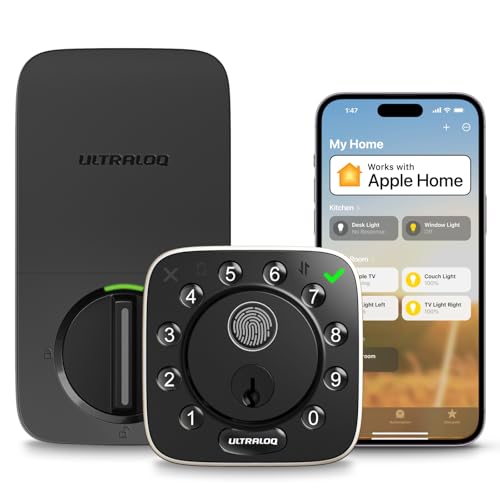
Pros
- 100 fingerprint profiles and 50 passcodes
- Remote access without an extra hub
- ANSI/BHMA Grade 1 security rating
- IP65 zinc alloy construction
- Apple Home, Alexa, and Google support
Cons
- 2.4 GHz Wi-Fi only
- Requires four 1.5V AA batteries

Pros
- 3D fingerprint recognition in under 0.3 seconds
- Stores up to 99 fingerprints
- Five entry methods, including physical key
- Remote app control and real-time alerts
Cons
- Not compatible with storm doors
- Not compatible with round latch holes

Pros
- Door sensor supports auto-locking and open-door alerts
- Apple Home Key and Android NFC support
- BHMA Grade 1 certified zinc alloy construction
- IP65 weather resistance for year-round use
Cons
- 2.4 GHz Wi-Fi only
- Requires eight AA batteries

Pros
- Fingerprint, keypad, RFID, and app access
- 10000mAh rechargeable battery with power display
- ANSI/BHMA Grade 2 security rating
- Auto-lock sensor with open-door reminders
Cons
- Remote features require 2.4GHz Wi-Fi and app
- Rechargeable battery needs periodic charging

Pros
- Palm vein and fingerprint entry
- 2K camera with 180° coverage
- 32GB encrypted local storage
- People, vehicle, and package detection
Cons
- Single-battery configuration
- Large 11 x 4.4 x 3.5-inch footprint
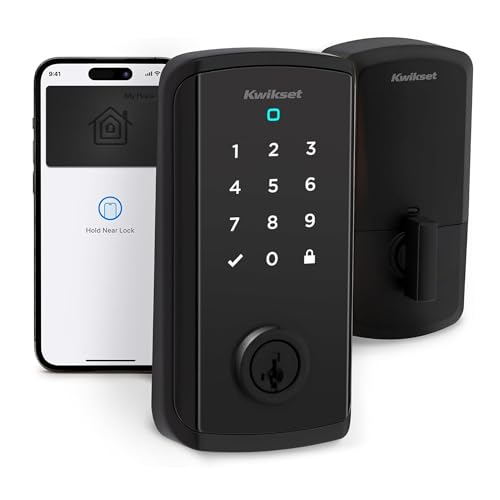
Pros
- Apple Home Keys and NFC tap access
- Touchscreen code entry
- Up to 250 guest access codes
- Works with Alexa, Apple Home, and Google Home
Cons
- Smart features require Wi-Fi and app setup
- Geofencing may not suit every household
What the Door Sensor Actually Adds
A smart lock controls the deadbolt, but a door sensor supplies the missing status check. The ULTRALOQ Bolt NFC Smart WiFi Deadbolt Lock and Anweller Smart Deadbolt Lock specifically describe automatic locking after the door closes, while the Lockly Secure Pro Wi-Fi Smart Deadbolt Lock provides open or closed status alerts through its app.
That distinction helps prevent a common mistake: assuming a locked bolt proves the door is fully shut. Before buying, check whether the product description mentions a door sensor, open-door alerts, or automatic locking tied to closure. For broader door hardware context, read about key lock boxes versus smart locks.
Pro Tip: Choose a model with a closure-based auto-lock feature if household members regularly pull the door closed without checking the deadbolt.
Entry Methods That Fit Your Household
Fingerprint readers suit families that want quick access without carrying a phone. The ULTRALOQ Bolt Fingerprint WiFi Smart Lock stores up to 100 fingerprints, while the Lockly model stores up to 99 and also combines fingerprint entry with a changing PIN keypad, app control, voice control, and a physical key.
NFC entry is more attractive if your household already relies on phones or watches. The ULTRALOQ Bolt NFC Smart WiFi Deadbolt Lock supports Apple Home Key and Android NFC, with passcodes, app access, a key fob, and mechanical keys as alternatives. The Kwikset Halo Select Plus Wi-Fi and Matter Enabled adds Apple Home Key, geofencing, touchscreen codes, and up to 250 shared access codes.
| Entry style | Useful distinction | Best placement |
|---|---|---|
| Fingerprint | Fast personal access | Busy family entry |
| NFC phone or watch | Tap without app | Apple or Android home |
| Camera biometrics | Video and entry together | Visibility-focused entrance |
For a door that serves guests, cleaners, or dog walkers, scheduled and temporary codes can matter more than biometrics. You can also review how smart locks can be hacked before granting remote access.
Power, Weather, and Installation Checks
Battery details vary sharply. The ULTRALOQ NFC model uses eight AA batteries for up to one year of regular use, while the fingerprint model uses standard 1.5V AA alkaline batteries and reports up to 10 months. Anweller uses a rechargeable 10000mAh battery, displays its power level, and includes an emergency power port.
Outdoor exposure also deserves attention. Both ULTRALOQ models list an IP65 rating and zinc alloy construction, Anweller lists IP54 protection, and the Lockly lock fits doors 1⅜ to 2 inches thick but is not compatible with storm doors or round latch holes. Confirm door thickness and latch compatibility before removing the existing deadbolt.
Before You Mount It: Do not overtighten the installation screws. Misalignment or excess pressure can make locking and unlocking difficult, even when the electronics are working.
ANSI or BHMA language describes a security and durability standard, not a promise that every door installation is secure. The ULTRALOQ fingerprint and NFC models list BHMA Grade 1, Anweller lists Grade 2, and Kwikset includes intrusion detection and door status sensing. The UL Solutions site is a useful reference for understanding safety certification terminology.
Expert Examined
From Jenna Castellano

I keep seeing smart-lock problems begin with a door that rubs, sags, or fails to line up with the strike plate. I would correct that mechanical issue first, because a sensor cannot compensate for a deadbolt that needs force to reach the opening.
Read more about Jenna CastellanoWhich Lock Fits Your Entry Routine
I would point families wanting fast personal access toward the <a href="ULTRALOQ Bolt Fingerprint WiFi Smart Lock. Its fingerprint storage, remote alerts, automatic locking and unlocking, Apple Home, Alexa, Google Home, SmartThings, and IFTTT support make it adaptable for a busy front door. It also needs no extra hub and includes two keys.
For homes where phones and watches are the natural keys, I would choose the <a href="ULTRALOQ Bolt NFC Smart WiFi Deadbolt Lock. The door sensor connects closure to automatic locking, and the model supports Apple Home Key, Android NFC, access history, remote codes, and a key fob.
I would reserve the <a href="Lockin Veno Pro Smart Lock for an entrance where visual monitoring matters as much as keyless entry. Its palm-vein and fingerprint access work alongside a 2K, 180-degree camera, motion detection, two-way talk, and 32GB local storage without monthly storage fees.
The Bottom Line
The single mistake most buyers make is treating a smart lock’s bolt position as proof that the door is closed. A door sensor, closure alert, or sensor-linked auto-lock feature gives you more useful information about the real condition of the entry.
If you do only one thing first, measure the door and inspect its alignment before choosing an access method. Then select fingerprint, NFC, keypad, or camera features that match the people who use that entrance every day.
FAQs
No. Some models specifically include or describe door sensing and open-door alerts, while others focus mainly on bolt control. Read the feature list for closure detection, door status, or automatic locking after the door closes rather than assuming every Wi-Fi lock has the same sensor arrangement. Fingerprint entry is convenient for households sharing one entrance without carrying phones. NFC is useful when residents already carry an iPhone, Apple Watch, or Android NFC phone, and some models retain passcodes, app access, and mechanical keys for visitors or emergencies. Battery life depends on the model, battery format, usage, and connectivity. Check the app or lock display for warnings, keep the specified replacement or charging method available, and confirm whether the lock has mechanical keys or an emergency power port. BHMA Grade 1 is a residential security and durability classification listed by the product manufacturer. It does not replace correct door alignment, suitable installation, or a sound strike plate, so the hardware and the door frame still matter.Do all smart locks include a door sensor?
Is fingerprint or NFC entry better for a front door?
How often do smart-lock batteries need attention?
What does BHMA Grade 1 mean on a smart lock?
Sources
- BHMA and ANSI standards information. buildershardware.com
- UL Solutions safety standards information. www.ul.com