
Shopping for the best smart locks that work with Home Assistant means checking more than a Matter label: the deciding detail is whether your existing hub can provide the required Thread or Wi-Fi connection. Renters, busy families, and smart-home owners need different entry methods and backup plans.

Pros
- Multiple entry methods, including fingerprint and passcode
- Matter over Thread supports multiple ecosystems
- Rechargeable battery lasts up to six months
- BHMA-certified with IP65 outdoor protection
Cons
- UWB requires specific Apple devices and a Thread hub
- NFC cards sold separately

Pros
- Apple Home Key with iPhone and Apple Watch
- Fingerprint reader stores up to 50 prints
- Four AA batteries last up to 8 months
- IP65 zinc-alloy body, emergency USB-C charging
Cons
- Aqara Zigbee hub required for remote passwords
- NFC card sold separately
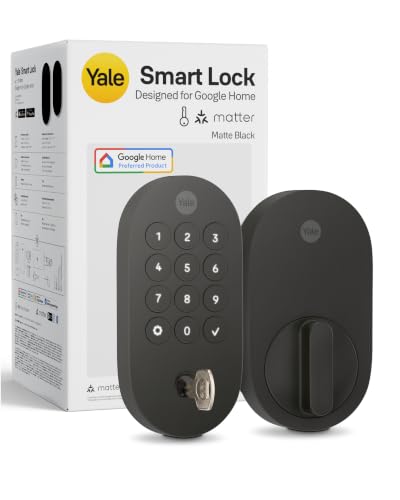
Pros
- Matter over Thread, energy-efficient mesh network
- Google Home and Google Assistant control
- Keypad, phone, voice, and backup key entry
- BHMA Grade 2 certified
- Designed for -22 to 140°F
Cons
- Matter hub required for remote access
- Google Home features limited to US and Canada

Pros
- Fingerprint access, up to 50 stored fingerprints
- Built-in Wi-Fi, no hub for app control
- 18-month battery life
- ANSI BHMA certified zinc alloy
Cons
- 2.4 GHz Wi-Fi only
- Matter requires a compatible Thread hub

Pros
- Five entry methods for flexible access
- Matter support for major smart-home platforms
- DIY installation in under 15 minutes
- Adjustable five-second auto-lock feature
Cons
- Emergency power requires a power bank
- Auto-lock begins after five seconds by default

Pros
- Facial recognition entry with local data storage
- 2K camera with 135° head-to-toe view
- 32GB local storage, no monthly fee
- 15,000mAh battery, up to six months
Cons
- Matter does not support camera streams
- Not compatible with mortise locks
Start with the connection your home already has
Matter can make a lock visible across compatible smart-home platforms, but it does not remove the need for suitable network hardware. The Aqara U400, Yale Matter deadbolt, ULTRALOQ Bolt SE, and eufy E40 use Matter-related features with Thread or an appropriate Matter controller, while the ULTRALOQ also offers built-in 2.4 GHz Wi-Fi for app access without a hub.
Home Assistant buyers should identify the Thread Border Router or Matter controller they plan to use before choosing a lock. The Aqara U100 also requires an Aqara Zigbee 3.0 hub for remote passwords and wider third-party integration, so its feature set depends more heavily on the surrounding system.
Pro Tip: Check your Home Assistant hardware and supported radio protocols before ordering. A lock can support Matter while still requiring a Thread Border Router, Matter controller, or brand-specific hub for particular functions.
Match entry methods to the people using the door
Fingerprint access suits households that want quick entry without carrying a phone. The Aqara U400, Aqara U100, and ULTRALOQ Bolt SE each provide fingerprint access, while the GUSEI lock adds card entry and uses a handle format suited to bedrooms, offices, apartments, and similar doors.
Apple households have a different priority. The two Aqara models support Apple Home Key, while the U400 adds UWB hands-free unlocking under specific Apple hardware and software requirements. Yale focuses on phone taps, keypad codes, Google Assistant, and a backup key, making it a simpler fit for Google Home users.
| Entry style | Notable requirement | Suitable household |
|---|---|---|
| Fingerprint | Local enrollment capacity | Families wanting keyless access |
| Apple Home Key | Apple Home hub | iPhone or Watch households |
| Video lock | eufy app for camera streams | Front-door monitoring |
For more context on access choices, review key lock boxes versus smart locks before replacing a mechanical entry plan.
Plan for batteries, weather, and fallback access
Battery format and recharge arrangements affect maintenance. The U400 uses a removable rechargeable battery rated for up to six months, the U100 uses four AA batteries rated for up to eight months, and the eufy E40 combines a rechargeable main battery with a built-in backup battery.
The ULTRALOQ Bolt SE lists up to 18 months of battery life and provides low-battery alerts, while the GUSEI has a Type-C emergency power port. Yale uses energy-efficient Matter over Thread and is rated for temperatures from -22°F to 140°F. Exterior exposure also matters: the Aqara locks, ULTRALOQ, and eufy list IP65 weather resistance.
Before You Mount It: Do not assume a smart lock replaces every emergency option. Keep the physical key, emergency charging method, or other supported fallback available, and confirm that the lock fits your existing door hardware before installation.
Certification language should also be read carefully. BHMA certification or a stated BHMA grade describes tested mechanical performance under that standard, not every digital or network behavior. The UL Solutions resources can help explain why certification marks and product claims should be checked separately.
Expert Examined
From Ray Okafor

I keep the backup-entry plan written down rather than relying on memory. The mistake I see is choosing a lock for its app first, then discovering that the preferred phone, hub, or battery method is unavailable at the door.
Read more about Ray OkaforFor additional door planning, see what a smart lock bridge does and confirm whether your setup needs one before installation.
Which lock fits your household
I would point Apple households that want the most flexible entry experience toward the Aqara UWB Smart Lock U400, Apple Home Key. It combines Apple Home Key, UWB hands-free unlocking, fingerprint access, passcodes, NFC support, voice control, remote app access, and a physical key. Its Thread-enabled Apple requirements are specific, so I would choose it only after confirming the compatible Apple hub and device software.
I would put the Yale Smart Lock Deadbolt with Google Matter on a Google-centered front door where keypad codes and Google Assistant matter more than biometrics. It offers phone, code, voice, and backup-key entry, plus Matter over Thread and a Grade 2 BHMA certification.
For a lower-cost door upgrade with broad entry choices, I would point you to the ULTRALOQ Bolt SE Wifi Smart Deadbolt Lock. Built-in Wi-Fi supports remote management without a hub, while Matter over Thread adds broader smart-home control when a compatible hub is available. Its fingerprint, code, app, voice, and mechanical-key options suit a busy household.
The Bottom Line
The biggest mistake is treating Matter support as proof that every lock feature will work automatically in Home Assistant. Thread Border Routers, Matter controllers, brand hubs, Apple requirements, and app-specific features can change what the lock actually does in your setup.
If you do one thing first, map your existing Home Assistant hardware and preferred entry method. Then select a lock whose required hub, power system, door format, and backup access match that plan.
FAQs
Fingerprint access is convenient for households that want to leave phones and keys aside. Keypad codes, phone access, and a physical key provide useful alternatives when biometric access or network control is unavailable. Some Matter locks use Thread and require a compatible Matter controller or Thread Border Router for platform access. Others also offer Wi-Fi or a brand-specific hub, so check the exact connection requirements before purchase. Choose the battery format you can maintain easily, then use low-battery alerts and keep the stated emergency charging or physical-key option available. Rechargeable systems and replaceable AA batteries involve different routines. BHMA certification or grading addresses mechanical performance under the stated standard. It does not guarantee that every app, Matter, Thread, Wi-Fi, or voice feature will behave the same way in your smart-home system.Which entry type is best for a Home Assistant smart lock?
Do Matter smart locks need a Thread Border Router?
How should I handle smart lock battery maintenance?
What does BHMA certification mean on a smart lock?
Sources
- BHMA and Builders Hardware Manufacturers Association standards www.buildershardware.com
- UL Solutions product safety resources www.ul.com
- US Consumer Product Safety Commission home safety information www.cpsc.gov