
Shopping for the best smart locks for home gets easier once you decide whether direct Wi-Fi, biometric entry, or flexible code sharing matters most. This selection is for homeowners, landlords, and families replacing a front-door lock without guessing which access method will fit daily life.

Pros
- Five access methods, including app and fobs
- Remote eKeys and scheduled user codes
- Auto-lock and low-battery alert
- Up to 250 user codes
Cons
- Requires three compatible pre-drilled door holes
- Alexa and Google Home need separate gateway

Pros
- Built-in WiFi for anywhere access
- Touchscreen keypad enables keyless entry
- Customizable alarm for forced entry attempts
- BHMA-certified security, durability, and finish
Cons
- Remote features require a home WiFi connection
- App control adds setup and management
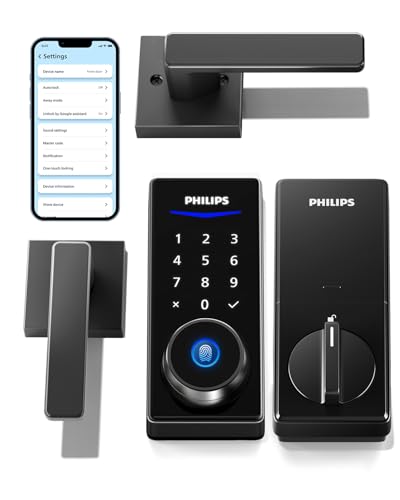
Pros
- Code, fingerprint, app, and key entry
- Includes two lever handles
- Auto-locking with backlit touchscreen
- Anti-peeping touchscreen design
Cons
- Heavy 6.55-pound hardware
- App-based entry depends on a smartphone

Pros
- Five access methods, including fingerprint and keypad
- Built-in Wi-Fi, no bridge required
- Up to 8-month life from eight AA batteries
- BHMA certified with IP53 waterproofing
Cons
- Battery life varies with usage frequency
- Small Handle size may not suit every door

Pros
- Built-in WiFi, no hub required
- Fingerprint entry in 0.3 seconds
- One-time and recurring PIN codes
- Matching handle set included
Cons
- Requires 2.4GHz WiFi within 33 feet
- Batteries not included, alkaline only
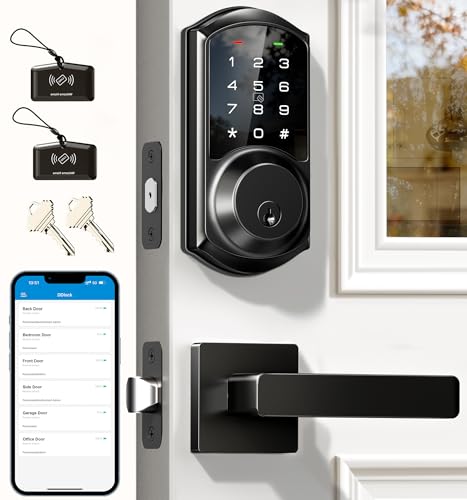
Pros
- App and web control with no subscription fee
- Stores 250+ flexible access codes
- IP54 weatherproof, BHMA/ANSI Grade 3
- IC card capacity exceeds 1,000 cards
Cons
- Remote features require separate G2 gateway
- Two-year warranty requires product registration
Match the lock to your entry routine
A keypad suits households that regularly share access with relatives, guests, cleaners, or renters. Veise models support permanent, scheduled, recurring, or one-time codes, while the Philips WiFi Keypad Deadbolt with Handle adds fingerprint access and remote management through its app.
Built-in Wi-Fi is useful when you want to check status or control the lock away from home without buying a separate bridge. The Schlage Encode Smart WiFi Lock, Lever Handle and eufy Security Smart Lock Front Door Lever Set both provide built-in Wi-Fi, while the Veise VE06-H Smart Front Door Lock Handle Set needs the Veise G2 gateway for Alexa and Google Home integration.
Pro Tip: Choose the access method your household will use most. A feature-rich lock is less helpful if everyone prefers a physical key or a simple PIN.
Compare access, connection, and door fit
Handle sets can change the appearance and function of the whole entry area, not just the deadbolt. The Philips Smart Deadbolt Lock with 2 Lever Handle includes two lever handles, and the eufy set pairs its lock with a matching handle for a consistent entryway.
Installation requirements also vary. Veise VE06-H fits standard US doors from 1-3/8 to 2 inches thick but requires three pre-drilled holes, while Veise VE06-L lists compatibility with 1-3/8 to 2-inch doors and specific hole diameters. Check your existing holes before ordering, and use the manufacturer instructions rather than assuming every handle set is interchangeable.
| Access style | Connection | Best fit |
|---|---|---|
| Keypad codes | App or gateway | Shared household entry |
| Fingerprint | Built-in Wi-Fi | Fast personal access |
| Key and fob | App or gateway | Backup flexibility |
If your door opens outward, hardware placement and frame condition deserve extra attention before installation. See these ways to secure an outward-opening door before choosing a replacement lock.
Plan for batteries and connectivity
Battery alerts are important because a smart lock can become inconvenient when power runs low. The eufy model lists up to eight months of battery life, the Philips WiFi model lists up to six months, and both Veise models include low-battery warnings.
Wi-Fi distance also matters. The Philips WiFi Keypad Deadbolt with Handle connects to 2.4GHz Wi-Fi and recommends keeping the lock within 33 feet of the router while minimizing walls, metal, and interference. For locks using a gateway, place that accessory where the lock can maintain a reliable connection.
Before You Mount It: Confirm the door thickness, hole spacing, handing, and latch movement first. A keypad cannot compensate for a misaligned door, and interrupting an automatic locking process can create connection or latch problems.
Expert Examined
From Jenna Castellano

I keep seeing smart-lock problems begin with the door itself rather than the electronics. If the latch drags or the frame is misaligned, correct that condition before adding app access or auto-lock.
Read more about Jenna CastellanoFor questions about deadbolt and knob combinations, review this explanation of whether you need both a deadbolt and knob lock. You can also learn what a smart lock bridge does before buying a gateway-dependent setup.
Which lock fits your household
I would point landlords and families sharing access toward the Veise VE06-H Smart Front Door Lock Handle Set. Its app supports eKeys, user management, access records, and more than 250 user codes, with options for scheduled and recurring entry. It also offers fobs, a mechanical key, and a thumb turn when a code is not convenient.
I would choose the Philips WiFi Keypad Deadbolt with Handle for a household that wants direct remote control, fingerprint entry, voice assistant compatibility, and adjustable auto-lock. Its 2.4GHz Wi-Fi connection does not require an extra hub, but router distance should be checked first.
For a coordinated handle and built-in Wi-Fi, I would consider the eufy Security Smart Lock Front Door Lever Set. Fingerprint, keypad, app, physical-key, and voice access give a busy entryway several options, while its listed 18-month protection and 24/7 support may appeal to buyers who prioritize assistance.
The Bottom Line
The mistake most buyers make is treating every smart lock as a universal replacement. Handle style, hole spacing, door thickness, Wi-Fi range, and gateway requirements can determine whether the installation works as expected.
Start by measuring the door and inspecting the existing holes, then choose the access method your household will actually use. If you share entry often, prioritize code management; if speed matters, consider fingerprint access; if remote control matters, verify the Wi-Fi or gateway arrangement first.
FAQs
A keypad works well for shared access because you can create different codes for family, guests, or service providers. Fingerprint entry is more personal and may be convenient for regular household members, while a physical key remains useful as a backup on models that include one. No. Check the door thickness, existing hole pattern, latch movement, and whether the model supports your door configuration. Some products require specific pre-drilled holes or hole diameters, so measurements should come before ordering. Watch for low-battery alerts and keep the specified battery type available. Battery life varies by model and use, and some products list batteries separately from the lock package, so confirm what is included before installation. BHMA is an industry standards organization that evaluates door hardware categories such as security, durability, and finish. Certification can provide useful context, but it does not remove the need to confirm fit, installation quality, and everyday access needs.Should I choose a keypad or fingerprint smart lock?
Will every smart lock fit my front door?
How should I maintain a smart lock's power?
What does BHMA certification mean on a smart lock?
Sources
- Builders Hardware Manufacturers Association buildershardware.com
- UL Solutions www.ul.com