
Choosing the best smart locks for bedroom door means matching the access method to your household, not simply adding more technology. Fingerprint handles suit private rooms and quick entry, while keypad or retrofit designs can work better for guests, rentals, or an existing deadbolt.

Pros
- Fingerprint handle recognition for keyless entry
- Built-in Wi-Fi with remote app control
- Real-time notifications and event history
- 15-minute installation with no drilling
- Works with left- and right-hand doors
Cons
- Requires eight AA batteries
- IP53 protection limits outdoor exposure

Pros
- Fingerprint handle opens in 0.3 seconds
- Five entry methods, including app and key
- Built-in 2.4GHz Wi-Fi, no hub required
- Up to 100 PIN codes with access logs
Cons
- Requires eight AA alkaline batteries
- Requires specific door hole and clearance
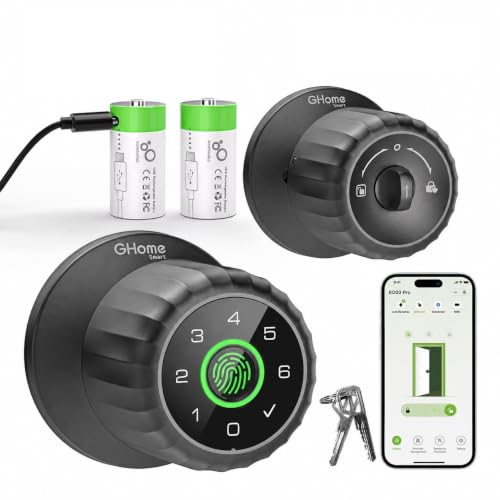
Pros
- 0.2-second fingerprint recognition
- Four entry methods, including backup keys
- Two removable 700mAh rechargeable batteries
- Local fingerprint storage for added privacy
Cons
- Remote access requires separate GHome Gateway
- App control works within Bluetooth range

Pros
- Fingerprint, keypad, NFC, and mechanical key access
- Remote temporary and permanent passcode management
- Entry logs and silent mode in app
- Installs without drilling or wiring
Cons
- Gateway required for Wi-Fi and voice control
- Admin fingerprint setup required before first use

Pros
- Five entry methods for family and guests
- App access records and remote code sharing
- DIY installation with no drilling or wiring
- Works with Alexa and Google via gateway
Cons
- No fingerprint entry
- Voice control requires a separate gateway
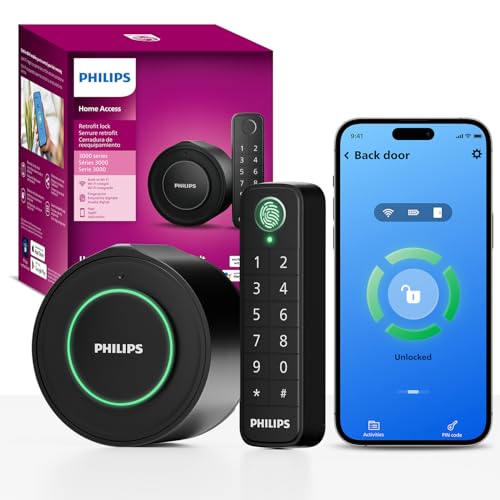
Pros
- Keeps original exterior hardware and keys
- Wireless fingerprint and passcode keypad
- Built-in WiFi, no extra hub required
- Remote app control and access history
Cons
- Requires a 2.4GHz WiFi network
- Keypad must sit within 39 inches
Start With the Door and the Access Routine
A bedroom lock should fit the door’s thickness, backset, and existing hardware before you consider app features. The Philips Upgraded Wi-Fi Smart Lock with Handle requires a 2-1/8-inch door hole, 4.53 inches of clearance between the deadbolt and handle set, and a door between 1-3/8 and 2 inches thick. GHome Smart Fingerprint Door Knob fits a broader range of interior doors, but measurements still matter.
Consider who needs entry and how often. A fingerprint handle is convenient for family members, while passcodes are easier to share with a roommate, cleaner, or short-term guest. A retrofit design such as the Philips WiFi Smart Retrofit Lock keeps the exterior hardware and existing keys, which can be preferable when you do not want to change the outside appearance.
Before You Mount It: A smart lock does not compensate for a door that sticks, a latch that misses the strike plate, or hardware that does not match the listed measurements. Confirm the door closes smoothly and check the installation dimensions before ordering.
Fingerprint, Keypad, or Retrofit Hardware
Fingerprint access removes the need to remember a code, but it is most useful when the same household members enter regularly. GHome stores fingerprints locally and adds keypad, app, and key access. The eufy Security Smart Lock C33 combines a fingerprint handle with built-in Wi-Fi, event history, and remote access.
Keypads are more flexible for shared bedrooms, guest rooms, and rental properties. Sifely offers keypad, app, key, FOB, and knob access, while Evanshow adds fingerprint, keypad, NFC card, and mechanical-key entry. Remember that Evanshow requires a gateway for Wi-Fi or voice control, and GHome requires a gateway for remote access or voice assistants.
| Lock style | Main access | Best room fit |
|---|---|---|
| Fingerprint knob | Fingerprint and PIN | Private bedroom |
| Keypad handle | Codes and app | Guest or rental room |
| Retrofit deadbolt | Existing keys | Finished exterior |
If your priority is preserving the outside hardware, a retrofit lock has a clear advantage. If fast entry from inside the home matters more, a handle or knob with fingerprint recognition keeps the process simple without requiring a phone.
Learn what a smart lock bridge does before buying a gateway-dependent model.
Power, Privacy, and Everyday Maintenance
Battery format affects maintenance more than many buyers expect. The eufy model uses eight AA batteries, Philips Upgraded uses eight AA alkaline batteries, GHome uses removable rechargeable batteries, and the Philips retrofit model uses two CR123 batteries. GHome can keep a spare rechargeable battery ready, while its USB-C port provides emergency power if the installed battery is depleted.
Wi-Fi models can provide remote access, activity history, and notifications, but connectivity adds another setup requirement. Bluetooth-only control can be enough for a bedroom if you are nearby, and it avoids buying a gateway for ordinary phone control. For broader access questions, review how smart locks can be hacked and use strong, separate account credentials.
Pro Tip: Keep backup keys, fresh batteries, or a charged replacement battery available outside the locked bedroom. Set auto-lock only after confirming that nobody can be trapped without a practical way to re-enter.
Expert Examined
From Dana Whitfield

I keep the most reliable backup method accessible before enabling automatic locking. The mistake I see is treating a low-battery alert as a future task, then discovering the bedroom lock has no usable key, spare battery, or emergency power option.
Read more about Dana WhitfieldPrivacy mode can also matter in a bedroom. GHome includes Privacy Mode, while Philips Upgraded includes a privacy setting and adjustable auto-lock from 5 to 180 seconds. Those controls are useful when the room needs to stay private, but they should not replace a clear emergency-entry plan.
Keep the reset procedure available in case the app, passcode, or administrator settings need to be restored.
Which Lock Fits Your Bedroom
I would point families toward the Philips Upgraded Wi-Fi Smart Lock with Handle when several people need separate codes, scheduled access, or voice control. It supports up to 100 passcodes, stores up to 50 fingerprints, connects directly to 2.4GHz Wi-Fi, and offers privacy and passage modes.
For a private bedroom where rechargeable power matters, I would choose the GHome Smart Fingerprint Door Knob with Keypad. Its removable battery, local fingerprint storage, emergency USB-C power, and backup keys suit everyday indoor use. I would choose the Philips WiFi Smart Retrofit Lock when keeping the existing exterior deadbolt and keys is the deciding factor.
The Bottom Line
The biggest mistake bedroom-lock buyers make is choosing a feature set before checking the door and backup-entry requirements. A fingerprint knob may be convenient, but a retrofit model may be the better answer if changing exterior hardware is unacceptable.
If you do only one thing first, measure the door thickness, backset, hole, and clearance against the selected product’s requirements. Then decide whether your household needs fingerprints, shareable codes, nearby Bluetooth control, or full Wi-Fi access.
FAQs
Fingerprint locks are convenient for regular household members who want quick entry without remembering a code. Keypads are usually more flexible for guests, roommates, cleaners, or rental access because you can assign and remove codes without registering another fingerprint. No. Door thickness, backset, hole size, handle clearance, and latch alignment vary. Check the product requirements and confirm that the door closes smoothly before installation. Backup options depend on the model. They may include a mechanical key, emergency USB power, a removable rechargeable battery, or a low-battery alert that gives you time to replace or recharge the power source. Not necessarily. Some locks use Bluetooth for nearby control and require a separately sold gateway for remote access or voice assistants. Other models connect directly to 2.4GHz Wi-Fi without an added hub. An IP rating describes protection against dust and water exposure under defined conditions. It does not mean the lock is waterproof or suitable for every outdoor location, so follow the product’s intended placement and installation instructions.Are fingerprint locks or keypad locks better for a bedroom door?
Can a smart bedroom lock fit any interior door?
What happens if the smart lock battery dies?
Does a gateway mean the lock has Wi-Fi?
What does IP53 or IP54 mean on a smart lock?
Sources
- UL Solutions and product safety standards. www.ul.com
- US Consumer Product Safety Commission and home safety information. www.cpsc.gov